



- Manufacturing teams juggle dozens of simultaneous, high-stakes workflows across production, quality control, inventory, and engineering, making generic tools inadequate and purpose-built software essential.
- The ideal manufacturing workflow platform centralizes cross-team visibility, automates handoffs and approvals, integrates with ERP and MES systems, and supports compliance tracking — all features Wrike delivers for customers like Siemens, Electrolux, and Fitbit.
- The article reviews 11 tools ranging from Wrike for enterprise-wide management to specialists like Tulip for pharma and aerospace, Katana for inventory, and Flowdit for inspections.
If you’ve worked in manufacturing for long enough, you know just how many workflows run simultaneously in an average management office. For example:
- Production scheduling and work order workflows ensure your team has the capacity to complete the requested work on time
- Inventory management workflows ensure the raw materials, components, and finished products are available when they’re needed.
- Quality control and inspection workflows keep manufacturing processes safe, compliant, and auditable, and identify areas for improvement or correction.
- Engineering change order workflows manage the necessary updates to your designs and processes in a way that minimizes disruption.
These processes represent a massive number of individual tasks, handoffs, and approvals, and the cost of a delay or a missed step can be eye-wateringly high.
Based on our experience of working with manufacturing teams, that’s also where many workflow platforms fall short. Generic and entry-level tools (including spreadsheets) simply aren’t built to handle this level of complexity, especially when the workflows run in parallel and across teams.
That’s why this post skips the typical work management options. Instead, we’ll focus exclusively on workflow software that’s powerful enough for manufacturing teams, and can be configured in enough detail to match and support a typical manufacturing workflow — including our platform, Wrike.
Let’s get started with a rundown of the workflow management features manufacturers actually need, and the benefits of finding a purpose-built platform.
Essential features for manufacturing workflow management software
When it comes to manufacturing workflows, it’s common for teams to be held back by issues like a lack of visibility into the supply chain and inventory, and delays in communication with team members, suppliers, and clients.
Over the years, we’ve worked with many manufacturers, which means we understand how difficult it can be when a high volume of data is scattered across teams. As our customer, NVIDIA, points out, mistakes in team alignment can cost dearly, and there are moments when the manufacturing process can’t afford to wait for people to catch up.
Lack of integration is another common problem. For example, when your workflow software solution can’t sync with your ERP (enterprise resource planning) tools or the MES (manufacturing execution system) you use on the shop floor, information silos can easily form between planning and production teams.
To combat these ongoing headaches, the best workflow management software platforms in this industry should offer:
- A central hub for workflow management: A powerful workflow management tool can be a shared location where engineering, operations, quality control, and commercial teams can work from the same overview and bank of resources. This increases transparency for cross-functional teams, especially in situations where workflows are shared across departments.
- Integrated communication tools: Workflow software should have features to help teams discuss the tasks they’re working on and alert one another when a task changes status or a risk develops — without having to bring email, spreadsheets, or a shared drive into the process. These features solve problems faster and create a clear chain of accountability.
- Workflow orchestration features: The software should make new tasks visible, coordinate handoffs, enforce compliance criteria, and integrate with the other platforms that are essential to your workflows (including budgeting, accounting, invoicing, operations, and process execution tools). This streamlines workflows and audit processes, and helps you implement more effective workflow automations for your team.
- Resource and capacity planning features: The best workflow software includes features for scheduling new work and kicking off new workflows, for example, by allocating tasks to team members who are not overbooked. This helps plan production and product development based on the roles and skills available, avoiding both bottlenecks and burnout.
- Compliance and auditing features: Workflow software should record the way tasks move through processes (usually as an added bonus of automated workflows). This creates a paper trail that tracks CAPAs (corrective and preventive actions), deviations, nonconformities, etc. Then, teams can search the history of their tasks and projects quickly, so if questions about an action arise, the answers are easy to uncover.
If you want all these features in one place, you’ll need a work management tool built by a company with deep expertise and experience in manufacturing workflows.
These purpose-built tools bring together the powerful, industry-specific features that cut through operational complexity, connect strategy to execution, and help more of your processes run according to plan.
11 manufacturing workflow software options for your team
For this list, we’ve selected powerful, scalable, integrated tools that work well for manufacturing teams — including some built for niches like automotive, pharmaceutical, CPG (consumer packaged goods), high-tech hardware, industrial machinery, building materials, apparel, and more.
Here are all the options we’ll discuss below:
- Wrike: Our workflow management software, with powerful customization and workflow monitoring features for manufacturing teams
- WhereFour: A tool combining MES, inventory, and compliance management for production teams
- Camunda: An orchestration tool with integrated AI features to minimize production downtime
- FlowForma: A process automation tool with features for supplier and vendor management, maintenance, and HSE management
- Flowdit: A tool for managing the workflows and checklists associated with inspection
- Katana: An inventory management system with features to share workflows with external collaborators and providers
- Odoo: An open-source MRP tool
- Smartsheet: A project management tool that works like a spreadsheet
- Tulip: An enterprise MES system that specializes in medical, pharmaceutical, and aerospace manufacturing
- Oracle NetSuite: A scalable, flexible tool for large manufacturing chains
- Zoho Projects: A project management tool suited to smaller manufacturers
1. Wrike: Granular workflow management for manufacturing teams
Wrike is an award-winning work management platform used by more than 20,000 organizations worldwide — including global manufacturers like Siemens Smart Systems, Electrolux, NVIDIA, and Fitbit.
Wrike is built to tailor your manufacturing project workflows to your exact requirements, give real-time insights into process performance, and align teams across your organization.
Let’s get started with an in-depth look at Wrike’s game-changing workflow features.
Complete customization for manufacturers
No two manufacturing teams approach their work in the same way, and Wrike is built with that in mind.
Rather than asking you to squeeze your processes into a set of rigid, generic workflow templates, Wrike lets you build a workflow, from the ground up, to match the way you want your team to approach a repeatable task.
The heart of this functionality is the custom item type. Custom items define the process that has to be completed for your work item to be marked complete. In Wrike, you can create custom items to match all your everyday tasks — things like parts, change, or tooling requests — and map out the workflow stages using manufacturing-specific terminology.
This makes it faster to kick off new work and ensures every team member follows the same efficient, compliant process every time a task lands on their to-do list.
And, with our comprehensive approval software, you can also structure and standardize your processes from end to end. Wrike’s rule-based approval workflows ensure the right sign-offs happen in the right order and at the right time to ensure compliance — for example, as part of your document management workflows.
Once you’ve optimized a process — whether that’s defining the onboarding stages for new suppliers, or clarifying the handover points between engineering and production — Wrike helps you to blueprint or template the task so you can apply the same process next time.
Wrike is also there to optimize the workflows you create for your team.
With our groundbreaking Work Intelligence AI, our software notes patterns in the way your team completes tasks and proactively suggests improvements — like opportunities to automate tasks and eliminate handover emails, or workflow adjustments that could shave time off the processes you regularly run. This means, with Wrike, you’re not just building custom workflows for your manufacturing team; you’re fostering continuous improvement, too.

Clear structures for your product lifecycle
Wrike also helps manufacturing teams standardize the way they gather information for their work.
Every request — whether it’s an NPI (new product introduction) idea, a supplier issue, or a quality event — can start with the same structured intake form.
Like the custom item types we discussed above, the fields in a dynamic request form can be tailored to capture all the information your team needs for the first stages of the workflow. This saves time, because there’s no back-and-forth to collect missing content, and no requests slip through the cracks.

When your workflows are kicked off, you can also structure and standardize your approach to timeline management.
For example, for the linear workflows that often power manufacturing processes, you can visualize the stages in one of Wrike’s custom Gantt chart tool. These charts show the critical path to success in the project, the task dependencies (where one team can’t take action until the first has completed its work), and whether your progress puts you on track to meet your next milestone. This turns complex, interconnected workflows into something your whole team can see and act on.

Full workflow visibility across plants and product lines
In manufacturing, a lack of visibility is more than just an inconvenience. When one team can’t see what the other is doing, it’s easy to miss a deadline, falsely allocate resources, or miss a quality control issue that becomes costly to fix later.
Wrike solves many common hitches in a manufacturing workflow by giving full, detailed, real-time visibility, no matter how many product lifecycles or manufacturing plants you manage with our software.
Simply put, once a task exists in Wrike, it can exist everywhere in Wrike.
Say you kick off a new engineering change request workflow through a dynamic request form. In this case, that item of work could then be tracked, simultaneously, in:
- The individual dashboard of the person to whom the task is assigned, so they can prioritize their tasks for the week.
- The team dashboard of the team requesting the change, so they can monitor its progress and schedule the work they’ll complete when the change has been made.
- The engineering team’s dashboard, so they can plan the best way to implement the change. They might also choose to view it, for example, as part of a Kanban board of the requests they currently have to complete.
- The PMO dashboard used by operations managers, so they can view it as part of the overall volume of work the teams have and view its potential impact on a project’s bottom line.

When something changes — a shifted delivery date, a failed inspection, a change in production priorities — the task also updates across all these workspaces, without a team member having to manually move a card and send a string of emails to inform the relevant departments.
Naturally, access to all these spaces is controlled by custom roles and permissions, so you can keep sensitive project data secure even as your teams share overviews.
Seamless collaboration across teams
Wrike doesn’t just show manufacturing teams what their colleagues are working on; it also helps them work together on their shared tasks with seamless team collaboration features that scale across entire companies.
Here’s what that looks like at key points in a standard product lifecycle.
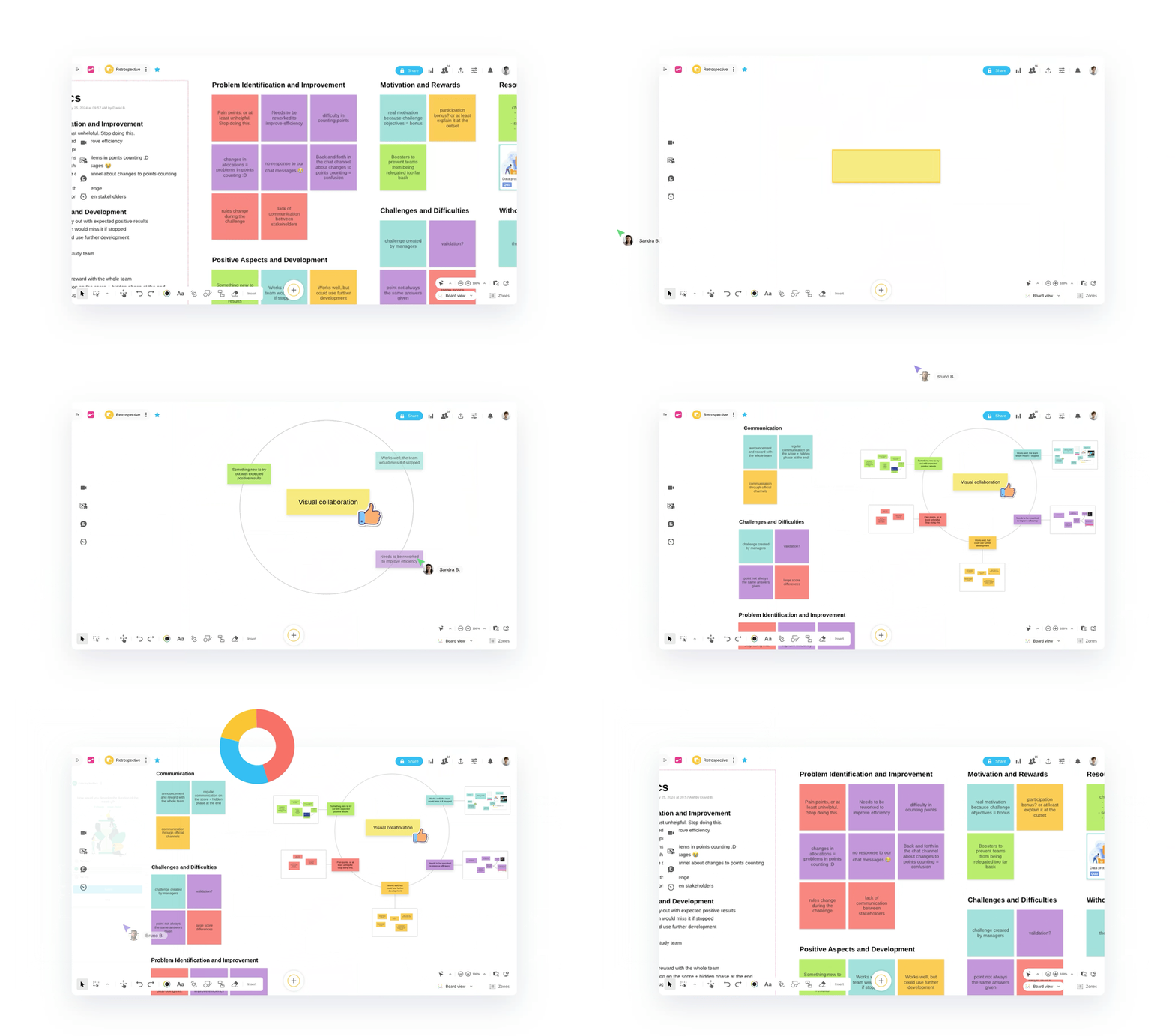
During early-phase design and process work, teams can share ideas using Wrike Whiteboards.
Whiteboards give every team member a space to contribute, no matter where they’re working. They’re accessible from everywhere, so, for example, your design engineers and production floor leads can collaborate in real time to map a revised assembly process or troubleshoot a bottleneck in production. This helps bridge the gap between what’s theoretically possible and what’s practically achievable earlier in your projects, so you can allocate your resources wisely.
Once development kicks off, Wrike’s commenting features can also power your cross-team discussions.
Every task card captures the full story of a project. To understand the work, team members can follow and weigh in on comment threads (and summarize them using AI to catch up), trace decisions through the task history, and use @mentions to flag areas where urgent input is needed from a specific team member and send them an instant notification — like if a materials engineer needs to weigh in on a spec change before production moves forward.
And when a new product or piece of equipment is ready for review, Wrike’s proofing tools let your teams go over technical drawings, compliance labels, safety documentation, and more — all in one place and without duplicating your essential project assets.

Finally, Wrike’s integrations with platforms like Slack, Microsoft Teams, and Salesforce make collaboration with external clients, suppliers, and contractors just as seamless. Integrations speed up these communications, while keeping all the context that surrounds your workflows inside Wrike rather than in each team member’s private inbox.
For manufacturing teams, it’s worth noting that Wrike integrates with systems such as SAP, Microsoft Dynamics 365 Business Central, Oracle, Salesforce, and PLM tools. These integrations are available through Wrike Integrate and Wrike’s API, which allows your technical teams to build custom connections between Wrike and any other systems your manufacturing team relies on.
Features like this have seen fantastic results for manufacturers, with teams involved at every stage in the product lifecycle connecting and reaping the benefits.
- Electrolux, a home appliance manufacturer, uses Wrike to connect creative teams responsible for packaging design with the product teams. By clarifying and standardizing requests, they greatly increased transparency and efficiency — saving 30% of their time per project and halving the number of emails the design team receives.
- Siemens Smart Infrastructure uses Wrike to automate its workflows, break down silos, and securely connect its global teams. 250 workflows now connect users in more than 20 countries, and productivity has increased by 10%.
- Fitbit uses Wrike as an essential part of its new product launch cycles, coordinating teams and working more efficiently during these critical project phases. They save 400 hours of meeting time each year by using Wrike for feedback and reviews, and spend 50% less time on project management specific to building and managing their timelines.
Although your workflow management software will never replace your PLM, ERP, MES, or shop-floor control software, Wrike drives the processes that connect your teams, powers data-driven decisions, and gives you full visibility into your project tasks. Plus, Wrike’s features can scale across plants, products, and regions.
2. WhereFour: MES system with production workflows
WhereFour is a manufacturing, inventory, and compliance platform — essentially a manufacturing execution system with workflow features to help track the process from raw material to finished product. This makes it a popular choice for teams on the production shop floor, though it’s not as useful for connecting manufacturing to other teams like marketing, design, or sales.
This tool gives companies oversight of their production processes, project planning, progress, and disruptions. For instance, it includes tools to identify production bottlenecks, measure team capacity, and improve the overall predictability of the production line. It also integrates with most ERPs.
3. Camunda: Process orchestrator with AI features
Camunda is a process orchestration tool that can be used by manufacturing teams — along with teams in other industries like financial services, the public sector, and retail.
Camunda includes agentic AI features, which can help manufacturing teams plan maintenance and handle quality control in a way that minimizes downtime. The AI workflow features include tools to make production line exception handling, supplier risk or delay responses, and equipment maintenance more standardized and streamlined. The platform also keeps production steps governed and traceable, to meet compliance requirements across the range of industries the tool handles.
Camunda integrates with core platforms like SAP, MES, and PLM systems — both legacy and modern systems — to make implementation easier.
4. FlowForma: Process automation software for complex workflows
FlowForma is a process automation tool with features to handle complex manufacturing processes and improve operational efficiency.
FlowForma’s standard tools cover repetitive tasks like supplier and vendor onboarding, production planning and change, quality management issues, and maintenance and asset management. Many of these workflows are powered by AI to streamline the steps, reduce the need for human intervention, and take care of some of the manual tasks of administrative work.
The software also keeps teams audit-ready and complies with a range of industry standards and regulations, such as ISO certifications and environmental and safety requirements.
5. Flowdit: Inspection management workflow tool
Unlike the tools on this list that are designed to orchestrate multiple production workflows, Flowdit specializes in managing the workflows and checklists associated with inspections.
Flowdit automates, standardizes, and simplifies workflows for plant and operations managers, maintenance managers, QA teams, commissioning engineers, and project leads. Like Wrike, it includes plenty of features to build custom workflows and adapt them quickly if the project conditions change. Tasks can be organized by deadline and priority and visualized from multiple angles.
Flowdit also includes AI and workflow automations to save more time and return a manager’s focus to growth and team communication.
6. Katana: Inventory management system
Katana is primarily an inventory management system that serves as a single source of truth for workflows across manufacturing, purchasing, order management, and warehousing.
By standardizing the processes and giving teams in these separate departments visibility, Katana makes it easier to measure stock levels, manage the supply chain, and ensure on-time deliveries. For manufacturing specifically, this platform includes standardized workflows, status visualizations, and tools that connect planning teams with external partners.
What’s more, Katana includes analytics tools that gather real-time data on inventory levels, stock movement, and resource allocation and identify actionable insights to help teams make informed decisions.
7. Odoo: Open-source MRP software
Odoo is an open-source tool that powers workflows relating to production planning, bills of materials, and raw materials.
In this tool, workflows for manufacturing can be visualized in a color-coded calendar with swim lanes for each part of a team, or in a Gantt chart showing dependencies between teams. Alongside workflow features, Odoo includes real-time simulated operations, such as manufacturing order simulation. This helps teams to make their capacity planning more accurate and control their costs.
Odoo also bills itself as the perfect tool for Six Sigma and Kaizen project management, so teams looking to work with a platform with an in-depth understanding of these methodologies can find many of the monitoring and visualization tools they entail here.
8. Smartsheet: Work management software
Smartsheet is a well-known project management software platform with an interface that feels familiar to teams who are used to managing their workflows with spreadsheets. Unlike a simple spreadsheet, it includes complex workflow visualization and tracking features that make it easier to track progress.
Smartsheet offers the basics that manufacturing teams expect from a workflow management system, including rule-based automations, connected project tracking, and Gantt charts. The platform scales to portfolio management and, like Wrike, integrates with many key platforms that keep teams connected, such as Salesforce, Slack, and Microsoft Teams.
For manufacturing companies, Smartsheet also includes some templates to get started faster, for example, for supply chain operations management, vendor contract management, and product development.
9. Tulip: MES for medical, pharmaceutical, and aerospace manufacturing
Tulip has a somewhat narrower range of use cases than many of the systems on this list, but for companies in medical, pharmaceutical, aerospace, or defense manufacturing, it provides a powerful set of tools.
Looking specifically at digital workflow features, Tulip helps companies set up complex, multistage processes to guide their production workflows. The system also connects multiple teams, for example, by pulling data from ERPs and contextualizing it with AI to help inform cross-team decision-making. Naturally, the platform includes features to display the latest data on desktop or mobile, so teams can collaborate from different locations in real time.
Tulip also includes AI-powered vision and logic features to automate a company’s workflows and increase the accuracy of their work.
10. Oracle NetSuite: Enterprise manufacturing management tool
Oracle NetSuite is a big name in manufacturing, particularly well-known for its cloud ERP system. This helps connect teams on the shop floor to managers in the office, even when operations at a certain plant are managed remotely.
NetSuite is an enterprise-level, flexible solution. From one centralized tool, it helps companies manage large-scale orders, planning, scheduling, procurement, supply chain, and QC, and it connects with CRM and marketing teams. This increases the visibility teams have of their entire production process, which helps eliminate inefficiencies and scale up.
This platform also lists some specific features for medical device manufacturing, industrial manufacturing and supplies, building materials, and CPG.
11. Zoho Projects: Project management tool for smaller manufacturers
Zoho is a software company known for a range of intuitive business tools. Zoho Projects is one of the tools that can be used to manage manufacturing workflows. It’s aimed particularly at smaller teams with simpler workflows and supply chains.
This platform includes most of the basic tools a company needs to visualize and share workflows, including Gantt charts, Kanban boards, and reporting tools. Successful workflows can be blueprinted, and the tools include some forecasting features that can be useful for manufacturing teams.
Zoho Projects markets itself to both process and discrete manufacturing industries and also allows teams to set up custom modules, reports, and dashboards that display key metrics for their projects.
Choose Wrike to power your ideal manufacturing workflows
In this guide, we’ve shared some of the workflow-specific features manufacturers need. From granular workflow tracking to silo-busting collaboration tools, Wrike brings these features together in a platform that’s powerful, scalable, and easy to use.
To find out more or see Wrike for yourself, book a demo today.
Frequently asked questions (FAQs) about manufacturing workflow software
Who should use manufacturing workflow software?
Manufacturing workflow software should be used by production managers, operations teams, and shop floor supervisors who need to coordinate complex processes across multiple departments. It’s particularly valuable for businesses dealing with high production volumes, tight deadlines, or recurring bottlenecks that slow down output.
Can manufacturing workflow software integrate with other tools?
Yes, most modern manufacturing workflow platforms are built to integrate with ERP systems, inventory management tools, CRM software, and more. These integrations allow data to flow seamlessly across your tech stack, reducing manual data entry and keeping all teams working from the same information.
How do manufacturers benefit from workflow software?
Workflow software gives manufacturers greater visibility into every stage of production, making it easier to spot inefficiencies, reallocate resources, and meet delivery deadlines consistently. Over time, this leads to reduced waste, lower operational costs, and improved product quality.
Is manufacturing workflow software worth it for small businesses?
Small businesses should also consider implementing manufacturing-specific workflow software. Although enterprise-level manufacturers are the obvious candidates, small manufacturers can also see returns because even minor inefficiencies can have an impact on their margins. Many platforms, including Wrike, offer scalable pricing and simplified feature sets designed specifically for smaller operations, making the investment accessible and practical.


