



- Project scheduling software lets teams plan, sequence, and track a project’s timeline.
- These tools can break work down into tasks, map dependencies, and keep everyone aligned on deadlines and priorities.
- Key features of project scheduling software include automated scheduling, dynamic updates, shared calendars, capacity management, and time tracking.
- Project scheduling software is not the same as project management software:
- The first is built specifically to maintain accurate timelines with dynamic dependencies, capacity tracking, and automated updates.
- The latter is designed to manage the full project lifecycle, including budgeting, collaboration, and reporting.
- Kanban boards are best suited for teams managing steady intake, Gantt charts work better for complex timelines with fixed deadlines, while Agile teams typically need sprint-based tools built around iterative workflows.
The best project scheduling software offers a user-friendly interface, real-time schedule updates, and simple tools to share your timeline. With software like this in place, you have all the features you need to clarify your capacity, allocate your resources, and keep your project work on track.
The problem is that there are as many different project scheduling platforms as there are types of projects. Finding an option that meets your needs and slots into your existing setup can pose a challenge to many teams.
This post covers the best project scheduling software on the market today. We’ll start with our full-service work management platform, Wrike, which includes scheduling tools like:
- Automated project scheduling and allocation with tailor-made request forms
- Dynamic schedule updates with automated task dependencies
- Shared calendars and multiple, real-time project overviews with custom-built project spaces
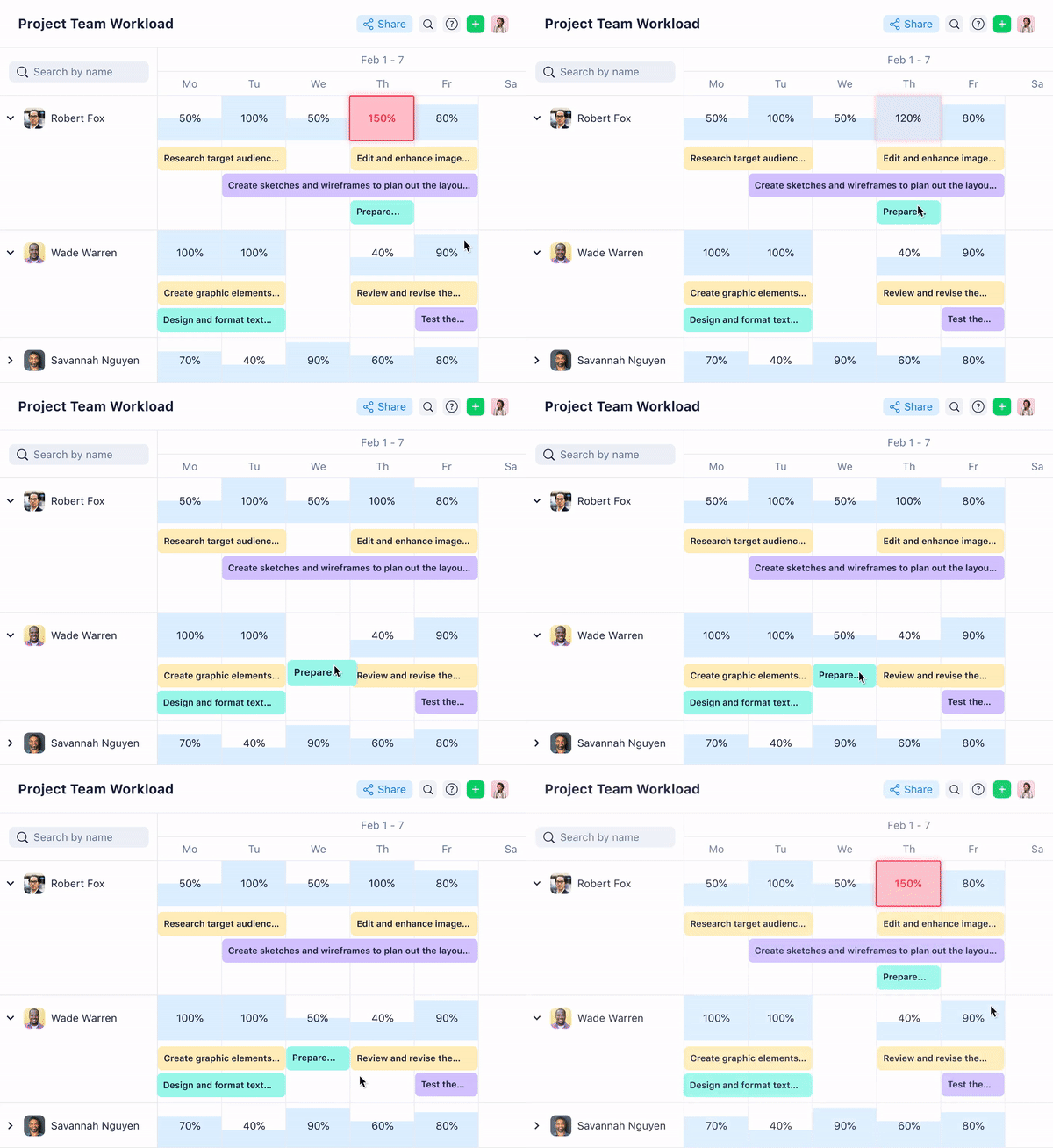
- Detailed capacity management with unbeatable workload visibility
- Precise time tracking and reporting features to help schedule your future projects even more accurately
Later in this post, we’ll also look at tools built for specific scheduling needs, including collaborative calendars, Kanban boards, Gantt charts, Agile team workflows, visual brainstorming, and spreadsheet-style scheduling, so you can find the right fit for your team’s size and working style.
What is project scheduling software?
Project scheduling software tools help teams plan, organize, and track the timeline of a project. They give everyone a clear picture of what needs to happen, who’s responsible, and when each task is due, typically breaking work down into individual tasks, assigning them to the right people, and mapping out how they connect.
Understanding this sequence of work and communicating it clearly across your team is the foundation of effective project scheduling. But to get the best results from your scheduling software, you also have to consider:
- How to manage task dependencies, so delays in one area don’t silently push back your entire timeline.
- How to track your team’s capacity and allocate resources in a way that keeps work moving without burning people out.
- How to keep your schedule up to date as projects evolve, so every stakeholder always has an accurate picture of where things stand.
The right software makes all of this easier, but with so many platforms on the market, it’s worth understanding what project scheduling software actually is before comparing your options, including how it differs from project management software.
Project scheduling software vs. project management software: What are the differences?
Project scheduling software focuses on the timeline, including when tasks need to occur, in what order, and who is responsible for each one. Project management software is much broader and covers budgeting, team collaboration, client communication, risk management, and reporting, in addition to the schedule itself.
Because project management software is built to handle so much more than scheduling, features like dynamic task dependencies, real-time capacity tracking, and automated schedule updates are not always included or fleshed out.
That’s why, when evaluating your options, it’s worth checking specifically for scheduling depth, not just general project management capabilities.
6 must-have features for better project scheduling
When comparing software options, look for features that offer a good combination of detail and simplicity, including:
- Standardized project intake. By gathering more scheduling information about the project when your services are requested, you can create a more detailed timeline from the start. Using templates or even software automations during intake also speeds up the kickoff phase, so you can confidently increase the number of smaller projects you schedule.
- Full workflow scheduling. Taking on a new project adds a deadline to your calendar, but it also means allocating time to the chronological tasks that lead up to it. Project scheduling software is more effective when it visualizes your entire process, for example, in a workflow diagram such as a Gantt chart or a critical chain.
- Real-time schedule sharing. A good schedule should make your project plan (and any changes to it) more transparent. Ideally, the all-in-one scheduling tool you choose should give you a real-time overview of your progress, and you should be able to view the work from multiple angles.
- Capacity management. When you have a detailed, accurate view of your team’s capacity, you can schedule projects more effectively and meet your client’s expectations. More importantly, these overviews show you which team members need more support during a project, like reallocating tasks or providing more resources, and give you the data needed for more accurate resource forecasting down the line.
- Accurate time tracking. When your software scheduling platform includes features to track your billable hours, you can see how your work stacks up against your project plan. This is valuable information that can inform the way you schedule similar projects in the future.
- Project cost management and budget tracking. Keeping an eye on project spend alongside your schedule helps see where resources are being over- or underallocated. When time and budget data live in the same platform, you can make smarter scheduling decisions before costs start to get too high and protect the overall profitability of your projects.
The most effective, full-service scheduling software on the market offers all these features and more. Now, we’ll examine Wrike in detail and show you how these elements build your ideal project scheduling and management system, whatever your goals.
7 best project scheduling software by category and use case
The tools below are organized by category and use case so you can quickly compare options built for different scheduling needs and find the right fit for your team.
- Project scheduling for cross-team collaboration and enterprise work: Wrike
- Collaborative calendars for a shared team overview: Teamup
- Kanban boards for simple workflows: Trello
- Gantt charts for visualizing project paths: TeamGantt
- Project scheduling software for Agile technical teams: Jira
- Brainstorming and visual planning project schedules: Miro
- Spreadsheet-style project scheduling: Smartsheet
1. Wrike: Best project scheduling software for cross-team collaboration and enterprise work
When you schedule your projects in Wrike, you align tasks across your team, eliminate wasted efforts, and set yourself up to complete your scheduled projects faster.
Wrike is our work management platform built for teams that want to plan, schedule, execute, track, and collaborate on projects. Over 30,000 organizations worldwide, including Lyft, Siemens, and NVIDIA, rely on Wrike to schedule projects and work seamlessly across teams.
For example, Lokesh D, Technical Manager in the health, wellness, and fitness industry, recently said:
As a daily user, what I appreciate most is how well Wrike handles complex workflows. The customizable dashboards, real-time updates, and multiple project views (Gantt, Kanban, Table) make it easy to stay on top of everything. Task tracking is excellent, with dependencies, subtasks, time tracking, and workload management all work seamlessly together. The automation features have also saved our team significant manual effort.
Lokesh D, Technical Manager, health, wellness and fitness industry
Key project scheduling features from Wrike:
- Custom request forms for automated project intake. By requesting crucial scheduling information like due dates, technical requirements, and necessary files, teams get a better idea of how long each new project will take.

- Comprehensive workflow tracking for visualizing the entire sequence of tasks and events leading up to a due date. You can even use Wrike AI to break large tasks into actionable steps or transform notes into workflows and then add them to your project calendar.


2. Teamup: Best collaborative calendar for a shared team overview
Teamup is a cloud-based calendar for groups and businesses. Teams can switch between 11 views of their calendar, including daily, timeline, and table views. Small teams can set up their calendar for free, and there are pricing plans to scale up to 150 sub-calendars for enterprise businesses.
The platform is designed to give teams a single, shared view of upcoming work without the overhead of a full project management tool. It’s able to cover scheduling basics without unnecessary complexity.
Key project scheduling features from Teamup:
- Nine levels of access permission to share information with stakeholders while keeping sensitive data under wraps.
- The “Assigned calendars” feature allows one event to exist in multiple calendars, so when several teams are involved, no one misses an update.
- Time zone support to help distributed teams organize events in multiple time zones.
- “Daily agenda” feature to extract information from the calendar and share an email with upcoming events.
3. Trello: Best Kanban board for streamlining intake
Trello is a visual project tracking tool built around Kanban boards. It allows organizations to organize work as cards that move through columns representing different stages of a workflow. It’s easy to use and quickly shows teams what’s in progress, what’s waiting, and what’s done at a glance.
The tool works well for teams that manage a steady flow of incoming requests or recurring tasks and need a simple way to optimize their task management. However, teams with more complex projects or greater scalability needs may find Trello too limited as their workload grows.
Key project scheduling features from Trello:
- Customizable boards with drag-and-drop cards to reflect your team’s intake and delivery workflow
- Timeline view to map out tasks against a calendar and spot scheduling conflicts
- Card templates to standardize recurring work and speed up project intake
- Automation tools to trigger actions like moving cards, setting due dates, or notifying team members when a task changes status
4. TeamGantt: Best Gantt chart tool for visualizing your critical path
TeamGantt is an online Gantt chart tool that can also switch to calendar and board views. This software will make a Gantt chart as an illustration when a team is first planning a project, and it also includes features to update your diagram as your project timeline changes. It also contains some features to view your team’s workload in the “Availability” tab, which can help with resource allocation.
Teams who prefer a visual schedule for project progress will find TeamGantt to be useful. It also allows you to set up automated notifications that alert team members when tasks are approaching their deadlines or when dependencies change.
Key project scheduling features from TeamGantt:
- Gantt charts showing the team or project by color, as well as who’s accountable for each task at a glance
- Progress tracking is displayed alongside the chart itself as a percentage of the scheduled work
- Drag-and-drop interface to change dates and reorder tasks
- Simultaneous views of multiple projects to help avoid scheduling conflicts for teams managing numerous clients or requests
5. Jira: Best project scheduling software for Agile technical teams
Jira is a project tracking platform built for software and technical teams that manage work in sprints, backlogs, and iterative cycles. The tool was originally designed for bug tracking, but it has since evolved into a full Agile project management tool used by engineering and product teams.
Its scheduling features are built on Agile methodologies, making it a natural fit for teams that work in Scrum or Kanban frameworks rather than traditional project timelines.
Key project scheduling features from Jira:
- Sprint planning tools to schedule and prioritize work across defined time periods
- Backlog management to sequence upcoming tasks and keep the team focused on what’s next
- Roadmap views to visualize long-term delivery plans and track progress against milestones
6. Miro: Best tool for brainstorming and visual planning
Miro is an online collaborative whiteboard platform used by teams to brainstorm, map out ideas, and plan projects visually. While it isn’t a traditional scheduling tool, it’s useful for early stages of a project when teams need to think through scope, structure, and sequencing before committing to a formal timeline.
Miro’s flexibility makes it popular with product, design, and cross-functional teams that need a shared space to align before work begins.
Key project scheduling features from Miro:
- Visual project planning templates, including timelines, roadmaps, and mind maps
- Real-time collaboration so distributed teams can plan and structure work together
- Sticky notes, flowcharts, and diagramming tools to map out project phases and dependencies visually
7. Smartsheet: Best spreadsheet-style project scheduling software
Smartsheet is a work management platform built around a spreadsheet interface. Teams who want more structure than a basic spreadsheet, but prefer a grid-based layout over visual boards or Gantt charts, will get the most out of this scheduling tool.
With Smartsheet, teams can manage hundreds of tasks across multiple projects in a single sheet, use conditional formatting to flag at-risk items, and set up automated alerts that trigger when deadlines shift or approvals are needed.
Key project scheduling features from Smartsheet:
- Grid, Gantt, card, and calendar views to switch between scheduling formats depending on the task
- Automated workflows and approval processes to keep projects moving without manual follow-up
- Resource management tools to track team capacity and flag scheduling conflicts
- Robust reporting and dashboard features to give stakeholders a real-time view of project status
When you want a project schedule that creates transparency and shows how to put your plan into action, Wrike has all the features you need.
Using powerful tools like request forms, automated workflows, dynamic dependencies, multiple project views, and exhaustive time tracking, you can customize a project scheduling space that perfectly suits your tasks and your team.
You’ll have access to powerful versions of popular scheduling tools like Kanban boards and Gantt charts, and you can filter your project data at any time to view individual tasks, workloads, or opportunities.
Ensure you deliver on time, every time. Find out how Wrike can build your ideal project scheduling platform today.
Frequently asked questions (FAQs) about project scheduling software
What is the difference between project scheduling software and project management software?
Project management software is built to run the full lifecycle of a project. Project scheduling software is built to keep the timeline accurate. Some platforms do both well, but many don’t, which is why it’s worth evaluating a tool’s scheduling functionality specifically when comparing tools.
How do I choose the right project scheduling tool for my team?
Start by identifying your biggest scheduling pain point. If missed deadlines come from poor visibility, look for tools with strong reporting and workload views. If coordinating with multiple departments is an issue, prioritize platforms with sharing and permission features. It’s also worth considering ease of use, since a tool with a steep learning curve can create more problems for project teams.
Which teams benefit most from project scheduling software?
Teams with high task volume, tight deadlines, or work that spans multiple people and departments tend to see the biggest impact on project success. When there are many handoffs involved in getting work done, a structured scheduling tool helps keep everything on track.
Do larger or more complex teams need specialized scheduling software?
Larger teams often need scheduling software with more in-depth features like capacity management, resource planning, automated dependencies, workload visibility, and reporting. The more stakeholders and moving parts involved, the more important it becomes to have a platform that can handle that complexity without manual workarounds.



