Key takeaways:
- What do enterprises need from project management software? Enterprises need a system that can coordinate large projects across multiple teams, maintain alignment, and handle organizational complexity.
- What makes a project management software suitable for enterprises? Project management tools suitable for enterprises can coordinate work across departments, give leaders clear visibility into progress and resources, reinforce accountability, and meet enterprise-level security and governance needs.
- Which project management tools are commonly used at the enterprise level? The top seven options include Wrike, Smartsheet, Adobe Workfront, ClickUp, Microsoft Project, Asana, and Teamwork.
- How should organizations choose the right enterprise project management tools? Enterprise teams should look for a platform that integrates smoothly into their workflows and systems, supports cross-department collaboration, and scales as projects, teams, and requirements grow.
- Why do many enterprises choose Wrike? Enterprises like Walmart and Siemens choose Wrike for its ability to handle high-volume work, unify teams under a shared system, and support strategic planning with the security and oversight large organizations require (Wrike is GDPR, CCPA, and HIPAA certified).
There’s no shortage of advice on how to choose project management software online. However, most of it is too generic because it tends to treat enterprises as if their needs are no different from those of any other organization.
As a result, you might end up evaluating tools like Trello or Zoho Projects, which are useful but may lack the enhanced security functions, cross-departmental visibility, resource coordination, and workload capabilities required to support large and complex operations.
Put simply, most project management platforms aren’t built for the volume or sophistication of complex workflows, and they may fail to hold up at the enterprise level.
That’s why in this guide, we’ll help you find the right project management solution for your needs by comparing seven platforms that can support true enterprise workloads. Here are all the platforms we’ll explore below:
- Wrike
- Smartsheet
- Adobe Workfront
- ClickUp
- Microsoft Project
- Asana
- Teamwork
Before reviewing each tool, we’ll first answer a key question: What actually makes a project management solution enterprise-ready? These are the features and factors large organizations should evaluate to determine if a platform can handle complex workflows and multiple teams.
Once we establish that framework, we’ll break down how each of the seven tools aligns with those enterprise needs — starting with Wrike, our intelligent work management platform used by The Estée Lauder Companies, Walmart, Sony Pictures Television, Capgemini, and Siemens Smart Infrastructure.
4 factors that make a project management software solution enterprise-ready
Any enterprise managing large tasks and teams will demand a lot from its project management software. To satisfy your needs, that software must be able to handle complex workflows.
In our experience, there are four key things enterprises need from their project management tool to keep larger teams aligned:
- It should let you coordinate projects across teams and agencies. When you’re managing complex projects across various teams and agencies, tools like Excel and email just won’t be enough. For enterprises, it’s more efficient and manageable to connect your workflows in a single platform. That speeds up admin, reduces the number of software licenses, and keeps all information updated in real time and in one place.
- It should give you visibility over project progress, resources, and costs. Being able to track tasks and dependencies is a must for any project. However, tools that report in detail on resources, costs, and efficiency are just as important for project managers and enterprise business leaders alike. Clear visibility across teams also helps leaders understand how projects overlap and where risks may slow down delivery.
- It should improve accountability for every team member. The best enterprise project management solution should make it easy to assign tasks, understand who’s responsible for what, and identify where bottlenecks occur. This becomes even more important when multiple teams depend on one another, because delays in one area quickly affect the rest. Plus, team members should have clarity on everything they personally need to complete their own work.
- It should be robust, compliant, secure, and integrable into their existing structures. Many project tools fail because they’re a pain to set up and are too rigid to support the way you want to work. Enterprise software must work within established processes and systems without creating extra overhead, while still meeting strict enterprise-grade security requirements. Robust security should be non-negotiable.
If a project management solution doesn’t fulfill these needs, it likely won’t be adequate for an enterprise. We chose the seven tools covered below because they all have the foundations needed to support work at enterprise scale.
7 best enterprise project management software platforms: Feature summary and detailed comparison
Here’s our compilation of seven options for your enterprise project management software needs, including rankings by Gartner Peer Insights for the Project Portfolio Management category and the Gartner Magic Quadrant for Collaborative Work Management.
|
Brand name |
Gartner® score |
Price |
Enterprises like it for its … |
Potential cautions |
|
Wrike |
4.6/5 A Leader in the Gartner® Magic Quadrant™ for Collaborative Work Management, 2025 |
Pricing starts at $10 per user per month. Enterprise plans are customized to your needs. A free trial is available. Get in touch here. |
Robust, flexible, and secure project management, with visibility over all of your tasks, resources, and teams. |
The customization process can take time to get you the best results. |
|
Smartsheet |
4.4/5
A Leader in the Gartner® Magic Quadrant™ for Collaborative Work Management, 2025 |
Pricing starts from $9 per user per month, for a maximum of 10 users.
On top of advertised plans, there are many expensive add-ons. |
Spreadsheet-style visuals and project organization. |
Smartsheet has many of the limitations of other spreadsheets, including the rigid sheet view and a lack of visibility over many projects at once. |
|
Adobe Workfront |
4.2/5
A Challenger in the Gartner® Magic Quadrant™ for Collaborative Work Management, 2025 |
Pricing isn’t publicly available. |
Seamless integration with Adobe suite. |
The software is difficult to customize. |
|
ClickUp |
4.3/5
A Leader in the Gartner® Magic Quadrant™ for Collaborative Work Management, 2025 |
Pricing starts from $7 per user per month. |
The huge range of features. |
ClickUp is known for being very buggy, and there can be problems with stability at scale. |
|
Microsoft Project |
4.2/5 |
Pricing starts from $10 per user per month. |
Compliance, security features, and integration with Microsoft Office. |
MS Project lacks many key features that other tools offer as standard. |
|
Asana |
4.6/5
A Leader in the Gartner® Magic Quadrant™ for Collaborative Work Management, 2025 |
Paid plans start from $10.99 per user per month. |
Easy adoption and flexible task management for large teams. |
Asana is comparatively limited in resource planning, portfolio management, and admin overhead at scale. |
|
4.5/5 |
Paid plans start at $10.99/user per month. |
Client-facing project delivery with time tracking and usability. |
Limited enterprise portfolio management, governance, and reporting. |
1. Wrike

Wrike is a project management platform built for enterprises. We’ve made it flexible enough to adapt to your organization’s way of working, while being sufficiently robust to include every feature you need to make managing large projects more efficient and secure.
20,000+ of the world’s top organizations use Wrike to manage their workflows, including enterprises like:
- Electrolux, the appliance manufacturer employing over 50,000 people worldwide. This company uses Wrike to cut the time spent on each creative project by 30%.
- Walmart Canada, the massive retailer serving 2.4 million customers online or in one of their 400+ stores nationwide. This company relies on Wrike to collaborate more effectively, automate processes, and prove project value.
- Siemens, the technology giant with over 293,000 employees worldwide. This company leverages Wrike to improve productivity by 10% across 14,000 users in 20+ countries.
For the third consecutive year, we were named a Leader in the 2025 Gartner® Magic Quadrant™ for Collaborative Work Management. Our score of 4.6 out of 5 beat competition from the likes of Monday.com, Asana, Smartsheet, and Adobe Workfront.
Let’s explore how Wrike’s enterprise work management software stacks up against the factors we explored above.
1. Wrike unifies your whole project management process in one platform
Today, enterprises often use a dozen or more different tools to manage projects — from Adobe Creative Cloud and Google Docs, to Slack and email, to documentation hubs like Notion or GitHub.
For large companies that work across multiple teams and agencies, this is a serious threat to efficiency. Plus, it means critical information gets scattered across multiple tools, making it difficult for every employee to find.
To tackle this, enterprises need a single tool to unify and clarify their projects, deadlines, deliverables, and workflows. This way, your teams can communicate, track progress and dependencies, and actually do their work all in the same place.
For organizations looking specifically for enterprise workflow management software, this kind of unified system is needed for keeping work visible, controlled, and moving across teams at scale.
Wrike lets you do exactly that by:
- Planning, tracking, and updating projects and tasks in one place. Set up a single source of truth for all your projects and workflows, even if they’re across agencies, departments, and geographies.
- Communicating about work and tasks in the same software. You can reduce the number of emails and Slack messages you send by briefing, discussing, and giving feedback on tasks within Wrike. Even people who are external to your organization can use the platform to give feedback on your work.
- Using workflow automation to increase efficiency. Wrike comes with robust automation features that make life easier for everyone. For instance, simpler collaboration tools will just notify colleagues when a given task is complete. In contrast, Wrike lets you automate the entire workflow from start to finish. As soon as a piece of work is requested, Wrike sets up all the relevant dependencies and triggers, cutting inefficiency and ensuring nothing falls through the cracks.
- Identifying other areas that could be more efficient. While you’re doing your work, Wrike’s AI tracks the repetitive tasks your team completes and suggests ways to automate them. It gives you additional opportunities to improve your performance.
Let’s take an example of how these features can drive efficiency. Intelco is an Italian software house that provides tailored services for large industrial groups of various kinds, ranging from motorways to airports, engineering, retail, textiles, and more.
The company brought on Wrike to help manage its large teams. Since onboarding the software, Intelco has reduced the number of internal emails by 90%. Even better, teams now spend 30% less time in project meetings.

With Wrike, we’re simplifying our work because, with a couple of clicks, we can backtrack on our activities to see previous communication or anything else we need to. That was one of the biggest goals Wrike helped us achieve — the whole company finally collaborating with each other.
Mattia Ronchi, Project Manager

2. Wrike gives you clear visibility on project progress and resources
Without an effective project management system, enterprises can lose track of projects.
This isn’t just an abstract worry. If you don’t have visibility on how projects are progressing, you can miss deadlines or risk overspending your budget. This carries concrete financial and reputational risks.
Instead, Wrike provides total clarity on the progress and cost of projects — and the capacity of staff — so you never lose track of a project again. Plus, thanks to our unique cross-tagging feature, Wrike helps you see how specific tasks impact other projects, too.
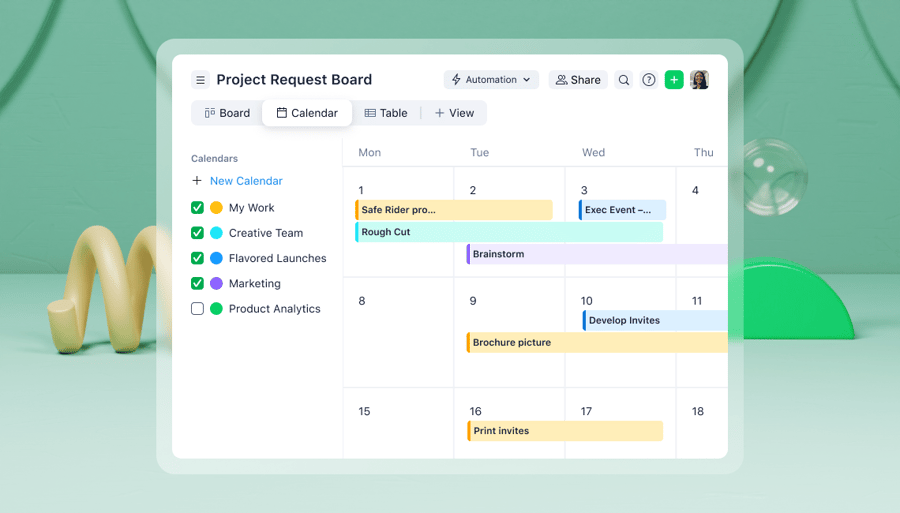
- Track project progress, task statuses, and any bottlenecks effortlessly. With Wrike’s sophisticated Gantt charts, Kanban boards, and other visualizations, you’ll be able to see everything you need to know about a project. That means dependencies, project statuses, milestones, and more.
- Understand how tasks relate across multiple custom projects. Every project is different, and no enterprise handles just a single project at a time. With Wrike’s unique custom item types, you can create, organize, and label your own folders, projects, tasks, and subtasks — entirely based on your own work structure and style. Then, you can use our cross-tagging feature to include your task in other projects your teams are working on without duplicating the task itself.
- Make data-driven decisions based on colleague capacity and availability. With live charts and time tracking functionality, you can also get insights into what resources are available and what more you need to finish a project. Timesheets can be automatically synced with your finance system for monitoring, invoicing, and more.
- Stay on budget with detailed cost and resource reporting. Track the remaining budget, analyze ROI, assess OKRs, and break down costs per task. You’ll get a granular view of the metrics you need to see how your resources are being used.

- Prioritize the right projects with AI insights. Wrike’s AI-powered features for work let you build dashboard widgets in seconds and instantly surface the most important information, trends, and risks. This means you can completely eliminate manual analysis and spend more time on work that actually matters.

3. Wrike gives every team member clarity on their tasks for added accountability
It’s not just leaders that need to know what’s going on across the organization. To collaborate well on projects, employees need to have clarity on their own workflows and tasks, understand what they need to do when, and see how their roles fit with colleagues’ tasks.
One of the key benefits of a robust project management tool like Wrike is that it gives every single person within your organization a personalized view of what they need to do each day. The result is better accountability and efficiency.
- Empower every team member with a personalized dashboard. Every Wrike user has their own custom dashboard, where they can see the tasks they need to prioritize and the dependencies they’re waiting on others for. They’ll have a unique perspective on their work, across all the projects they’re working on.

- Notify everyone automatically with tasks they need to complete. If new projects are requested or new tasks are ready to be actioned, every relevant person will be personally notified with a brief and a due date. This way, team members don’t need to bring up a separate tool to explain to others what needs to be done.
- Ensure employees only see what they need to with robust access levels and permissions. Access permissions are set at the folder level, so you can trust that your assets and resources stay secure.
- Help employees prioritize and streamline their inbox with AI. Wrike’s AI cuts through information overload to deliver important mails, prioritize action items, and categorize topics instantly. Employees can also start their day in an organized and efficient manner by getting a morning digest of key notifications, updates, and priorities.

Before using Wrike, Capgemini, a French management consulting enterprise, was struggling to get complete visibility and assign active tasks.
“Since we had a decentralized system in place to gather and manage those requests, it was hard to understand what every team member was working on at any given moment. When I learned about Wrike, I realized how powerful this solution might be for solving our challenges,” says Dan Stevens, Director of Marketing Services.
Now, thanks to Wrike, Capgemini has complete visibility into workload requirements, granular control over its workflows with the ability to group tasks differently, and detailed reports about the value its work delivers.
I think it’s amazing to be able to have a tool that helps us collaborate, and to be surrounded by people that have the same vision and really want to get everything done, and done beautifully.
Dan Stevens, Director of Marketing Services
4. Wrike is secure, compliant, and easy to set up
Enterprise leaders know that any onboarding difficulties will put the brakes on adoption. That’s why, at Wrike, our professional services teams are with you throughout to securely migrate your data, set up your software, and customize it to your needs.
- Migrate your data from previous tools quickly, securely, and easily. Our professional services team will make this simple. Or, if you’d prefer, you can do it yourself using XSL files.
- Trust our support teams to help you customize your workflows to get the best out of Wrike. Many enterprise tools will onboard customers and leave them to handle everything else themselves. Instead, our teams are there to make sure you have everything you need, through weekly calls and software training.
- Keep using business-critical tools alongside Wrike. Thanks to Wrike’s hundreds of integrations, you can easily use our project management tool alongside your existing software. For instance, you can use the Microsoft Office suite alongside Wrike, as well as your CRM or your communication tools. Integrations are easy to use (and no code, too), and you can set up automations across apps to streamline your workspace even further. You can also use Wrike’s APIs to integrate with your current stack or build enterprise-grade apps.
- Be reassured about your data privacy. Wrike is GDPR, CCPA, and HIPAA certified. You can find out more about our security features here.

Siemens is a Swiss technology company with dispersed international teams and a huge volume and scale of projects. The enterprise found that its disjointed tech setup was affecting team productivity and posing a security risk, and so it brought on Wrike.
“Security matters,” says Hannes Leitner, Process Owner, Project Execution at Siemens Smart Infrastructure. “Now, Wrike is aligned to our internal enterprise standards, and the users can add all their confidential data in Wrike without having to fear security breaches or compliance issues.”

Wrike offers some helpful, out-of-the-box features that are essential for enterprise use. We set up the dashboards so collaboration and task management work best across functional teams in branches. Custom workflows and conditional request forms also support and scale up to efficient work management in the regions. Additionally, the effort estimation in Wrike’s resource management is helpful. Changes in due dates or tasks are easily tracked and consolidated, supported by the Gantt chart view — which makes planning easy.
Christina Fischer, Global Product Manager

Wrike reviews
For the third consecutive year, Wrike was named a Leader in the 2025 Gartner® Magic Quadrant™ for Collaborative Work Management. Its score of 4.6 out of 5 beat competition from the likes of Monday.com, Asana, Smartsheet, and Adobe Workfront.
Wrike has a Capterra score of 4.4, based on over 2,800 reviews.
Wrike pros
- Wrike is a platform built for enterprises that has all the project management features you’ll need.
- Wrike boasts robust security, and it’s easy to migrate all relevant data without hassle.
- Wrike gives you clear data for project planning, resource allocation, and budget tracking.
- Wrike is flexible, agile, and customizable, so you can build the workflows and projects you need.
- Wrike offers hundreds of integrations, so you can easily fit it into your current workflows and technology stack.
Wrike potential considerations
- Wrike can require some time to optimize its customizations.
Wrike pricing
Pricing starts at $10 per user per month. Enterprise plans are entirely customized to your organization’s needs.
If you want to try out Wrike before you start, a 14-day free trial is available. Get in touch here.
2. Smartsheet
Smartsheet is a project management software that’s based around the concept of a spreadsheet.
That makes it a great option for teams who are already used to spreadsheets. However, if you actively want to move away from the spreadsheet format (as many enterprises do), you may find that Smartsheet replicates many of the features (and flaws) of a spreadsheet, which other software can liberate you from.
Smartsheet is well-suited for enterprises because it’s scalable. Projects are shown as individual spreadsheets, and tasks are listed as lines in those sheets. If you have multiple projects, all you need to do is add as many sheets as you need, and there’s no greater complexity at scale.
That said, you won’t have access to all of Smartsheet’s features — for instance, reporting — if you only pay for the standard plan. Instead, you’ll need to pay for additional add-ons to get value from the tool.
Smartsheet reviews
- Gartner: 4.4/5
- Capterra: 4.5/5, based on over 3,400 reviews
Smartsheet pros
- Smartsheet has a spreadsheet style that will be familiar to most employees.
- Smartsheet scales well to handle the largest projects.
Smartsheet potential considerations
- Smartsheet’s spreadsheet format may be limiting for many users.
- Smartsheet doesn’t offer sophisticated analytics and reporting. It actually invites you to export data to Excel to analyze it there.
Smartsheet pricing
Smartsheet is priced using four different plans, starting at $9/user/month when billed annually. The enterprise plans offer a custom price based on your needs.
Be aware that Smartsheet plans don’t typically include everything you need for effective project management. Instead, the tool has many add-ons, meaning you might end up paying more than you originally intended.
3. Adobe Workfront
Adobe Workfront is another project management tool designed specifically for enterprises. It has a large variety of features, including resource management tools, collaboration channels, and automated workflows, which will satisfy organizations with more complex demands.
As it’s part of the Adobe family, it can make sense for teams and organizations that already use the Experience and/or Creative Cloud suites, such as design or marketing teams. However, you should be aware that it’s among the most expensive tools on this list (although you can get a discount if you’re an Adobe customer already).
One downside of Workfront is its user interface. Customers often note that completing simple tasks requires a lot of complex navigation. Plus, it’s a surprisingly inflexible tool, with a very rigid structure that doesn’t allow for ad-hoc tasks.
Adobe Workfront reviews
- Gartner: 4.2/5
- Capterra: 4.4/5, based on over 1,400 reviews
Adobe Workfront pros
- Adobe Workfront is particularly strong for creative teams, as it seamlessly integrates with the rest of the Adobe Creative Cloud suite.
- Adobe Workfront scales well, as an enterprise tool should.
Adobe Workfront potential considerations
- Adobe doesn’t offer a free trial, meaning you can’t know for sure what you’re going to get.
- Adobe Workfront is not very customizable, with most configurations only modifiable by an admin.
Adobe Workfront pricing
Adobe Workfront doesn’t publicly share its pricing plans, nor does it offer a free plan. Instead, you’re invited to contact the team.
4. ClickUp
ClickUp is a well-known project management software solution. It’s a pretty flexible product that works well for teams of almost any size, structure, or complexity. While it’s not built specifically for enterprise teams, many large organizations do use it.
Part of ClickUp’s appeal is that it markets itself as the all-in-one app for work. In practice, all this means is that it has lots of features, many of which have nothing to do with project management. For instance, it has its own docs tool, Docs, where you can do work within the software itself, without the need for an integration.
But this wealth of features can be a double-edged sword. Not all of them are as reliable as they should be, particularly at scale. One of ClickUp’s clear benefits is that it’s really easy to set up, even at scale. But if you need some support, you won’t always get it. In fact, ClickUp offers no phone support at all.
ClickUp reviews
- Gartner: 4.3/5
- Capterra: 4.6/5, based on over 4,500 reviews
ClickUp pros
- ClickUp is really easy to set up, even if you’re operating at an enterprise level.
- ClickUp boasts a wide variety of features, meaning it can replace many of your tools if you want it to.
ClickUp potential considerations
- Despite its numerous task views, ClickUp lacks the comprehensive PPM features needed to run a larger enterprise. Users will find it difficult to roll up data and provide executives with a high-level view of project progress.
- ClickUp’s reliability is an issue, with many features not always performing well, particularly in meeting the needs of larger enterprises with complex workflows.
- ClickUp’s support is lacking, with no phone support at all.
ClickUp pricing
ClickUp is free for the basic plan. Its cheapest plan starts at $7/user/month billed annually. For enterprise packages, you’ll have to contact the sales team for a custom quote.
5. Microsoft Planner
Microsoft Planner is Microsoft 365’s own project management tool. Enterprises like it for its compliance, an area where Microsoft applications tend to be strong. It can be an attractive option if you’re already using the MS 365 suite, as it’s already included.
One thing to be aware of is that the MS Planner by itself is limited and will require adding either Project Plan 3 or Project Plan 5 to access work management capabilities. For instance, there is no option to view workload or demand across team members, and budget tracking across multiple projects is almost impossible. Overall, the dashboards and reporting are weak, with many key features simply unavailable.
This is because Microsoft assumes that you’ll be using MS Planner alongside other (Microsoft) tools for collaboration, automation, and more. Of course, you can, but you’ll end up flicking between Microsoft Teams, Outlook, Word, and other Microsoft 365 tools to actually get any work done. Another issue to be aware of is that, like Teams, MS Planner can be heavy, complex, and rigid. If you use it, don’t expect a great user interface like some modern alternatives.
Microsoft Planner reviews
- Gartner: 4.3/5
- Capterra: 4.4/5, based on over 2,000 reviews
Microsoft Planner pros
- Microsoft Planner seamlessly integrates with the entire Microsoft 365 suite.
- Microsoft Planner, like Teams, is strong when it comes to questions of security and compliance.
Microsoft Planner potential considerations
- Microsoft Planner is really rigid and relies on integrations with other Microsoft 365 tools, a drawback for companies not fully embedded in the Microsoft ecosystem. For highly customizable workflows, efficient time tracking, and in-depth project analytics, Wrike comes out ahead.
- Microsoft Planner lacks many features you’d expect from a project management tool, including proofing.
Microsoft Planner pricing
Microsoft Planner is included in the Microsoft 365 suite. To gain access to more work management capabilities, organizations will need to upgrade to Project Plan 1, Project Plan 3, or Project Plan 5. Pricing for an annual subscription for the Project Plan additions starts at $10 per user per month (paid annually) and quickly rises to $55 per user per month (paid annually) for the addition of Project Plan 5.
6. Asana
Asana is a popular project management tool with a user-friendly interface, highly flexible task management features, and easy adoption that appeals to many enterprise teams.
It’s capable of managing complex portfolios or providing executives with centralized visibility across hundreds of projects. That’s not to say it’s the most complete choice for enterprise work. As organizations scale, teams can run into gaps in resource management, capacity planning, and cross-department reporting that require additional tools or manual workarounds.
Another thing to consider is that Asana’s flexibility can become a drawback for large teams. Without strong governance, large teams may create inconsistent workflows, duplicate projects, or rely on different naming conventions. This can make it challenging to maintain clean data and produce clear roll-up reporting for leadership.
Asana reviews
- Gartner: 4.6/5
- Capterra: 4.5/5, based on over 13,000 reviews
Asana pros
- Asana’s UX is simple to use and is considered highly adoptable for larger enterprise teams.
- The tool offers flexible task views and automations that make coordinating day-to-day work easier and more efficient.
- Asana integrates well with common enterprise tools, making it easier to fit into existing workflows.
Asana potential considerations
- Cross-department visibility can be limited unless teams maintain strict governance and consistent workspace structures.
- Asana is developing its vertical industry sales programs. As a result, it may lack tailored solutions for specialized use cases, indicating a more general work management approach rather than deeply specialized industry solutions.
Asana pricing
Asana offers a free plan for small teams. Starter, Advanced, and Enterprise plans require paid upgrades, starting at $10.99 per user, per month (billed annually).
7. Teamwork.com
Teamwork.com is a project management platform built with a strong focus on client-facing work. While it can be used for all types of work, the most common users are agencies, professional services teams, and internal services organizations that need key features like task ownership, time tracking, and visibility into billable work.
Teamwork.com is flexible enough to support both small and large enterprise teams, but it does have some limitations when managing complex, cross-department initiatives. Reporting and global oversight can also become more difficult, especially for enterprises running many teams with different workflows.
However, users claim that Teamwork.com is easy to use and prioritizes simplicity over heavy customization. This makes it easier to adopt than some enterprise platforms, but it can restrict how much organizations can tailor workflows.
Teamwork.com reviews
- Gartner: 4.6/5
- Capterra: 4.5/5, based on over 13,000 reviews
Teamwork.com pros
- Teamwork.com is well-suited for client services and agency-style work, with strong task management and time tracking.
- The platform is easy to adopt and offers a clean interface that minimizes onboarding effort.
Teamwork.com potential considerations
- Some advanced features like portfolio management, resource forecasting, and executive reporting are limited for enterprise teams.
- Less flexible than alternative enterprise-focused platforms when it comes to workflow customization and governance.
Teamwork.com pricing
Teamwork.com offers a free plan while paid plans start at $10.99 per user per month (billed annually). Enterprises can access a 30-day free trial but need a custom quote for pricing.
Choose Wrike for flexible, robust, and secure enterprise project management software
With its flexible work structure, robust security, and powerful reporting features, Wrike’s enterprise project management software offers everything you need to deliver projects more efficiently and successfully.
Contact us to set up a demo or start your free two-week trial.
Frequently asked questions (FAQs) about enterprise project management software
1. What is enterprise project management software?
Enterprise project management software (sometimes abbreviated as EPM) is a platform built to plan, track, and govern many projects across an entire organization. It gives employees, team leaders, and stakeholders visibility into tasks, processes, resources, budgets, and risks so they can make informed decisions at scale.
2. How is enterprise project management software different from regular project management tools?
Standard tools help individual teams manage tasks, while enterprise systems foster collaboration and coordinate work across departments and different business units. They support resource capacity planning, executive reporting, standardized workflows, and enterprise-grade security.
3. What features should enterprise project management software include?
Key features include collaboration for internal teams and external agencies, project and resource visibility, workflow customization and automation, as well as enterprise-grade security and compliance capabilities.
4. How much does enterprise project management software cost?
Pricing varies widely depending on the vendor, number of users, deployment model, and level of customization. Costs typically include software licenses, implementation services, integrations, training, and ongoing support. Enterprises usually evaluate the total cost of ownership rather than the subscription price alone.
5. What are the best practices for implementing enterprise project management software?
Successful enterprise implementations start with well-defined goals, clear governance, standardized processes, and early integration planning. Good customer support, ongoing training, and buy-in from key stakeholders are also essential for driving adoption.