

12 approval workflow software solutions to streamline approvals

Key takeaways:
- What is an approval workflow? An approval workflow is a system that manages project approvals, ensuring documents and tasks receive necessary endorsements before distribution.
- Why is approval workflow software essential? It centralizes approvals, streamlines communication, optimizes processes, and reduces the risk of forgotten approvals, enhancing efficiency.
- What features should approval workflow software include? Look for automated notifications, role management, audit trails, custom workflows, multiple integrations, and analytics for optimization.
- How does Wrike improve approval processes? Wrike offers customizable workflows, centralized communication, task tracking, and automation, making approvals faster and easier.
- What’s the best approval workflow software? The right solution depends on your team’s specific needs. Approval workflow software generally falls into several categories, such as complete project management platforms, creative proofing tools, visual collaboration tools, legal and enterprise document systems, lightweight approval tools, and self-hosted solutions.
An approval workflow is a system that helps you manage your team’s project approvals. It’s how you can ensure that documents and tasks are approved before being sent to clients, colleagues, or senior management. However, it’s not straightforward to operate one without dedicated approval workflow software.
Often, teams use a combination of email, paper forms, and Excel to request approvals and track workflows. While a setup like this can work for a while, teams usually run into one or more of the following limitations:
- Approvals get lost or forgotten.
- Important projects get delayed while waiting for approval.
- Employees find the process of requesting approvals complex, bureaucratic, and tiresome.
- It’s easy to lose track of communication about approvals when it’s spread over multiple email threads with multiple people.
- Sometimes, approving a task might require the approver to manually pull in data from multiple sources, which can be frustrating and time-consuming.
- There’s either no record at all of past approvals, or it takes a long time to search through an archive, especially if that archive involves actual filing cabinets.
Approval workflow software solves these challenges by centralizing approvals, communication, deadlines, and task information in one system while enabling automated approval workflows that reduce manual steps and keep requests moving.
To kick off this article, we’ll explain how to determine which approval workflow software is right for your business needs. Then, we’ll look at the 12 best approval workflow solutions grouped into six categories:
- Complete project management platforms with approval workflows: Wrike and Asana
- Creative approval and proofing tools: Filestage and Approval Studio
- Visual and whiteboard approval tools: Miro and FigJam
- Legal and enterprise approval tools: DocuWare and IntelligenceBank
- Lightweight approval tools: Jotform and Formstack
- Self-hosted and open source tools: Budibase and Nextcloud Flow
How should you choose approval workflow software? (Key features and considerations)
All standard approval workflow tools should include certain core approval management features such as custom approval workflows, automated notifications, roles and permissions, an audit trail, and automated status changes when tasks get approved.
But to find approval software that’s a cut above the rest, I advise you to also look out for the following functionality:
- Interactive product tours, step-by-step tutorials, and videos that make it easy to learn the tool without requiring extensive training
- The ability to approve tasks in as few clicks as possible
- Excellent customer support through regular webinars, responsive support agents, and thriving support forums where users answer each other’s questions
- Analytics to track approval times and identify bottlenecks so that the approval process can be optimized
- Compliance with industry security standards, such as SOC 2, so you know that your data is safe
- Either tiered pricing or flexible licensing, so that the platform can scale with you as you grow
- The ability to customize approval workflows by device, browser, approval stages, language, and user input
- Integrations to pull in data for your approval forms from other apps or export your completed projects to other tools in your stack
Keep these factors in mind as you read through the following list of software options.
Complete project management platforms with approval workflows
Complete project management platforms run approvals directly within the broader delivery workflow, from intake and planning through execution and launch. Embedding approvals inside the same system where work is managed helps teams lock in requirements early, keep stakeholders aligned throughout the project lifecycle, and identify issues before they escalate.
1. Wrike
Wrike is a versatile, customizable project management platform that’s used by 20,000 organizations worldwide, including large companies such as Siemens, Aveva, and Ogilvy.
It’s ideal for managing approvals in workflows that are complex or have overlapping tasks, and makes signing off on tasks both faster and more efficient.
Some cases where you could use Wrike to approve documents include:
- Budgets
- PTO requests
- External reports
- Invoice approvals
- New vendor requests
- Contracts
- Travel expenses
- Purchase orders
- Content review for social media campaigns
Make it easy to request approvals
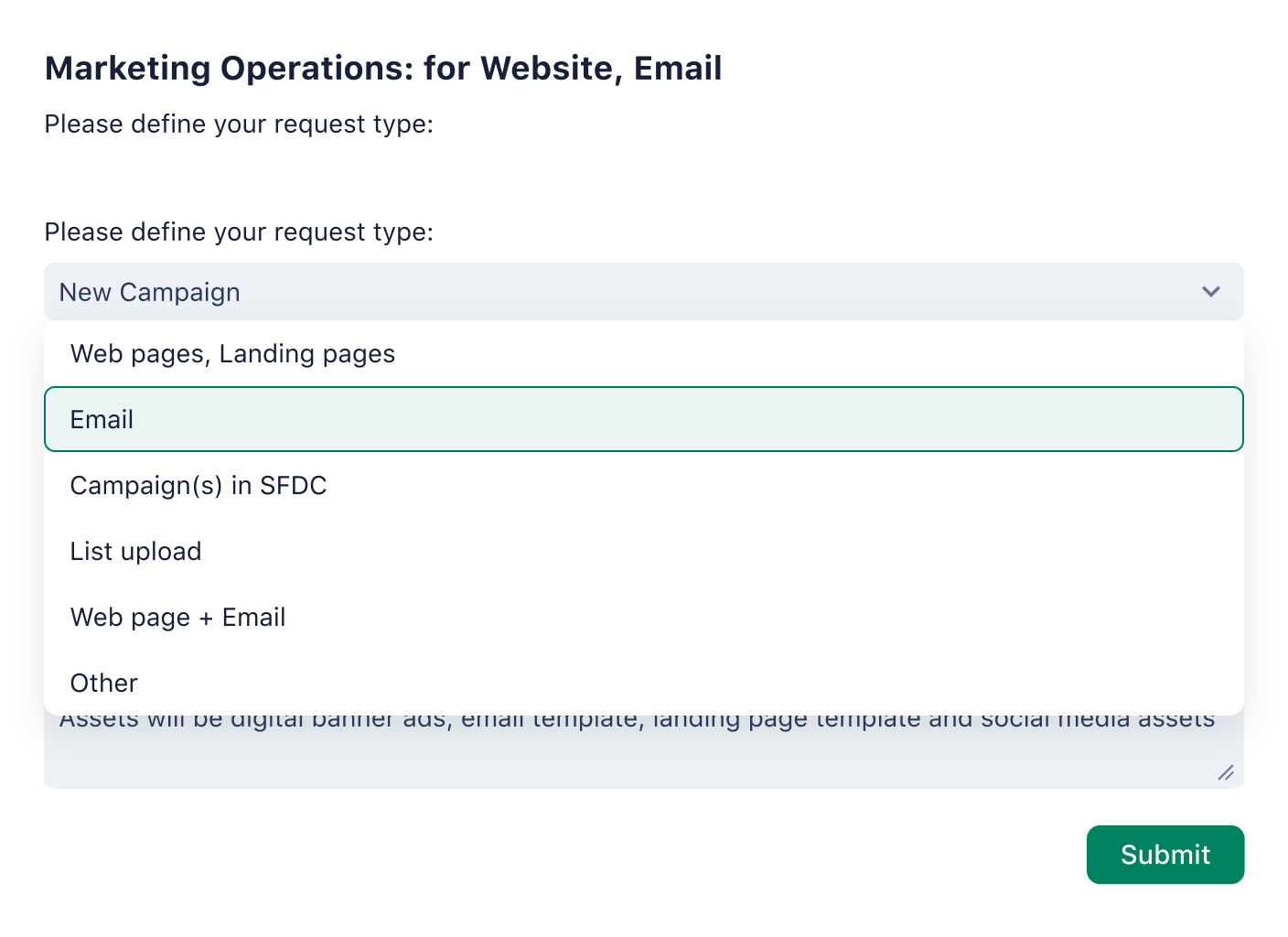
Some approval tools will force you to fit your tasks into prewritten workflows that don’t really reflect your business processes. Instead, Wrike’s user-friendly functionality lets you create custom item types, which are unique tasks that move through a workflow that you can determine.
You can also make a custom request form that collates all the necessary details for approval in one place, so it’s as easy to approve as possible. Using Wrike, it’s possible to get the approval process down to just one click on the approver’s side.
On your form, you can select what needs to be approved, e.g., an attached file. From there, you can add the approver(s) to the form, select a due date, and include any additional documents that provide approvers with the necessary context to make the right decision.
You can also request approval on a new folder or new project before it’s shared more broadly with the rest of the team by selecting “Add approval.” It features accessible approval routing across teams, streamlining decision-making.
Ensure approvals don’t get lost or forgotten
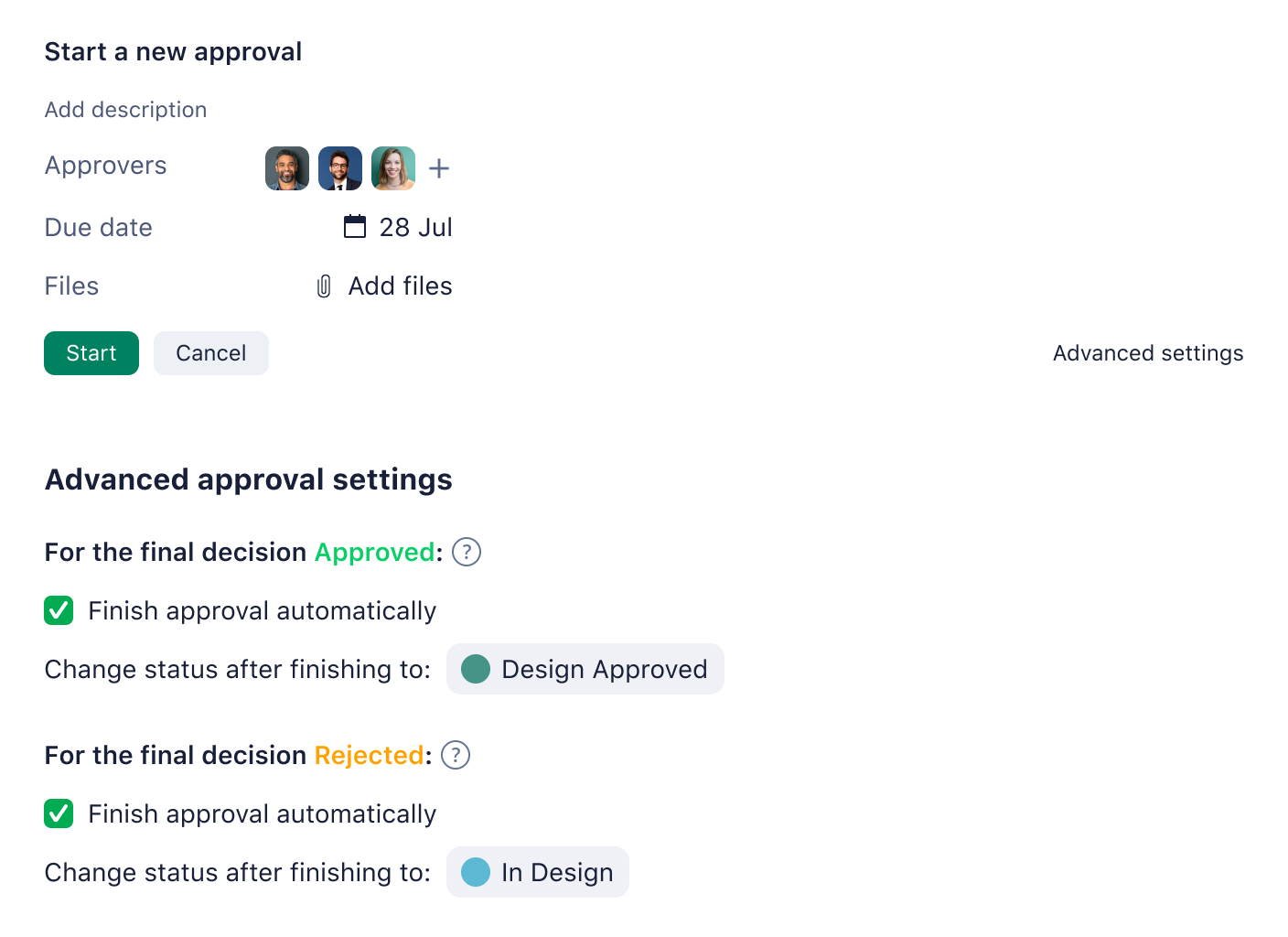
Businesses that track their approvals manually commonly find that approvals get forgotten, or even lost entirely. Wrike eliminates this problem by giving project managers a series of controls and approvers a series of notifications to ensure they don’t lose sight of what they need to approve.
Wrike gives project managers 100% visibility over the approvals process from their dashboard, so they can ensure that none are missed. They can add custom widgets that filter tasks by approval status, such as:
- Approved
- In consideration
- Needs revision
- In review
To see pending approvals for a particular task or a record of comments and feedback, all they need to do is click on the task.
Wrike also makes it easy for approvers to keep track of all the projects they need to sign off on. For example, an employee sending an approval request can use a custom task status to designate the individual approver who needs to approve that task. Wrike will then notify approvers when they need to make an approval, and any approvals in their list are prioritized by due date. This ensures that the most urgent approvals are tackled first.
Facilitate easy communication between approvers and other team members
Teams that manage approvals over email often lose track of important messages, which means that projects get delayed while managers play detective and trawl through long email threads.
In Wrike, all the communication between the person drafting a document and the person approving it happens in one central location, so there’s no risk of messages getting lost. It’s even possible for multiple approvers to work on the same document concurrently.
If the approver doesn’t want to approve a particular document, they can make a change request in Wrike, send it back to the employee who originally drafted it, and give it a priority level so the employee has a sense of the required urgency.
Once the approver is ready to share the document with external stakeholders, such as clients, they can also do that within Wrike by using the external requester collaboration feature to send an email. This accomplishes several things at once:
- The document gets shared.
- The external stakeholder gets asked for feedback.
- All the work associated with that document is kept within the task flow in Wrike, which acts as one central source of truth.
Much easier than going back and forth over email with multiple stakeholders!
Save time with intuitive automations
Managing approvals can sometimes feel like you need to do a lot of tedious manual labor in order to keep up with all the moving parts. Wrike’s automations eliminate a lot of this manual work. And they’re simple to use as well — just set up a when/then, as shown here:
Here are some examples of approval-related tasks that you can automate with Wrike:
- Share contextual details with approvers when creating a task, so that they have all the information needed to make the right approval decision.
- Send approvers reminders when a deadline is looming, or when a task is stuck in “Pending approval” for too long.
- Make approvals on a form conditional on having chosen a specific answer on that form.
- Send notifications to the person who’s responsible for the next stage of the approval process once you’ve changed the task status, and assign the task to that person. This could potentially mean sending the task back for revisions as well.
- Add files to a task once it’s been approved.
- Deliver files to a shared folder once they’ve been signed off on.
View details of past approvals

It’s sometimes helpful to review details of past approvals, perhaps to see how long a particular approval took or to review comments made by a past approver on a similar project. Combing through a filing cabinet to do this is time-consuming, but Wrike makes it easy.
Whenever any action is taken on a task or any comment is made, Wrike automatically adds it to the task's update stream. Naturally, some of those updates are related to approvals. Users can filter the stream of updates to find approval-related updates quickly and easily.
For example, you can use this to find out:
- Who asked for approval
- Who gave the approval
- Why the approval was denied
- When the approval was given
- How long the approval process took
Pass data back and forth with integrations
Approvals often require teams to pass data between tools in their stack, such as pulling data from your CRM to create an approval form or sending a project that’s been approved to a client’s Slack.
Wrike comes with over 400 integrations that allow you to pass data of this nature back and forth easily, instead of manually. One of the most popular is our integration with Adobe Creative Cloud, which allows designers to share content and collaborate within Wrike.
Other useful ones for approvals include:
- Salesforce, for pulling data from your CRM into your approval request forms
- Microsoft Teams, if you need to refer to a particular approval process during a call
- Slack, if you want to DM a coworker about an approval
- Dropbox, for reviewing historical archives of approvals
Try Wrike for your approval workflows
Whether you’re a budding startup, a scaling business, or an established enterprise, Wrike’s flexible software can cater to your unique needs. We offer a variety of pricing options (including a free plan), so you can choose the best one for your current situation. If you need to add more users as your business grows, we make that easy.
Wrike goes beyond simple approval workflows. Our paid plans offer additional features important for managing approvals, including unlimited request forms, unlimited tasks, user groups and permissions, and customizable user types. We also have powerful AI capabilities, customizable dashboards, reports, Kanban boards, Gantt charts — the list goes on.
Because we offer all-in-one collaborative work management software, you might find Wrike is more streamlined and cost-effective in the long run — no more juggling multiple subscriptions for disparate tools that don’t speak to each other.
2. Asana
Asana is a work management platform that works well for teams who want approvals to live inside the project plan, not in a separate tool. Instead of chasing sign-off across email threads, you can turn key steps into approval moments that stay attached to the task, the timeline, and the team’s workload.
Asana supports approval tasks, which let reviewers approve, reject, or request changes directly on the work item. Because approvals sit in the same place as files, comments, owners, and due dates, it’s easier to keep context intact and avoid the classic “approved, but approved what version?” problem.
For teams running repeatable processes, Asana’s AI workflow templates, rules, and automation help standardize how approvals move from request to review to completion. You can also use saved views and reporting to track what’s waiting on approval and where work is getting stuck.
Creative approval and proofing tools
Creative approval and proofing tools are built for one job: getting files reviewed, annotated, versioned, and approved with minimal friction. They shine when feedback needs to be visual and precise, like marking up a design, commenting on a video frame, or comparing versions side by side, and the main output is an approved asset.
3. Filestage
Filestage is an online proofing software used by agencies, marketing departments, and creative teams to manage their approval workflows.
The software collates all your approvals into one centralized dashboard, which makes it easy to see what stage of the process each approval is at, all in one place. You can click on each approval task to see who’s responsible for the approval, when it’s due, and any extra context that’s helpful for that project. You can also go back through past approvals to look at old file versions and see when they were approved.
Collaboration on approvals is straightforward inside Filestage. It’s possible for approvers to leave comments on files and discuss changes in real time. These approvers don’t necessarily have to be internal employees, as you can also use Filestage to invite an unlimited number of external approvers.
4. Approval Studio
Approval Studio is another online proofing tool, this time for approvals related to artwork, design, and similar creative projects.
Approvers can use it to compare two versions of a mockup side by side on one screen and use five different annotation shapes to highlight any areas they want to comment on. Both approvers and designers also get access to an on-screen ruler so they can ensure the length of various design elements is as it should be.
Approval-related communication is simple, with approvers and designers able to participate in real-time conversations on the same document. If approval is denied for a particular project, it automatically gets assigned back to the designer for edits. The software will automatically tag the project as needing edits, so it’s easy for designers to see what they need to do to move the process forward.
Visual and whiteboard approval tools
Visual and whiteboard approval tools are best for early-stage work like concepts, wireframes, campaign directions, workflows, and stakeholder mapping, where the approval is about agreeing on direction rather than signing off on a final asset. Compared to creative proofing tools, feedback tends to be higher-level and more collaborative.
5. Miro
Miro is a visual collaboration platform that’s primarily used for planning, mapping, and aligning teams in real time. One of the ways teams use it is to get “directional” approvals on early-stage work, like wireframes, campaign concepts, stakeholder maps, and process flows, before anything moves into formal production.
Miro’s comments and @mentions make it easy to pull the right stakeholders into the conversation and keep feedback anchored to the exact part of the board it refers to. And because boards can be shared with different access levels (view, comment, edit), teams can control who can contribute feedback versus who can actually change the work.
Teams use it to get quick, directional approvals on early-stage work like wireframes, campaign concepts, stakeholder maps, and process flows, before anything moves into formal production. Miro has also recently incorporated new AI workflow solutions to help accelerate delivery and save teams valuable time.
6. FigJam
FigJam is Figma’s online whiteboard that’s designed for fast alignment in workshops, critiques, and planning sessions. It’s a strong fit when “approval” really means getting the room to agree on a direction before the work becomes a deliverable.
Instead of formal approve and reject buttons, FigJam gives teams lightweight ways to reach a decision quickly. Voting sessions let you run structured votes where choices stay hidden until the session ends, so feedback is more honest, and the outcome is clear. When you need to drive consensus live, Spotlight pulls everyone to the same view of the board, and comments keep feedback pinned to the exact idea being discussed.
Legal and enterprise approval tools
Legal and enterprise approval tools are built for approvals where control, traceability, and risk management matter more than fast creative iteration. They typically focus on document-centric workflows like contracts, invoices, HR files, and regulated records, with stronger permissions, retention, audit trails, and compliance features than most team collaboration tools.
7. DocuWare
DocuWare is a document management platform built for teams that run approvals on documents that need structure, control, and a clean audit trail. Things like invoice sign-offs, HR files, and procurement paperwork all fall within its wheelhouse.
Rather than sending a PDF back and forth via email, DocuWare uses workflow tasks to assign review steps to specific people or roles. Approvers can record decisions directly in the task, and you can automatically notify users by email when a new workflow task lands in their queue. Workflow history also captures which decisions were made by which users, so you don’t lose accountability when a process spans multiple stakeholders.
DocuWare also supports approvals that leave a clear mark on the document itself. Stamps can add “Approved” indicators and update index fields to push a document to the next stage, which is useful when your approval decision needs to trigger downstream actions. And if signatures are part of the process, DocuWare’s Signature Service connects to external providers like DocuSign.
8. IntelligenceBank
IntelligenceBank is a marketing operations platform that’s known for the strength of its content approval process. Marketing teams can use it to make creative briefs and then get them approved to fit with high-level brand guidelines.
The document approval process is quick and robust, with approvers aided by a combination of brand checklists and an AI-led compliance review. When approvers find a section in the content they want to highlight, they can draw on top of it, so it stands out to the rest of the team.
For managers looking to streamline their content approval system, there’s a comprehensive audit trail that lets you go back through past approvals to see where the bottlenecks were. Managers can also get approvers to track the time they spend reviewing different items, which is a nice feature to have if you’re looking to speed up the process.
Lightweight approval tools
Lightweight and general-purpose approval tools are built for simple, repeatable approval requests without the overhead of a full work management platform. They are typically form-first, meaning the workflow starts with a submission, then routes to one or more approvers for a clear approve or reject decision. These tools are a strong fit for operational requests such as reimbursements, purchase approvals, PTO, and basic sign-offs, where collaboration on files is not the core need.
9. Jotform
Jotform is an online form builder that’s primarily used for B2B use cases. One of those is building approval forms.
The software is easy to use, and it’s much faster to create an approval form using Jotform’s no-code, drag-and-drop interface than it is to code them in-house. The forms themselves can be simple if that’s what you need, but conditional logic and custom triggers also mean that they can support more complex use cases if necessary.
Once an approval form has been created, managers can set up different roles and permissions so that only team members who are designated as approvers can approve forms. Clients or team members receive notifications automatically whenever an approval form is assigned to them.
10. Formstack by Intellistack
Formstack is a no-code form builder often used for internal requests and operational workflows, and approvals are among its most practical use cases. It’s a strong pick when you want a simple submission-to-approval flow without needing a full project management platform.
Approvals in Formstack are built around routing submissions to designated approvers, in a specific sequence if needed, with logic that can skip steps based on pre-determined criteria. Approvers can approve or deny directly from the email notification, add notes, and you can configure confirmation and denial messages that go back to the submitter once a decision is made.
Formstack is also popular for its integrations with major CRMs (such as Salesforce and HubSpot), payment platforms, and CMS platforms.
Self-hosted and open source approval software
Self-hosted and open source approval workflow tools are for teams looking for an alternative to running approvals on a vendor’s infrastructure.
You deploy these tools on your own infrastructure, control where the data lives, and decide how it’s secured, updated, and monitored. The upside is maximum control and easier alignment with strict compliance or data residency requirements. The tradeoff is that you usually need technical resources to build, maintain, and update workflows over time.
11. Budibase
Budibase is an open-source platform for building internal tools and automating workflows on your own infrastructure. It’s a strong fit for self-hosted approvals because you can create approval flows that sit directly on top of your data, whether that’s an external database, a REST API, or Budibase’s built-in database.
What makes it useful for approvals is the combination of app-building and workflow management in one place. You can build the request form, define who needs to approve what, and trigger the next step automatically once a decision is made, without stitching together five different tools.
12. Nextcloud Flow
Nextcloud Flow is an automation layer inside Nextcloud that’s built for organizations that want approvals and workflows without handing their files to a vendor cloud. It’s designed around data sovereignty and privacy, and it runs in the same privately hosted environment as the rest of Nextcloud, which is why it’s commonly considered in the public sector and regulated industries.
Flow lets admins set up event-based rules that react to what happens in Nextcloud, like someone uploading a file to a specific folder, then triggering an action such as sending a notification. Under the hood, it’s a user-defined workflow engine where rules are triggered by events and then run operations based on checks you configure.
For approvals specifically, Nextcloud points to its Approval app, which adds a lightweight file approval system directly in the file sidebar so people can approve without bouncing between tools.
Use Wrike to power your approval workflows
Approval workflow software helps teams centralize requests, automate notifications, and keep a clear record of decisions. The right tool ultimately depends on where approvals happen in your workflow and how much structure your team needs.
If approvals are tightly connected to project execution, a complete project management platform like Wrike is typically the best fit. Wrike is especially valuable for organizations that need approvals to scale across multiple teams.
Its flexible workflows, automation capabilities, and integrations with 400+ solutions allow teams to route requests, automate repetitive steps, and share crucial data with the rest of their tech stack. The platform also supports enterprise-grade security controls, customizable permissions, and reporting that helps teams track progress and make decisions in real time.