When handling multiple resources and projects, it’s difficult to recognize which problems need your immediate attention and why. The inability to identify these key priorities and risks often results in delayed and over-budget delivery.
Does your team struggle to:
Assess risk factors?
Decide how to take action?
Find the necessary resources?
Wrike’s project risk assessment template can help. Use it to:
Identify potential risks to your project and analyze their scope
Mitigate risks by prioritizing actions based on the likelihood of occurrence
Implement RAID (risks, assumptions, issues, and dependencies) logs into your workflow
Why you need this risk analysis template
Poor visibility into risks
Wrike’s project risk analysis template provides comprehensive risk visualization and pre-built RAID entry forms, so your teams can easily update stakeholders and monitor the status of project liabilities.
Problems are too siloed
Use the project risk assessment template to view risks holistically, along with their level of severity and impact. You can also notify other teams by cross-tagging and helping your organization make well-informed decisions.
Teams lack information
Wrike’s business risk assessment template provides you with a clear outline of information needed for each risk report and RAID log. Identify the causes and impact of each risk at a glance.
How to use the project risk analysis template in Wrike
The risk analysis template streamlines the way you raise new RAID entries and view risks. These risk reports and logs are housed in a central risk analysis page, helping you better manage resources and maximize outcomes by improving your visibility across multiple tasks and projects.
With Wrike’s project risk assessment template, you can:
The template comes with pre-built request forms to help you create detailed RAID entries.
Fill out the pre-made form with details like RAID type, description, business cost, and whether the problem should be classified as a risk or not.
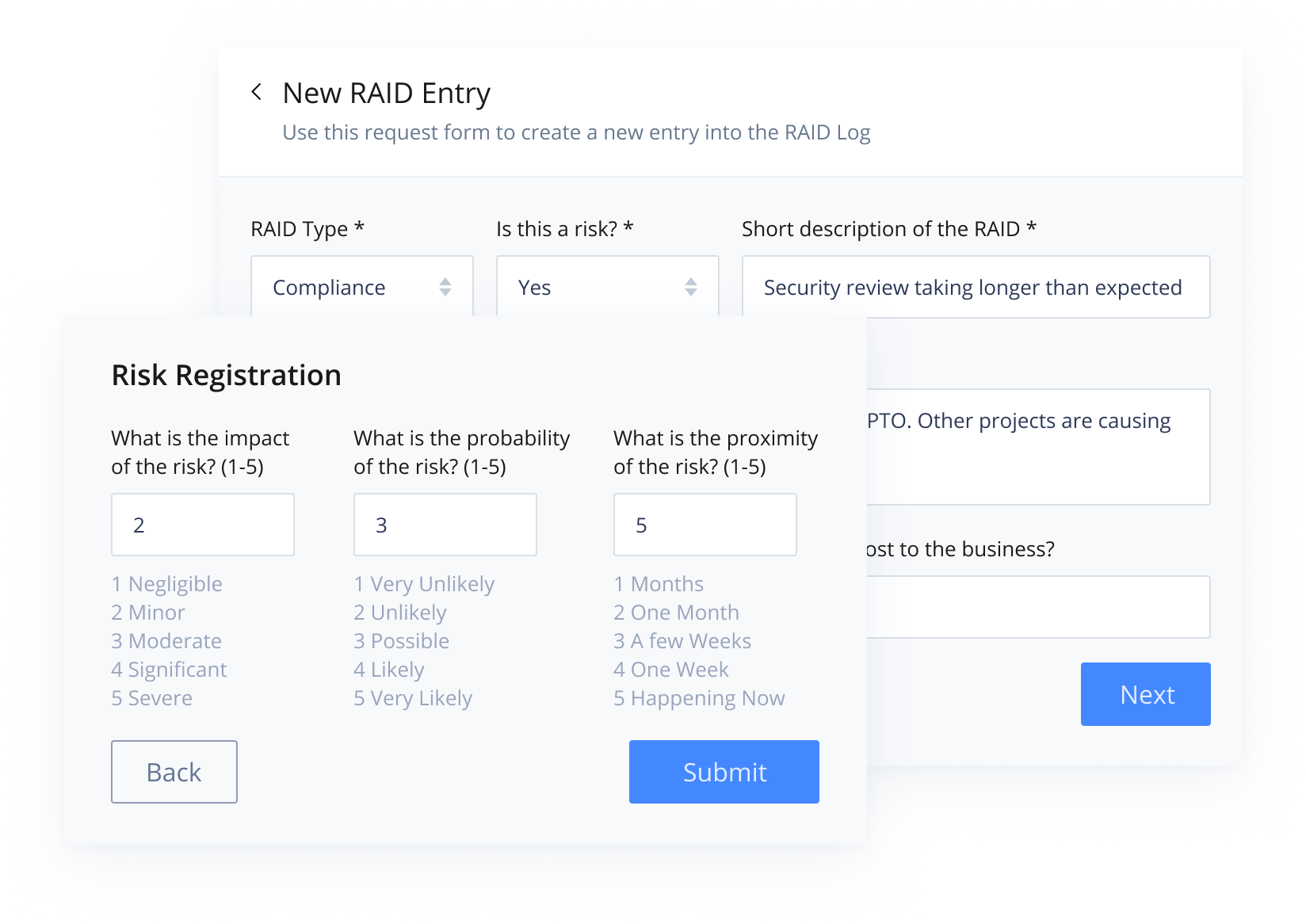
Risks can also be graded by using a conditional part of the RAID form. The score of each risk can range from 3–15, depending on factors such as the risks’ impact, probability, or proximity.
Once you create a new RAID report, it’ll land in the “RAID Intake” folder, which provides a tailored table view of potential risks. This table displays several custom fields and calculations, like the status of the problem, its cost to the business, risk score, and more.
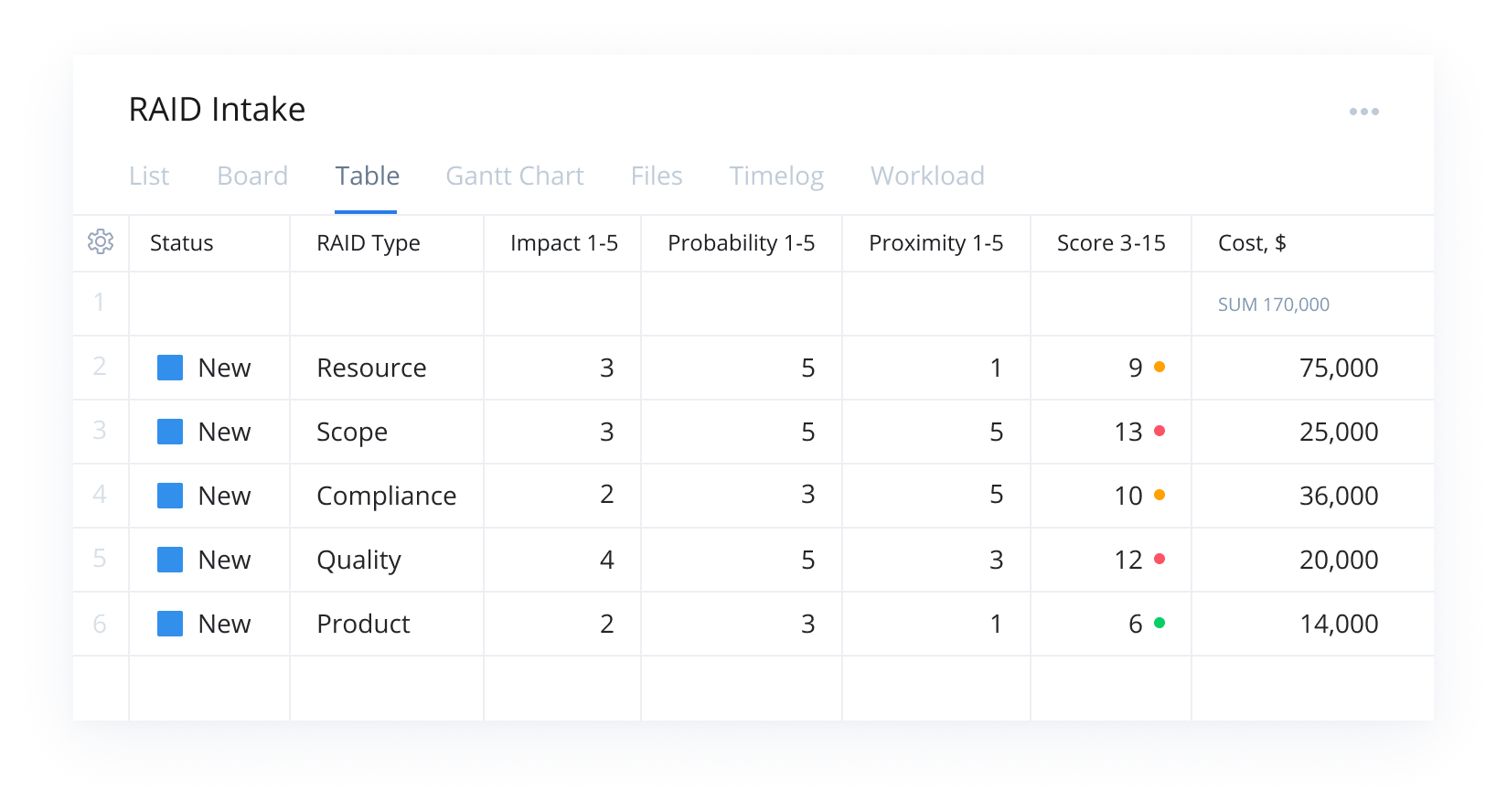
As individual project managers submit new risks, this table view will help program or risk managers gain a more holistic view of risks across multiple tasks or projects.
Risk reports can also be easily shared with other teams to improve visibility across multiple projects.
Step 2: Assess reports
Risk managers can assess each report and decide whether or not to confirm it. If a report is accepted, it can then be sent to the RAID Log folder by changing its status to “In Progress.”
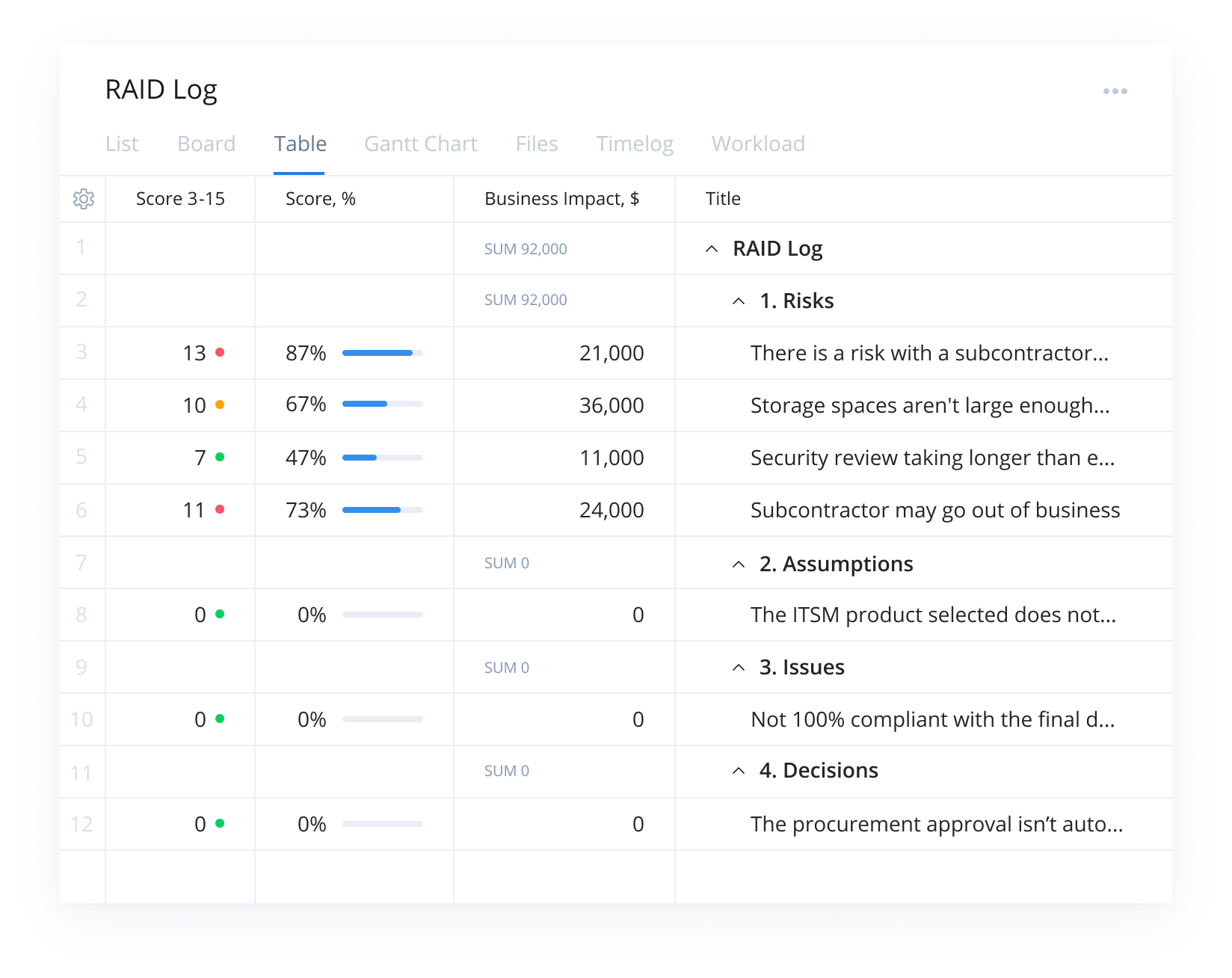
The RAID Log folder is divided into four subfolders:
Risks
Assumptions
Issues
Decisions
As they progress through the mitigation process, risk managers can move it through each RAG (red, amber, green) status, as well as assign milestones and due dates. Once sufficiently mitigated, the problem can be resolved and marked “Completed.”
Step 3: Track statuses
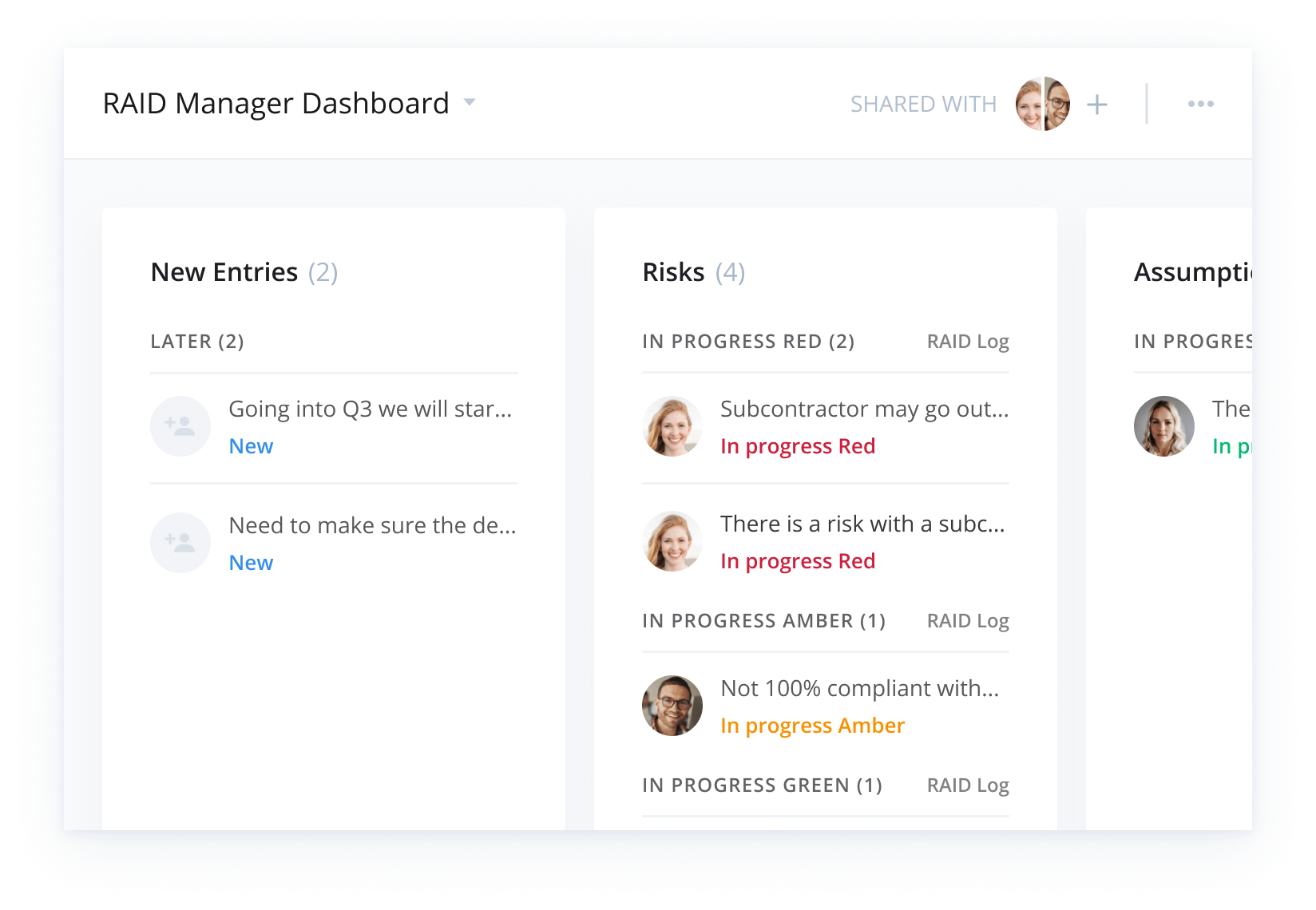
The business risk assessment template also includes a RAID Manager dashboard, which provides full 360-degree visibility of RAID reports at a glance.
Explore Wrike’s versatile platform
As well as the tools included in the project risk analysis template, Wrike also offers other features that can help your teams avoid negative outcomes.
Optimize your resources and protect sensitive information with the help of:
Wrike’s software can be adjusted to suit your organization’s unique processes. Try our platform for yourself to see how you can customize your project management.
Resources for risk managers
Case study
Learn how security firm ABUS enabled better collaboration with Wrike
Case study
Find out how Tactus centralized project info and shortened Scrum periods by 50%
eBook
Discover best practices for managing resources in the remote work era
Wrike’s risk analysis template makes it easy to create RAID logs, see risk across multiple projects, and understand what needs your attention and why. Increased visibility also helps you reallocate resources to the projects that need them most.
Anyone who experiences risks while delivering projects will be able to utilize this template to easily report and manage them. Project, program, risk, and delivery managers will benefit the most from the increased visibility and details.
To begin, enter the business email linked to your Wrike account into the field below. You can then immediately access the template, integrating it into your risk management process.
How to install this template in your account
You can only access this template when you create a new space. You can access the use case templates gallery through the space creation wizard. When you opt to create a new space, the template gallery opens by default.
Click the “+” button in the upper-right corner of your workspace.
Select “Space.”
On the page that opens, hover over the use case you want and click “Preview.” Look for the “Risk assessment” template in the list (use the search bar if needed).
Now, you can see more information about the use case. Click “Select” to create a space.
Yes, there are.
To use this template, you need to have at least the Business plan or up. Check our plans here.
You must have the required permission to create a public space in your account.
If the template contains account-level custom fields, custom item types, workflows, request forms, or automation, you must have the permission required to create those items.
This template is only available when the workspace language is set to English.
Check the prerequisites above. If you don’t match one of the prerequisites, talk to your space admin or your account owner. If you match all the prerequisites and you still can’t see the “Risk assessment“ template, feel free to reach out to the Wrike support team.
Unlock the power of Wrike’s templates
Use our smart search tool to explore versatile templates, designed for easy customization and streamlined project management.
Wrike enhances its website search experience using Google's Vertex AI Search and Conversation generative AI service. Users are cautioned that generative AI might produce inappropriate, inaccurate, offensive, or unintended results, and are advised against submitting explicit, harmful, offensive, or illegal content as search input. Neither Wrike nor Google uses your search inputs to train its machine learning models or for advertising purposes, but search activities may be collected and/or stored via cookies in accordance with our Privacy Policy if you previously registered on our website. These cookies can be deleted through your browser settings. Wrike's search service is not designed to be used in connection with your personal data or any sensitive data of any kind, which users must refrain from inputting.