Key takeaways:
- What are the essential features for enterprise collaboration software? It should support project and task management, communication, file sharing, workflow automation, and reporting across teams. Additional features, such as visibility, governance, and security, are also necessary for many teams.
- What are the different types of enterprise collaboration software? Enterprise collaboration tools generally fall into several categories, including dedicated project and workflow management software, communication tools, file-sharing platforms, and simple task management systems.
- What challenges do enterprises face when managing collaboration across teams and tools? Work gets much harder to track, and information becomes fragmented across systems when collaboration is managed across too many tools. This can reduce visibility, slow down coordination, and decrease operational efficiency.
- Why choose Wrike for enterprise collaboration? Wrike gives enterprises a central platform to manage projects, workflows, and team collaboration while integrating with the tools teams already use. It helps organizations ditch tools they don’t need and keep large teams in sync on daily operations.
Collaboration is often a real challenge in enterprise organizations because:
- You’re working across multiple departments, geographies, and teams.
- Your team members are working on multiple projects at one time.
- You’re using many different systems, processes, and apps to plan, manage, and talk about your work.
The result is a really fragmented way of working that’s an obstacle to productivity, project tracking, and accountability.
To overcome these challenges, many organizations turn to enterprise collaboration software. These types of tools help large organizations and their teams align across projects, functions, and distance. They’re designed to streamline communications, prevent tasks from getting siloed, and help you work better overall.
However, not all enterprise collaboration tools are built to solve the same problems.
Some are useful for handling dependencies or approvals. Others are built for day-to-day, real-time communications. Treating these tools as interchangeable makes it harder to choose the right solution (or mix of solutions), as each is optimized for a very different type of collaboration.
To help you avoid this problem, we’ve organized 15 enterprise collaboration solutions into five distinct categories based on what large teams actually need:
- End-to-end work and workflow management
- Wrike
- Asana
- Teamwork
- Messaging and real-time team communication
- Slack
- Microsoft Teams
- Zoom Workplace
- File sharing and document collaboration
- Google Drive (Google Workspace)
- Dropbox
- Notion
- Lightweight collaboration for simple tasks
- Trello
- Businessmap (formerly Kanbanize)
- Miro
- Technical and engineering collaboration
- Jira
- GitLab
- Confluence
What enterprises need from a collaboration platform: 4 factors to consider
Enterprises differ from regular businesses, and not just in terms of scale. Typically, the collaboration tools that small businesses use won’t provide the efficiency gains, compliance and security features, and robust reporting you’ll need at an enterprise level.
As an enterprise organization, you’ll need a collaboration system that does the following:
- It should help unify work and collaboration across tools: An enterprise collaboration platform should serve as a central system for managing work, where resources, project communications, and task assignments take place. A wide range of integrations can help connect the dots between your existing tools, too.
- It should give everyone clear visibility over their workflows: Enterprise workspace software should include tools that give individuals clarity about what they need to do when, so projects can run smoothly across departments. However, it should also enable managers to see where bottlenecks occur, for better accountability.
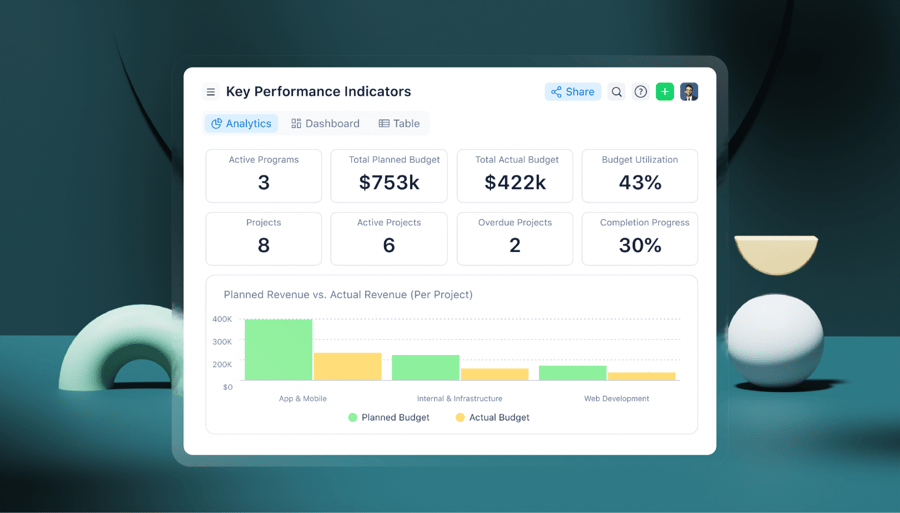
- It should have robust reporting features: Detailed information on project statuses, resources, and costs is a must for enterprises. The more robust the better — this helps leaders manage spending and identify efficiencies within the collaboration process.
- It should be a tool that you and your teams trust and want to use: That means the tool should be intuitive and easy to set up and customize, as well as scalable, secure, and compliant.
In the rest of this article, we’ll explore common challenges in enterprise collaboration, as well as the top enterprise collaboration tools by category.
Common challenges of enterprise collaboration without a unified collaboration platform
Enterprise collaboration can mean many different things, including everyday communication between teams, managing projects internally, sharing files, and coordinating complex workflows across departments and external partners.
Because an organization’s specific needs can vary, most enterprises rely on multiple tools to support different types of collaboration. It’s common for organizations to use:
- Messaging apps, email, and other daily communication tools
- Video conferencing tools for live meetings
- File-sharing systems like Google Drive, Dropbox, or Microsoft OneDrive to share resources
- Task management tools (often with different departments using different software)
- Database or coding tools like Jira, Airtable, or GitLab
- Any other tool teams need to do their work, such as Adobe Creative Cloud or Google Docs
Each tool serves a purpose, and there’s no single platform that can replace them all. Enterprise collaboration will almost always involve multiple systems, especially for real-time communication and specialized work such as coding.
But the challenge is that when everything is spread across too many disconnected systems, it becomes harder to maintain visibility across the organization, and coordination tends to break down across departments.
Over time, this disjointed approach can also increase complexity and bloat within the organization. When teams rely on too many unnecessary tools, tracking work becomes harder, and collaboration slows down as employees have to switch back and forth between systems.
That’s why enterprises should aim to centralize collaboration on a single unified platform (like Wrike) and integrate additional tools only when truly needed. This approach reduces bloat and lowers monthly license costs. Most importantly, it helps teams stay aligned even as collaboration scales.
The 15 best enterprise collaboration tools (across 5 categories)
Below, we break down the 15 best enterprise collaboration tools to help you compare platforms based on your organization’s collaboration needs.
Best for end-to-end work and workflow management
Large and fast-growing organizations often need a central system to manage work from start to finish. That’s not just for individual tasks, but the full workflow, including planning, dependencies, approvals, timelines, resources, and reporting.
Imagine a scenario where your team is working on a cross-functional product launch. Initial work requests are received, tasks are then created and assigned, dependencies and deadlines are set, teams collaborate on deliverables, and approvals move work forward. Progress must be visible throughout the process to ensure continuous alignment and collaboration.
But without the right platform, much of this work needs to be pieced together through various tools.
End-to-end work and workflow management platforms are designed to handle this complexity. They provide a shared system of record for work, automate repeatable processes, and give teams visibility into how tasks, timelines, and responsibilities connect across departments.
This category is suitable for you if your organization runs complex, cross-functional initiatives and needs a scalable way to plan, coordinate, and track work from start to finish.
1. Wrike
Wrike is an all-in-one work management platform built to help enterprises collaborate more fluently, efficiently, and cost-effectively.
Already, some of the world’s biggest organizations use Wrike — including The Estée Lauder Companies and Ogilvy — to collaborate better. For example, Electrolux, the appliance manufacturer with over 50,000 employees, uses Wrike to cut time spent on each creative project by 30%.
Below, we outline core Wrike features and explain how Wrike performs against the four factors we outlined above.
Unify all your work into one collaboration platform
Wrike cuts through the clutter and silos of the modern work environment by providing a single source of truth for all your processes, tasks, and internal communications.
Within Wrike, you can:
- Plan, track, and update projects and tasks in one place. Wrike provides a single point of reference for teams that are spread across departments and locations. Our workflow management software centralizes everything, so enterprises can track what needs to be done and when.
- Communicate about work and tasks in the same software. You can reduce the number of emails and Slack messages you send by briefing, discussing, and giving feedback on tasks all within Wrike. For instance, you can use our dynamic request forms to manage incoming work requests in a form that makes sense for your team — so you don’t have to go back and forth with queries.
- Complete work, share files, and get approval. Thanks to integrations with the likes of Adobe Creative Cloud, you can actually do your work within Wrike. Then, you can just invite external collaborators or clients to approve that work, without having to leave the platform.

Wrike makes teamwork easier by handling all aspects of your business, so you only need a single collaboration software solution.
Take the example of Granicus, a company that provides digital experiences for local governments, serving over 6,000 agencies. Before Wrike, Granicus was using as many as eight different project management tools, inherited from a series of acquisitions. This was expensive to manage and actually made collaboration harder.
Granicus switched to Wrike and was able to centralize all teams into one collaboration platform. That meant better visibility, alignment, and efficiency.
Create clear, custom visibility over all workflows
To collaborate well on projects, employees need to have clarity on what they need to do and when, as well as how their roles fit in with their colleagues’ tasks. Wrike offers every team member a personalized view of enterprise workflows to boost productivity and ensure accountability.
With Wrike, team members and leaders can:
- Organize their own individual tasks: In Wrike, every team member gets a personalized dashboard, where they can organize to-do lists and track progress on both individual tasks and shared projects.
- Visualize work in a way that makes sense for them: Effective alignment shouldn’t undermine the way that individuals prefer to work. With Wrike, everyone gets visibility on the big picture of workflows, while visualizing information in a way that works for them. For instance, to visualize work, you can choose between custom views such as Gantt charts, Kanban boards, and more.
- Understand how tasks relate to various projects: One of the real weaknesses of a lot of collaboration software is that tasks are only visible within single projects. Wrike’s unique cross-tagging feature lets you make sense of how tasks impact different projects and teams. It’s just a much more realistic view of how work happens in enterprises.
- Only see what they need to see: In enterprises, sensitive information is best restricted to as few people as possible. That’s why Wrike has robust, customizable permissions.

“Historically, for us, our greatest challenge was getting full visibility into timelines,” says Sherrie Besecker, Creative Technology Manager at Syneos Health. “Our reliance on disconnected management systems and manual processes resulted in inefficiencies and redundancies across our workflows. It was time for a change.”
So, Syneos Health turned to Wrike.
Easily track how well teams are collaborating
Within any organization’s work and collaboration processes, there will always be opportunities for improvement and greater efficiency. As an enterprise, identifying these opportunities is an important part of driving business performance overall.
That’s why, as part of any collaboration system, robust reporting is critical. With Wrike, you can:
- Track colleague availability and capacity: Wrike’s workload charts let you see who is available to take on an additional project and who is at risk of burnout. This way, you can plan for disruption, maintain project health, and ensure that everyone is collaborating at their best.
- Quickly build real-time reports: When different teams or leaders want big-picture updates on projects, effortlessly create a report in Wrike. Our reporting feature automatically brings together live data on your collaboration as well as work progress from across your entire enterprise.
- Manage costs, timesheets, and more: Wrike also lets you see the costs of collaboration with time tracking software. This way, you can manage how much you’re spending on collaboration with external freelancers as well as in-house staff.
These are features of Wrike that Italian HR brand Intelco has particularly benefited from. Before Wrike, Intelco’s managers couldn’t easily see how many projects were in progress, or easily track status updates or information on past projects.
Now, Intelco can track everything, and the project management team members love the visibility. They said: “It’s helpful to see the saturation level of our teams so we can better plan for future projects, considering the incoming projects and those who might have priority on already planned tasks. Furthermore, we can track all our activities back and forth in case we need to accelerate a project or shift a task from one colleague to another without losing track of our global planning efforts.”
Secure your system and make the setup process simple
Collaboration software should make life easier in your enterprise. If it doesn’t, team members may as well continue to use the various tools they were using before — and fair enough.
That’s why Wrike is built to be as easy to use and set up as possible while keeping all your sensitive information secure. With Wrike, you can:
- Easily migrate your enterprise data from other collaboration tools: Our professional services team makes this simple. If you’d prefer, you can even do it yourself using XLS files.
- Trust that your enterprise data is secure: Wrike is GDPR, CCPA, and HIPAA certified, giving you the industry standard in data privacy. You can find out more about our security features here.
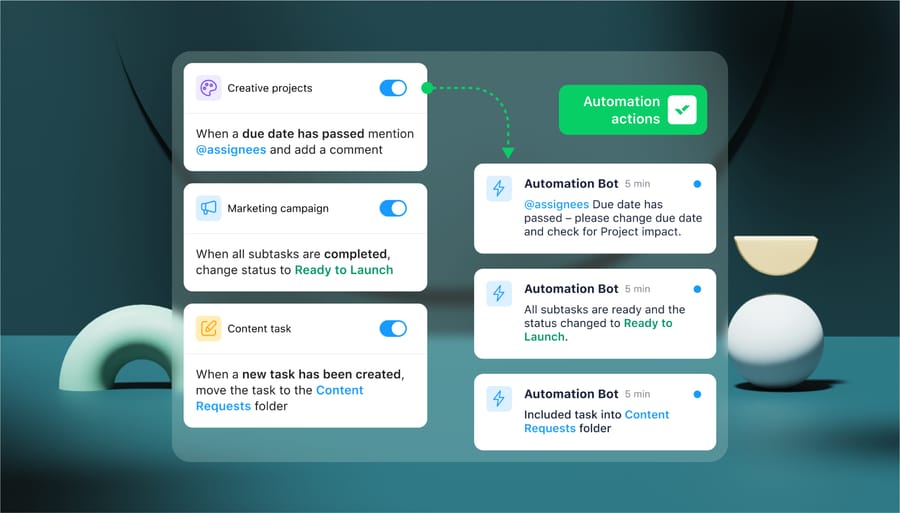
- Automate key tasks across your workflows to improve collaboration: Wrike’s powerful automation helps you automate repetitive tasks that your teams perform across your organization and frees them up for more valuable collaborative work. Plus, our AI features can identify additional opportunities for automation that you may have missed.
Additionally, Wrike is really easy to set up, even in the largest enterprises — as Walmart Canada discovered. The retail chain relied on Wrike’s professional services experts, who ensured that deployment went smoothly.
2. Asana
Asana is a work management platform that teams use to plan and coordinate work across projects. It includes complete task management features, along with task dependencies, timelines, and workload views, which help teams understand who’s responsible for what and when.
Asana also supports collaboration around work through comments, mentions, and file attachments, keeping conversations tied directly to tasks. While it offers automation and integrations, its strength is in organizing and coordinating work more than in supporting highly customized or complex workflows.
The project tracking features on Asana are reliable, but some organizations with complex approval chains or highly specialized processes may find its workflow customization options limited.
3. Teamwork.com
Teamwork.com is a project management platform built primarily for client-facing and service-based teams. It’s often used by agencies, consultancies, and professional services organizations that need to manage delivery work while collaborating with external stakeholders.
The platform brings tasks, timelines, files, comments, and approvals together at the project level. Teams can plan work using lists, tables, or Kanban boards, set dependencies and deadlines, and clearly see what’s complete, overdue, or awaiting approval.
Other features include time tracking, workload planning, and budget visibility. Because Teamwork.com offers so many features, onboarding and taking full advantage of all capabilities can take a long time. As projects grow in size and complexity, navigation and task discovery can require more discipline, and some advanced reporting and planning views may feel limited or less customizable.
Best for messaging and real-time team communication
These tools focus on fast, direct communication between individuals and teams. They’re useful for conversations, quick coordination, and real-time collaboration through chat, calls, and meetings.
However, they don’t replace project management or planning systems. Instead, many enterprises use messaging or chat tools to help teams stay aligned in the moment, share updates quickly, and resolve questions without long email threads or meetings.
Ideally, your collaboration platform should integrate with these messaging tools, making it easy to share updates and notify teams of changes.
Choose a tool from this category if your primary goal is to improve day-to-day team communication, or if you already rely on other platforms to manage tasks, timelines, and project execution.
4. Slack
Slack is a messaging platform for fast, ongoing team communication. Channels organize conversations by topic, project, or team, making it easier to keep discussions visible and searchable instead of buried in email chains.
Slack is user-friendly and works best as an internal communication tool, but it can also support external communications with individuals outside of your organization. Teams typically use it alongside integrations from project management platforms, file storage systems, and calendar tools. It’s not specifically designed to manage tasks or workflows, but it’s a popular choice for keeping teams aligned.
5. Microsoft Teams
Microsoft Teams is a messaging and meeting platform that works seamlessly within the Microsoft 365 ecosystem. Chat, video calls, and file access are all tightly connected to tools like Outlook, SharePoint, and OneDrive.
For enterprises already standardized on Microsoft 365, Teams often becomes the default place for day-to-day communication. Its ease of use allows conversations, meetings, and shared files to live in one place, reducing the time teams spend switching between tools.
However, Teams is typically used with other systems to manage tasks, workflows, and project execution.
6. Zoom Workplace
Zoom Workplace extends Zoom’s conferencing capabilities to also include chat, phone, and basic collaboration features.
Distributed teams and organizations that rely heavily on live discussions, training sessions, and external meetings will get the most out of the platform. Pricing for initial Zoom Workplace access is free, and it includes key features like screen sharing, meeting summaries, and unlimited meetings. But larger enterprise teams will need to upgrade to a paid plan.
While Zoom Workplace supports messaging and collaboration, there are no specific task management features, so it’s usually paired with other tools that handle planning and execution.
Best for file sharing and document collaboration
File sharing and document tools are used to store, share, and collaborate on files and documents across teams. They make it easy for multiple people to access the same content, work on documents together, and manage versions without sending files back and forth.
File sharing and document collaboration platforms are a requirement for most organizations, especially for teams that work heavily with documents, spreadsheets, presentations, and creative assets. They help ensure everyone is working from the latest version and can quickly find the resources they need.
However, these tools are not built to manage work itself. They typically lack structured task management, workflows, automations, and visibility into how files connect to broader projects.
You should choose a tool from this category if your primary need is secure file access and real-time document collaboration, and you already have other systems in place to manage tasks and projects.
7. Google Drive (via Google Workspace)
Google Drive is a cloud-based file storage and document collaboration platform within Google Workspace. It’s widely used by enterprises for creating, sharing, and collaborating on documents in real time.
But this is not a standalone collaboration platform in the traditional sense. It really functions more as digital file storage for teams already working within Google Workspace.
Its primary role is enabling access to shared content. Teams use Drive to store files, collaborate on documents in Docs, Sheets, and Slides, and manage permissions across individuals and groups. Other features, like comments and version history, also make it easy to work on the same document without creating duplicate files.
But enterprise teams won’t get structured task management, workflows, or visibility into how documents relate to broader projects or initiatives when using Google Drive.
8. Dropbox
If your organization already has task management and project tracking covered, but struggles with keeping documents organized and accessible, a tool like Dropbox could be what you’re looking for.
Dropbox makes it easy to store, sync, and share files across teams. Many enterprises use it to centralize documents and creative assets and simplify collaboration. The platform also includes controlled document access, end-to-end encryption, and advanced data protection features.
Because Dropbox is built around files rather than work, it doesn’t attempt to manage tasks, workflows, or ownership. It’s better used alongside other collaboration platforms that handle project planning and execution.
9. Notion
Notion takes a very different approach to collaboration and acts as a complete digital workspace for documentation, tasks, projects, and team coordination.
Teams use Notion to create living documents, such as specs, wikis, roadmaps, and internal guides. Its biggest strength is adaptability, mainly because teams can structure content to match their own processes instead of conforming to rigid workflows.
That same flexibility can become a drawback for larger enterprise teams. It’s possible for workspaces to become inconsistent or difficult to navigate. These larger databases and more complex setups can also bring on performance slowdowns or issues with media management.
Best lightweight enterprise collaboration software for simple tasks
Not every team needs a full work management system. In some cases, collaboration is as simple as tracking a small set of tasks or giving teams a lightweight way to stay organized without heavy setup.
Lightweight collaboration tools are typically easy to adopt and quick to configure. They’re often used for basic task tracking, visual planning, or team-level coordination where workflows are straightforward and don’t require complex dependencies or reporting.
The tradeoff is the level of depth these systems can provide. They offer more limited structure, visibility, and governance, which can make them harder to scale across large or cross-functional teams.
However, this category is a good fit if your collaboration needs are simple or if your teams value flexibility over extensive features.
10. Trello
Trello is a visual collaboration tool built around Kanban-style boards. It’s a simple task tracking platform that many large teams use because it’s easy to see what’s being worked on, what’s been completed, and what’s up next.
The platform’s biggest strength is simplicity. Teams create boards, lists, and cards in just a few clicks to kick off a new task or project. Within each card, members can add comments, attachments, due dates, and basic automations, which helps teams coordinate work in one place.
However, there is a lack of advanced structure, reporting, and governance within Trello because of how simple it is. Enterprise teams that need to manage complex or cross-functional projects might feel it’s not enough, but it’s useful for team-level coordination and visual planning.
11. Businessmap (formerly Kanbanize)
Businessmap (formerly Kanbanize) is a Kanban-based work management platform that helps teams easily visualize work and improve the flow of work across various teams. It’s commonly used by enterprises that want better visibility without moving to heavyweight project management systems.
The platform allows teams to model complex workflows using Kanban boards, apply work-in-progress limits, and track how work moves across teams and departments. It also supports strategic planning, portfolio tracking, and includes built-in analytics and reporting that help teams measure flow efficiency over time.
It also includes automation capabilities and an AI-powered assistant to help streamline repetitive actions and improve productivity, but these are typically more relevant for mature teams that are ready to invest in process optimization.
12. Miro
Miro is a visual collaboration platform for both brainstorming new ideas and planning tasks or projects. It’s commonly used by product, design, engineering, and strategy teams that need a flexible space to collaborate in real time.
Many users choose Miro because of how easy it is to get started. Teams can jump into a board and collaborate immediately, without training or setup issues. The interface is intentionally flexible and uncluttered, making it well-suited for workshops, ideation sessions, mind mapping, and visual planning.
However, it can be a challenge for extremely large teams because, as boards grow, they can become harder to navigate and manage. Performance may slow on very large boards, and keeping content organized requires discipline and extra work. Plus, sharing and permission controls can also take some getting used to, particularly when collaborating across teams or with external stakeholders.
Best for technical and engineering collaboration
Technical and engineering teams often have collaboration needs that differ from the rest of the organization. Their work is closely tied to code or technical workflows, which require tools built specifically to support version control, issue tracking, and development processes.
Platforms in this category are designed to help engineering teams manage these tasks and collaborate around technical documentation. They work well for coordinating development work and maintaining clarity within technical teams.
However, these tools are typically optimized for engineering use cases rather than broader, cross-functional collaboration. Non-technical teams may find them complex, and they’re often not well-suited for managing work that spans multiple departments.
13. Jira
Jira is an issue tracking and project management platform built specifically for software development teams. It’s widely used for planning sprints, tracking bugs, and managing Agile workflows.
Customers report that Jira excels at structuring technical work. This allows teams to break initiatives into epics, stories, and tasks, manage backlogs, and track progress through customizable workflows.
Agile boards and sprint planning tools can also help teams coordinate work across releases, while built-in reporting provides complete visibility into project statuses.
The platform integrates with development tools like Git repositories, CI/CD pipelines, and testing frameworks, which allows engineers to link code changes and deployments directly to issues.
14. GitLab
GitLab is a DevOps platform that centralizes code collaboration, version control, CI/CD, and project management into a single system.
It can support the full software development lifecycle, from planning through deployment. GitLab centers collaboration around code. For instance, developers can collaborate through merge requests, code reviews, and inline comments, with automated testing and security checks built directly into the workflow.
Similarly, setting up CI/CD pipelines to run automatically is simple for most users. This helps teams catch issues early as code changes and release with more confidence. GitLab also includes basic planning tools, such as issues and roadmaps. Technical teams can use GitLab to coordinate work without leaving the platform.
15. Confluence
Confluence is a team workspace and documentation platform that many organizations use alongside Jira. It’s built to help technical teams create, organize, and share knowledge in a structured, searchable way.
Teams take a different approach when using Confluence because the platform supports collaboration through shared documentation rather than task execution. Within the platform, users can maintain technical documentation, architecture diagrams, onboarding guides, and decision records. Pages can also be collaboratively edited, commented on, and linked directly to Jira issues for context.
While Confluence doesn’t directly manage workflows or execution, it complements development tools by keeping documentation and project context accessible.
Choosing the best enterprise collaboration software
Enterprise collaboration software comes in many forms, including complete workflow management platforms, messaging tools, file-sharing systems, lightweight task trackers, and technical collaboration tools. The right choice for you really depends on how your teams collaborate and what problems you’re trying to solve.
For instance, if you’re managing high-level tasks across multiple departments, you’ll need planning, scheduling, reporting, and visibility in one place. That’s where you could benefit most from an end-to-end work management platform.
This is where Wrike fits in. The platform brings planning, execution, collaboration, and reporting into a single system, while integrating with the communication and file-sharing tools your teams already use. This makes it easier for work to stay connected and move forward.
Frequently asked questions (FAQs) about enterprise collaboration software
What is enterprise collaboration software, and what problems does it solve?
Enterprise collaboration software is used by large organizations to coordinate work across teams and departments in one shared system. It addresses common enterprise issues, such as fragmented communication, a lack of visibility into project status, and slow decision making caused by information spread across different tools.
What are the key features to look for in enterprise collaboration software?
Key features include project and task management, communication, file sharing, workflow automation, and reporting. Most enterprise-ready platforms also typically include visibility, governance, and security capabilities.
How do enterprise collaboration tools integrate with other business systems?
Most enterprise collaboration tools integrate with existing systems through native integrations or APIs. These integrations could include communication tools such as Zoom or Slack, productivity suites, identity providers, or additional specialized systems that enable teams to collaborate within their existing workflows.
What are the differences between popular enterprise collaboration platforms?
The most popular enterprise collaboration platforms differ in which area they focus on. For example, the best file-sharing tools won’t offer project management features, while some communication tools don’t include file storage features. The specific features offered by a platform will affect how well it supports visibility, accountability, and execution across teams.
How do enterprises ensure security and compliance when using collaboration software?
Large organizations usually look for platforms that offer enterprise-grade security features such as data encryption, role-based access controls, audit logs, and compliance with industry standards. Robust admin controls and governance features help organizations manage risk while supporting large, distributed teams.