Maximize every sprint with Wrike. Utilize our sprint retrospective template to determine priority actions and improve efficiency, quality, and effectiveness.
Retrospectives can be haphazard and poorly organized, leading to teams duplicating work or recreating problems in future sprints. Teams can even be hesitant to schedule retrospectives if they don’t have an easy process for completing them.
Retrospective feedback can be missed or lost, making it difficult to adjust associated processes
Action items can be lost in team members’ to-do lists, creating further problems in future sprints
Teams can feel overwhelmed if priorities can’t be easily outlined following feedback sessions
Eliminate these obstacles with Wrike’s sprint retrospective template.
Ensure teams understand the ground rules that keep retrospectives on track
Easily create individual retrospective boards to share with the broader team as needed
Quickly assign tasks and priorities based on retrospective results
Why you need this template
Process problems aren’t shared
Organize information from all team members in a single place and ensure everyone is on the same page before the next project starts.
Systems aren’t updated
Ensure process adjustments are prioritized with a drag-and-drop board view so your team doesn’t repeat the same problems in the next sprint or project.
Remote workers aren’t included
Include all team members, remote and in-office, with an online collaborative workspace. Maximize your sprint retrospectives by ensuring everyone is included in the process.
How to get the most out of your project retrospectives
Are your retrospectives failing to achieve better results? Is your team struggling to produce actionable insights?
Streamline your post-sprint process with Wrike’s sprint retrospective template. This template is the tool you need to ensure your retrospectives produce results that positively impact future sprints.
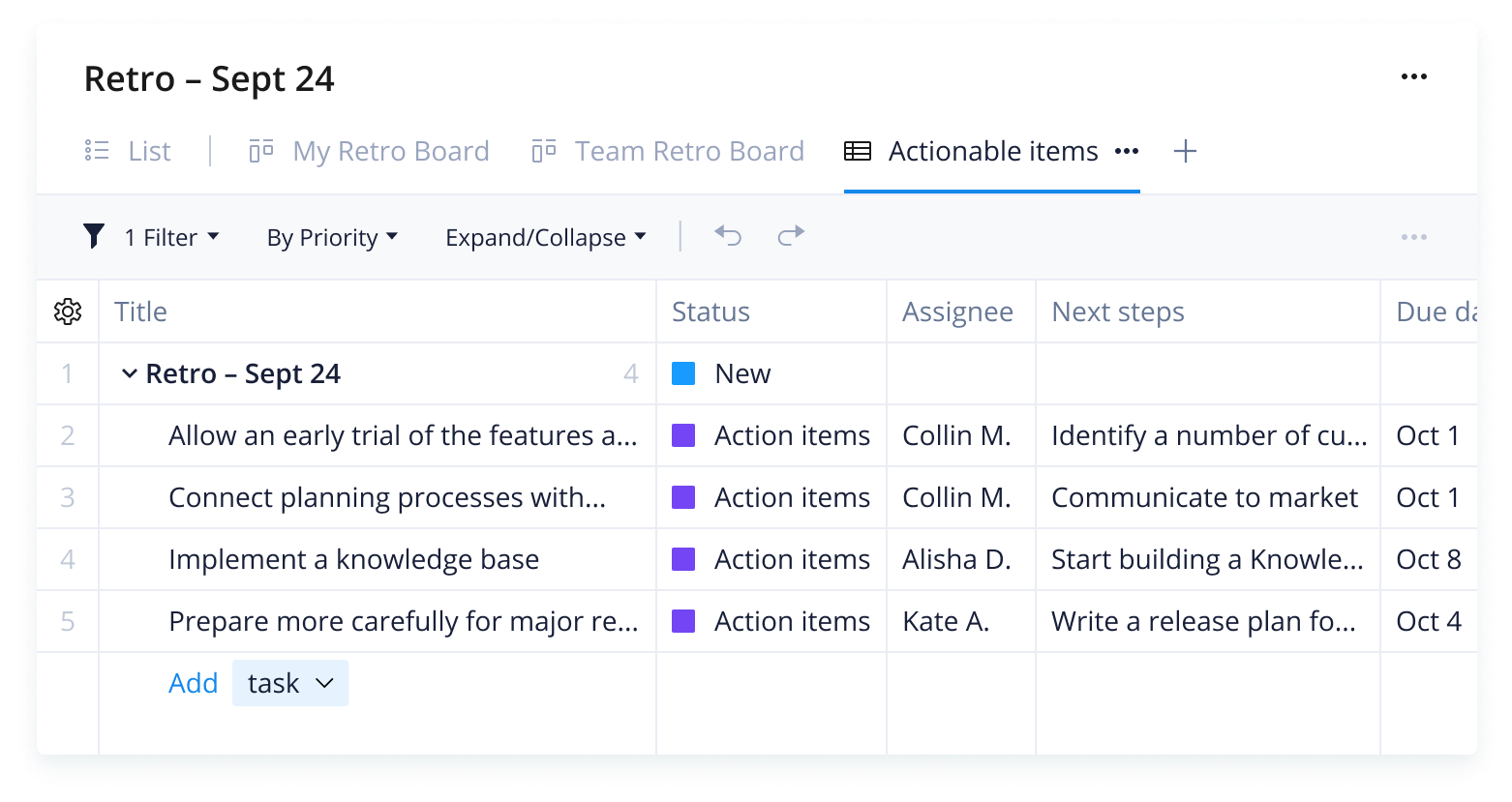
Ensure the team understands the goals and rules for each sprint with automatic guidelines
Organize individual feedback with individual board views
Make retrospective meetings count by prioritizing action items
Instantly organize feedback by category with a custom retrospective report
As a project manager or Scrum master, you want your team to be as effective, efficient, and successful as possible. Haphazard or disjointed retrospectives won’t help your team deliver better results or avoid common roadblocks in the future.
That’s why you need Wrike’s Sprint retrospective template that includes customizable board views for individuals and teams to organize retrospective feedback and turn it into actionable tasks.
When a project manager is ready to start a retrospective, they simply use the sprint retrospective template to automatically set up boards. These will then help team members capture the right info, categorize it, and filter it depending on what information they need.
The project manager can use the sprint retrospective template as a guide to the next three steps.
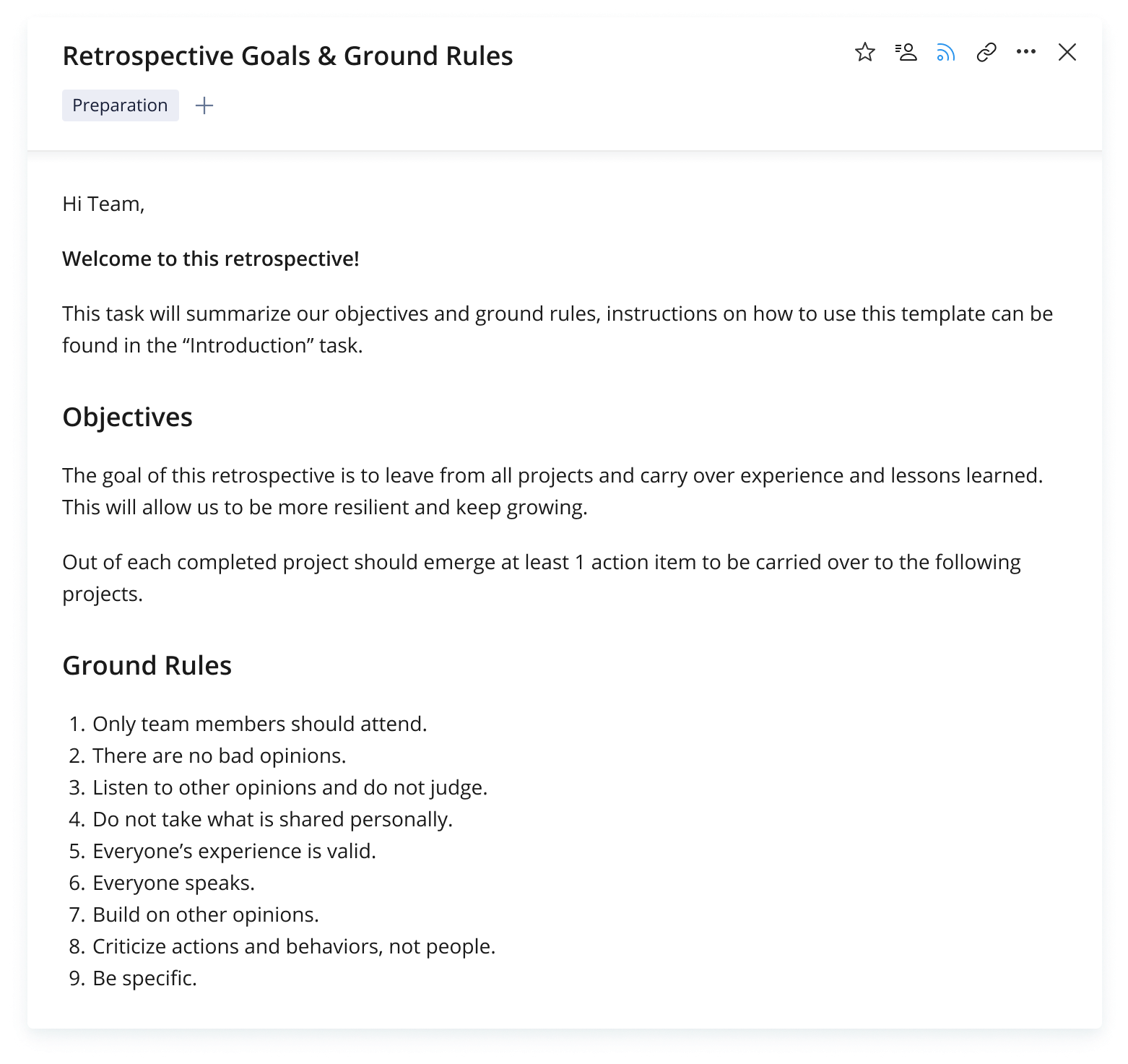
Step 1: Ensure team members understand goals
Wrike’s sprint retrospective template automatically creates a task with goals and ground rules for sprint retrospectives, which can help all team members get on the same page before you start a retrospective. This information will also save project managers time by informing new team members about expectations.
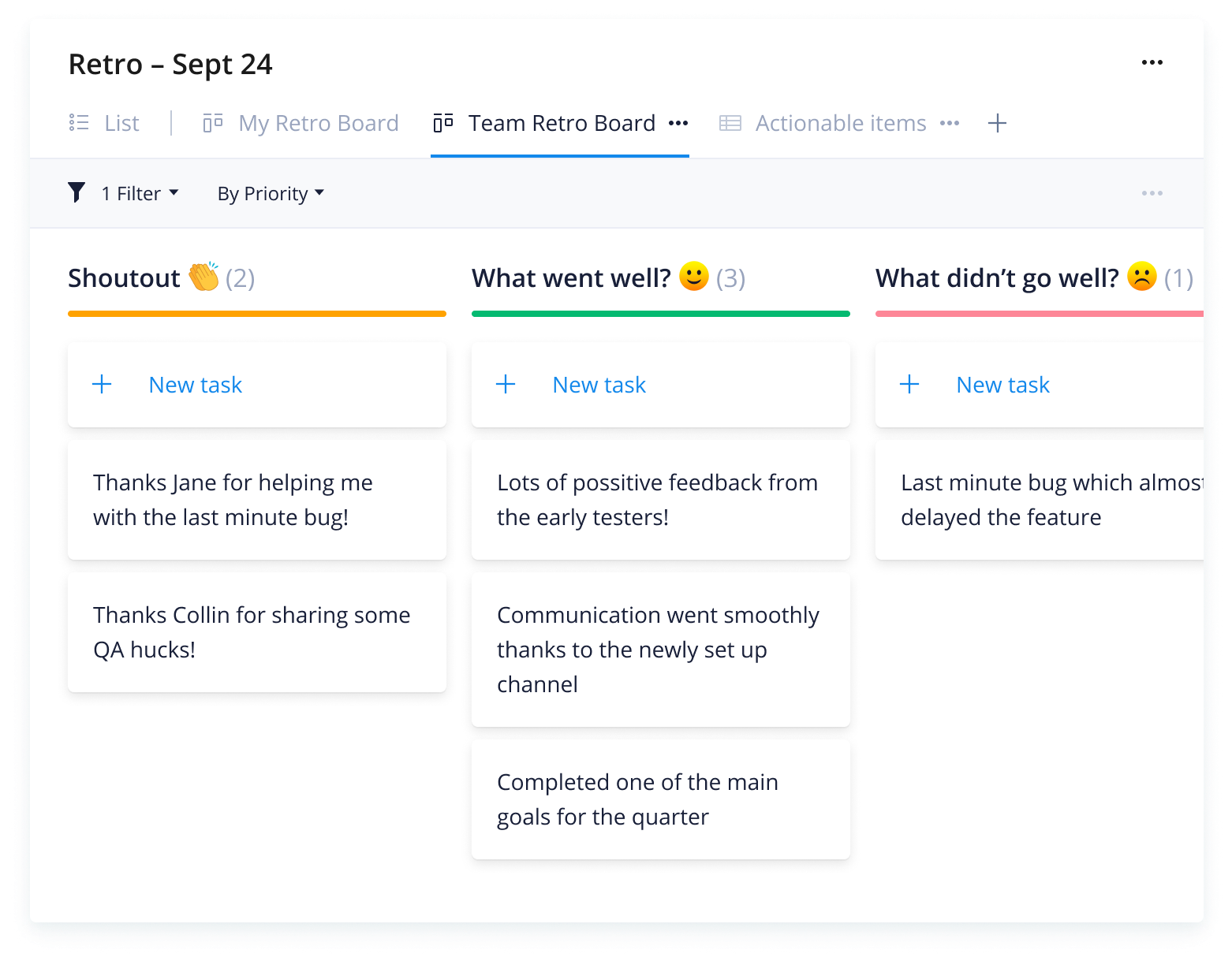
Step 2: Set up individual and team boards
With Wrike’s sprint retrospective template, project managers or scrum masters can quickly set up individual boards, where team members can offer their own positive or constructive feedback. They’ll also be able to set up a team retrospective board where all feedback can be collected.
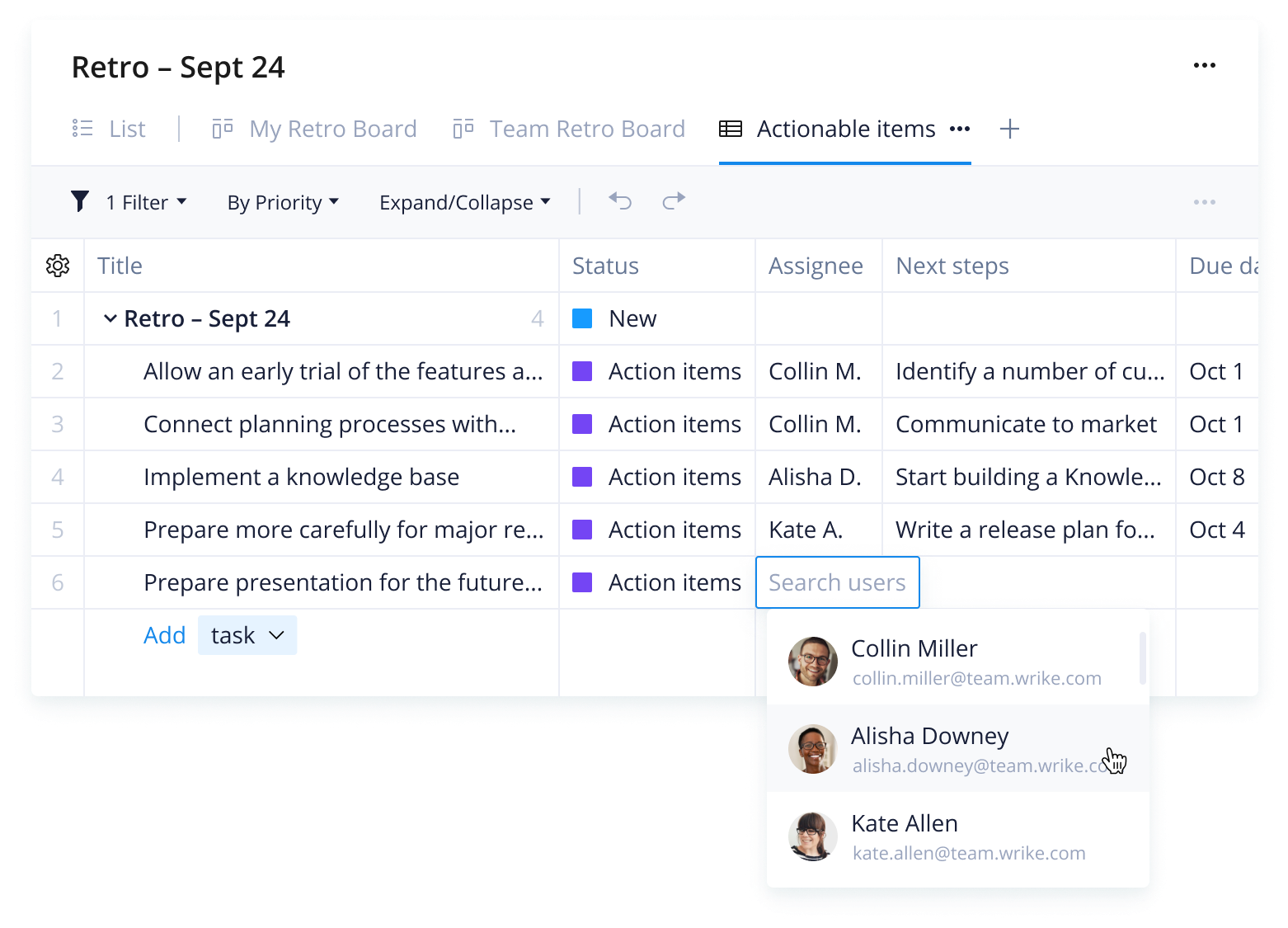
Step 3: Prioritize and assign action items
Finally, Wrike’s sprint retrospective template will automatically set up a board to view action items, and the project manager or Scrum master can drag and drop tasks in based on priority, assign accountability to individuals, and keep an eye on their status going forward.
Make Wrike work for you
Want to learn more about Wrike? Take a tour to find out what versatile tools would work best for your teams. Our customizable features include:
Wrike’s software is designed to work for you — not the other way around. Use it to supercharge your Agile processes, maximize your sprints, and level up your retrospectives.
Resources for content teams
case study
Alchemy Systems
Learn how Alchemy Systems used Wrike’s project management software to improve its processes.
case study
Arvig
Discover how Arvig reduced project time and fostered communication across teams with Wrike.
case study
Flashbay
Read all about how Flashbay improved accountability, balanced workloads, and decreased reliance on emails.
Wrike’s sprint retrospective template simplifies the retrospective process, gives guidelines for maximizing retrospectives, and ensures each team member is involved. It also allows managers and higher-level stakeholders quick insight into sprint progress.
Project managers, as well as scrum masters, can use this template to quickly and easily set up a sprint retrospective board that their entire team can utilize.
Yes, the sprint retrospective template includes individual boards for each team member, as well as a team board for better collaboration.
No need to install anything. Simply click the button below and the template will appear in your Wrike workspace. Don’t have a Wrike account yet? Start your free trial today!
How to install this template in your account
You can only access this template when you create a new space. You can access the use case templates gallery through the space creation wizard. When you opt to create a new space, the template gallery opens by default.
Click the “+” button in the upper-right corner of your workspace.
Select “Space.”
On the page that opens, hover over the use case you want and click “Preview.” Look for the “Scrum / Sprint Retrospective” template in the list (use the search bar if needed).
Now, you can see more information about the use case. Click “Select” to create a space.
Yes, there are.
To use this template, you need to have at least the Business plan or up. Check our plans here.
You must have the required permission to create a public space in your account.
If the template contains account-level custom fields, custom item types, workflows, request forms, or automation, you must have the permission required to create those items.
This template is only available when the workspace language is set to English.
Check the prerequisites above. If you don’t match one of the prerequisites, talk to your space admin or your account owner. If you match all the prerequisites and you still can’t see the “Scrum / Sprint Retrospective“ template, feel free to reach out to the Wrike support team.
Unlock the power of Wrike’s templates
Use our smart search tool to explore versatile templates, designed for easy customization and streamlined project management.
Wrike enhances its website search experience using Google's Vertex AI Search and Conversation generative AI service. Users are cautioned that generative AI might produce inappropriate, inaccurate, offensive, or unintended results, and are advised against submitting explicit, harmful, offensive, or illegal content as search input. Neither Wrike nor Google uses your search inputs to train its machine learning models or for advertising purposes, but search activities may be collected and/or stored via cookies in accordance with our Privacy Policy if you previously registered on our website. These cookies can be deleted through your browser settings. Wrike's search service is not designed to be used in connection with your personal data or any sensitive data of any kind, which users must refrain from inputting.