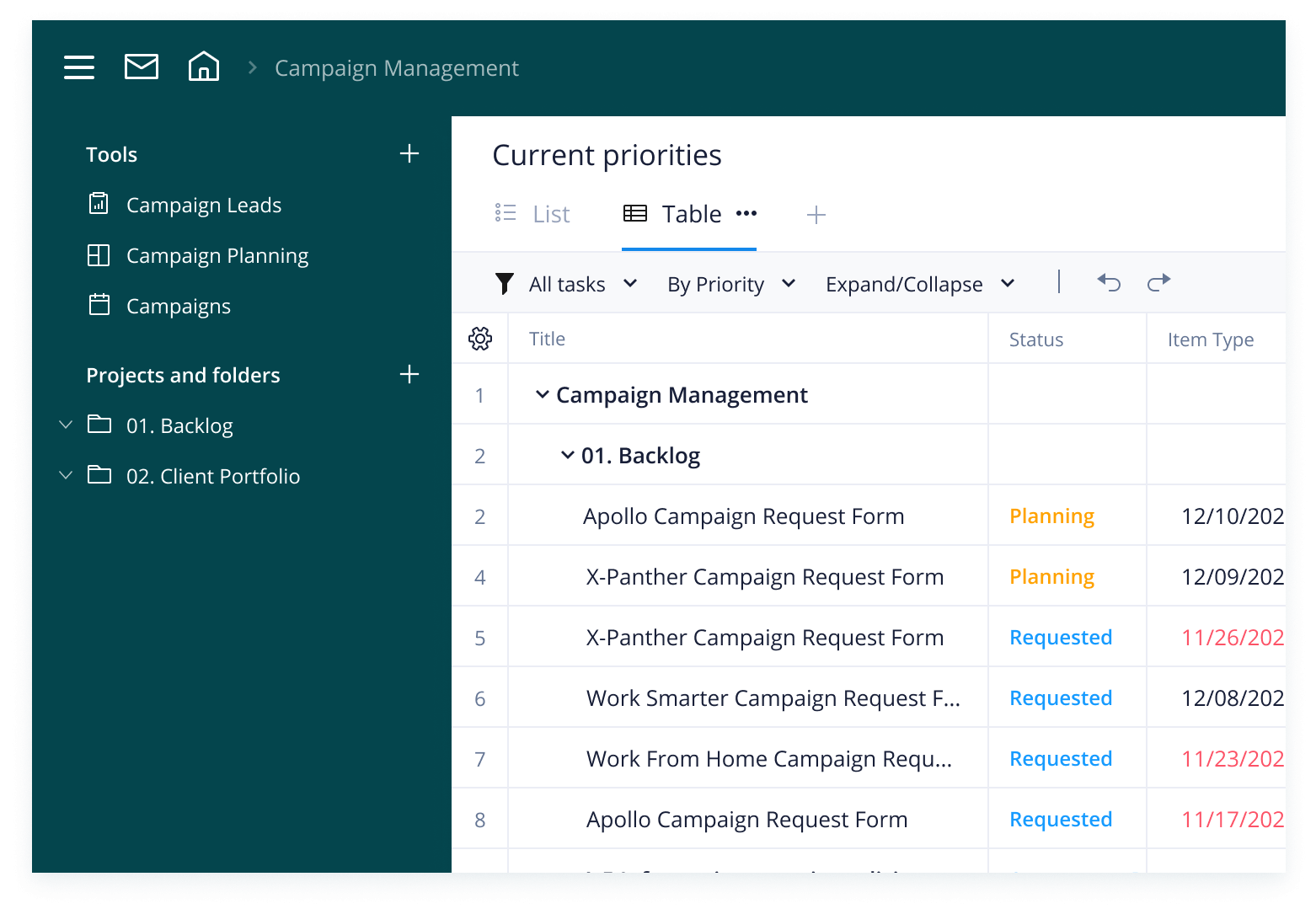
Every marketing team should create a detailed marketing promotion plan ahead of each product or service campaign. It should highlight the key points of your promotion, letting each team member know when they need to organize their PR communications, sales pitches, and social media posts.
Wrike’s promotional plan template offers a clear outline that your team can easily follow when handling promotions. Whether you’re looking for a short-term promotion plan example for smaller campaigns or something that will take you through the entire year, Wrike’s versatile template has everything you need to pull off a seamless marketing campaign.
Why you need this promotion plan template
Unclear structure
A marketing promotion plan can help you break projects into phases, create a checklist, and assign tasks. Build a clear, timeline-based campaign so your team members know when certain deadlines need to be hit.
Lack of visibility
Wrike’s Gantt charts and dashboards give you a bird’s-eye view of every campaign. Track lead data, spot potential roadblocks, and monitor performance to see if customers are responding to your promotional messaging.
Poor collaboration
Work together with other team members and across departments with real-time updates. With the promotional plan template, you can instantly notify stakeholders of any changes and share campaign performance with clients.
Wrike’s comprehensive promotion plan template makes strategizing the most important elements of your marketing campaigns easier than ever.
Follow these three simple steps to get started.
Step 1: Manage your backlog
Is your marketing team overwhelmed by a stream of incoming tasks? Customize our campaign intake form to streamline requests.
Add required fields such as client name, relevant campaign, target audience, and budget. Assign tasks to team members and set start and due dates.
Step 2: Organize your promotions
With Wrike’s easy-to-use tagging system, you can seamlessly organize your promotional assets and tasks into projects and folders.
Use the sample folders included in this template or add your own. Include subfolders for each client for maximum clarity.
Step 3: Monitor campaign performance
Wrike’s promotional planning template also includes custom workflows and a pre-built dashboard to help you monitor task status.
Track the performance of multiple campaigns at a glance and get a bird’s-eye view of individual tasks with interactive Gantt charts. Ensure your team meets every deadline.
Work your way with Wrike
Our marketing promotion plan template will help you forecast every element of your promotional strategy, but we also offer other project management tools in Wrike.
Take a look at some of our key features to find out how Wrike can help your marketing teams deliver high-quality marketing campaigns.
Wrike’s software can be easily configured to suit your marketing team’s unique needs. Experience the power of our all-in-one collaboration platform today.
Resources for marketing teams
case study
Bonnier case study
Find out how Bonnier Broadcasting used Wrike to manage promotional requests and deliver impactful results ahead of schedule.
free ebook
Marketing campaign eBook
Discover how seasoned CMOs adapt to the evolving business landscape and create successful digital marketing campaigns.
case study
Capgemini case study
Read all about how Capgemini’s marketing team boosted visibility and maximized productivity with Wrike’s collaborative tools.
This promotional planning template helps marketing teams to manage incoming requests, plan digital campaigns, and track performance.
Wrike’s marketing promotion plan template offers a range of customizable features, including a request form, workflow, dashboard, and calendar.
The marketing promotion plan template is suitable for marketing managers and content team members working on promotional events and activities.
How to install this template in your account
You can only access this template when you create a new space. You can access the use case templates gallery through the space creation wizard. When you opt to create a new space, the template gallery opens by default.
Click the “+” button in the upper-right corner of your workspace.
Select “Space.”
On the page that opens, hover over the use case you want and click “Preview.” Look for the “Campaign Management” template in the list (use the search bar if needed).
Now, you can see more information about the use case. Click “Select” to create a space.
Yes, there are.
To use this template, you need to have at least the Business plan or up. Check our plans here.
You must have the required permission to create a public space in your account.
If the template contains account-level custom fields, custom item types, workflows, request forms, or automation, you must have the permission required to create those items.
This template is only available when the workspace language is set to English.
Check the prerequisites above. If you don’t match one of the prerequisites, talk to your space admin or your account owner. If you match all the prerequisites and you still can’t see the “Campaign Management“ template, feel free to reach out to the Wrike support team.
Unlock the power of Wrike’s templates
Use our smart search tool to explore versatile templates, designed for easy customization and streamlined project management.
Wrike enhances its website search experience using Google's Vertex AI Search and Conversation generative AI service. Users are cautioned that generative AI might produce inappropriate, inaccurate, offensive, or unintended results, and are advised against submitting explicit, harmful, offensive, or illegal content as search input. Neither Wrike nor Google uses your search inputs to train its machine learning models or for advertising purposes, but search activities may be collected and/or stored via cookies in accordance with our Privacy Policy if you previously registered on our website. These cookies can be deleted through your browser settings. Wrike's search service is not designed to be used in connection with your personal data or any sensitive data of any kind, which users must refrain from inputting.