Remembering and balancing your team’s respective vacation time throughout the year can be a daunting task, whether you manage a small or large team. Are you inundated with vacation requests? Do you regularly experience issues with these activities?
Assessing and approving vacation requests promptly
Dealing with ad hoc requests through email and Slack
Organizing coverage for absent team members
Eliminate these obstacles with Wrike’s vacation calendar template.
Use Wrike’s built-in reminders to ensure you approve or reject each vacation request in a timely manner
Set up automatic notifications in Wrike’s vacation scheduling template, so you’re informed as soon as you receive a request
Use the vacation calendar template to anticipate workload gaps
Why you need this employee vacation tracker
Automate vacation requests
When vacation requests don’t come through the proper channels, they can get lost or approvals can be delayed.
Use the vacation calendar template from Wrike to ensure your team members follow a set process for requesting time off. Once your employees input the dates for their vacation request, you’ll receive an automatic notification.
Set automatic reminders
Keeping track of which requests have been approved, denied, or need addressing without an efficient approval process can be very difficult. With Wrike’s employee vacation tracker, you can set automatic reminders for each request so you can approve or reject them promptly for your employees.
Increase team visibility
If vacation requests are stored in a folder, understanding your team’s capacity throughout the year becomes impossible. Our vacation scheduling template serves as an interactive dashboard that allows you to visualize all your employee vacations at a glance and determine whether a new request can be approved.
How to use the employee vacation tracker template in Wrike
Are you struggling to keep track of employee vacation requests? Are your team members failing to manage workloads because too many employees are absent at the same time?
Wrike’s employee vacation tracker template creates a single location for receiving and assessing employee vacation requests and monitoring your team’s capacity through busy holiday months.
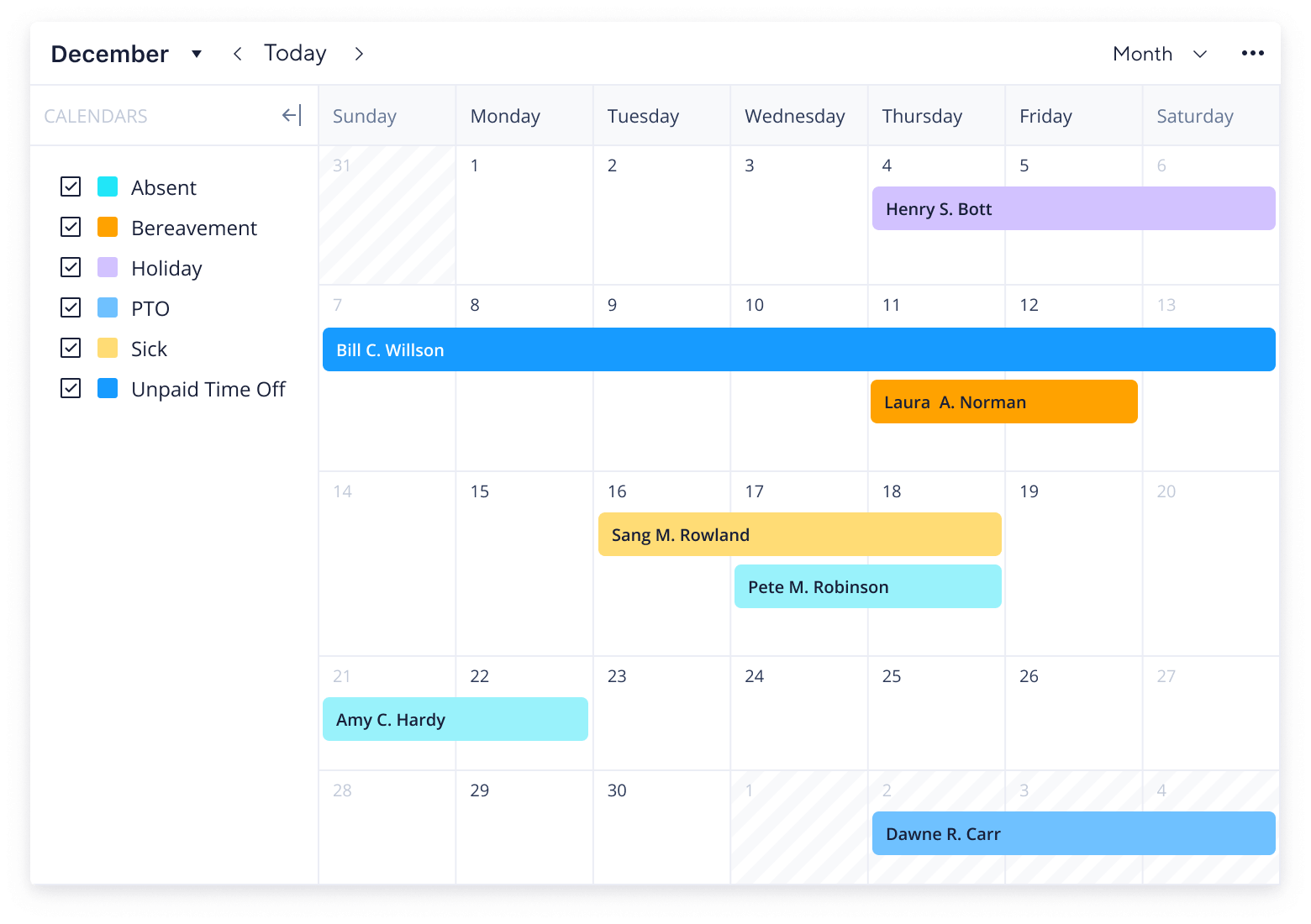
Stay apprised of planned employee availability with calendars
Monitor upcoming and completed vacation requests with dashboards
Managing vacation requests for an entire team, whether you oversee a handful of people or a large number, can be a difficult and time-consuming task. Determining whether employee vacation requests can be approved requires an efficient system.
This employee vacation tracker template sets up an easy-to-use system for approving, tracking, and monitoring time off.
Step 1: Use the request form to submit a vacation request
Employees use the custom request form to submit their own vacation requests and include all pertinent information. They will input their name, requested vacation dates, and any contextual information in the notes box.
Step 2: Monitor vacation requests with a dashboard
Easily view which vacation requests have been approved, denied, or need more information with the customizable dashboard. You can also get an overview of each employee’s vacation days with the built-in report.
Step 3: View approved vacation days on a shared calendar
Absences can be viewed on a team calendar, which is color-coded to reflect each employee’s approved vacation request. Look forward to future weeks and months to assess whether vacation requests can be approved and monitor your team’s capacity to take on additional projects.
Make Wrike work for you
Want to learn other ways Wrike can help improve employee monitoring? Our versatile work management software offers a range of powerful features to help you efficiently manage your team. These include:
The employee vacation tracker template is used to collect and assess vacation requests and monitor scheduled employee time off.
This template is designed to give managers a streamlined system for assessing and approving employee vacation requests, eliminating confusion with an effective process.
Wrike’s employee vacation tracker has a range of features to get you started, including a customizable request form, in-built report, calendar, and dashboard.
How to install this template in your account
You can only access this template when you create a new space. You can access the use case templates gallery through the space creation wizard. When you opt to create a new space, the template gallery opens by default.
Click the “+” button in the upper-right corner of your workspace.
Select “Space.”
On the page that opens, hover over the use case you want and click “Preview.” Look for the “Attendance tracker” template in the list (use the search bar if needed).
Now, you can see more information about the use case. Click “Select” to create a space.
Yes, there are.
To use this template, you need to have at least the Business plan or up. Check our plans here.
You must have the required permission to create a public space in your account.
If the template contains account-level custom fields, custom item types, workflows, request forms, or automation, you must have the permission required to create those items.
This template is only available when the workspace language is set to English.
Check the prerequisites above. If you don’t match one of the prerequisites, talk to your space admin or your account owner. If you match all the prerequisites and you still can’t see the “Attendance tracker“ template, feel free to reach out to the Wrike support team.
Unlock the power of Wrike’s templates
Use our smart search tool to explore versatile templates, designed for easy customization and streamlined project management.
Wrike enhances its website search experience using Google's Vertex AI Search and Conversation generative AI service. Users are cautioned that generative AI might produce inappropriate, inaccurate, offensive, or unintended results, and are advised against submitting explicit, harmful, offensive, or illegal content as search input. Neither Wrike nor Google uses your search inputs to train its machine learning models or for advertising purposes, but search activities may be collected and/or stored via cookies in accordance with our Privacy Policy if you previously registered on our website. These cookies can be deleted through your browser settings. Wrike's search service is not designed to be used in connection with your personal data or any sensitive data of any kind, which users must refrain from inputting.