Monitoring absences for large teams can be time-consuming and overwhelming. Are you finding it difficult to track employee attendance? Do you regularly experience the following issues at work?
Absences aren’t recorded accurately
Absent employees are paid for hours they haven’t worked
Productivity is impacted when multiple employees are absent simultaneously
Eliminate these challenges with employee attendance tracking from Wrike.
Accurately record absences for team members and easily monitor absence patterns
Use precise data to calculate weekly or monthly salaries to reflect absences
Monitor absence levels to decide where further action may need to be taken with individuals
Why you need the attendance tracker template
Inaccurate absence data
The attendance tracker template from Wrike updates regularly, with each absence reflected in real time. The template is fully customizable, so you can add contextual notes for each absence.
Incorrect salary calculation
The information recorded in your attendance tracker will allow you to accurately calculate what employees should be paid. Stop overpaying or underpaying staff — trust the data captured by Wrike.
Ineffective absence processes
The attendance tracker template will help you better monitor attendance rates in line with your organization’s absence policies. It will also indicate where you need to take further absence management steps.
Improve employee attendance tracking
How to use the attendance tracker template in Wrike
Are you struggling to keep track of employee attendance? Are employees receiving payment for unexcused absences or having their pay docked when their absences were acceptable?
Wrike’s attendance tracker template creates a single location for tracking employee absences, allowing you to easily monitor patterns and take action when necessary.
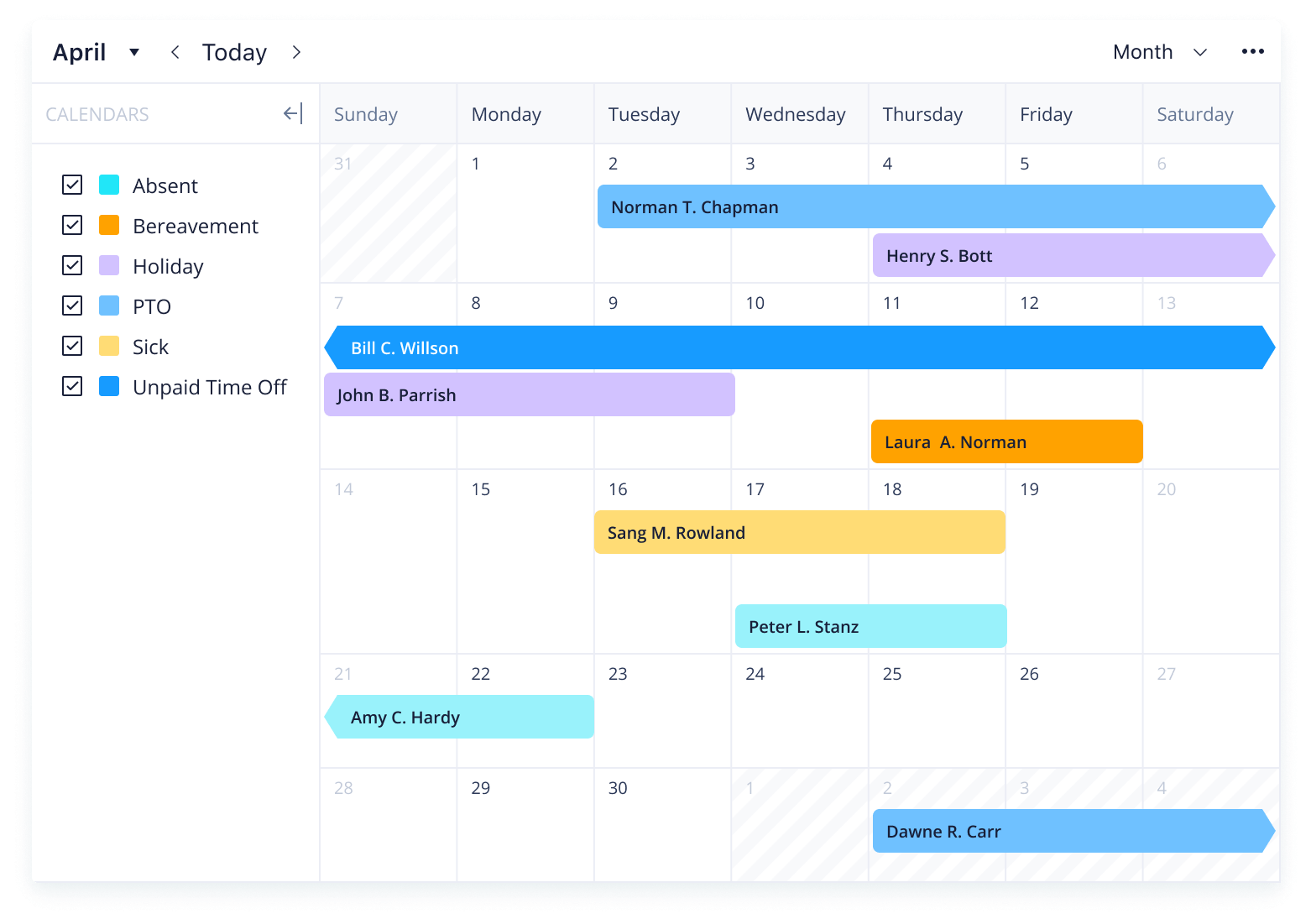
Stay apprised of planned absences with custom calendars
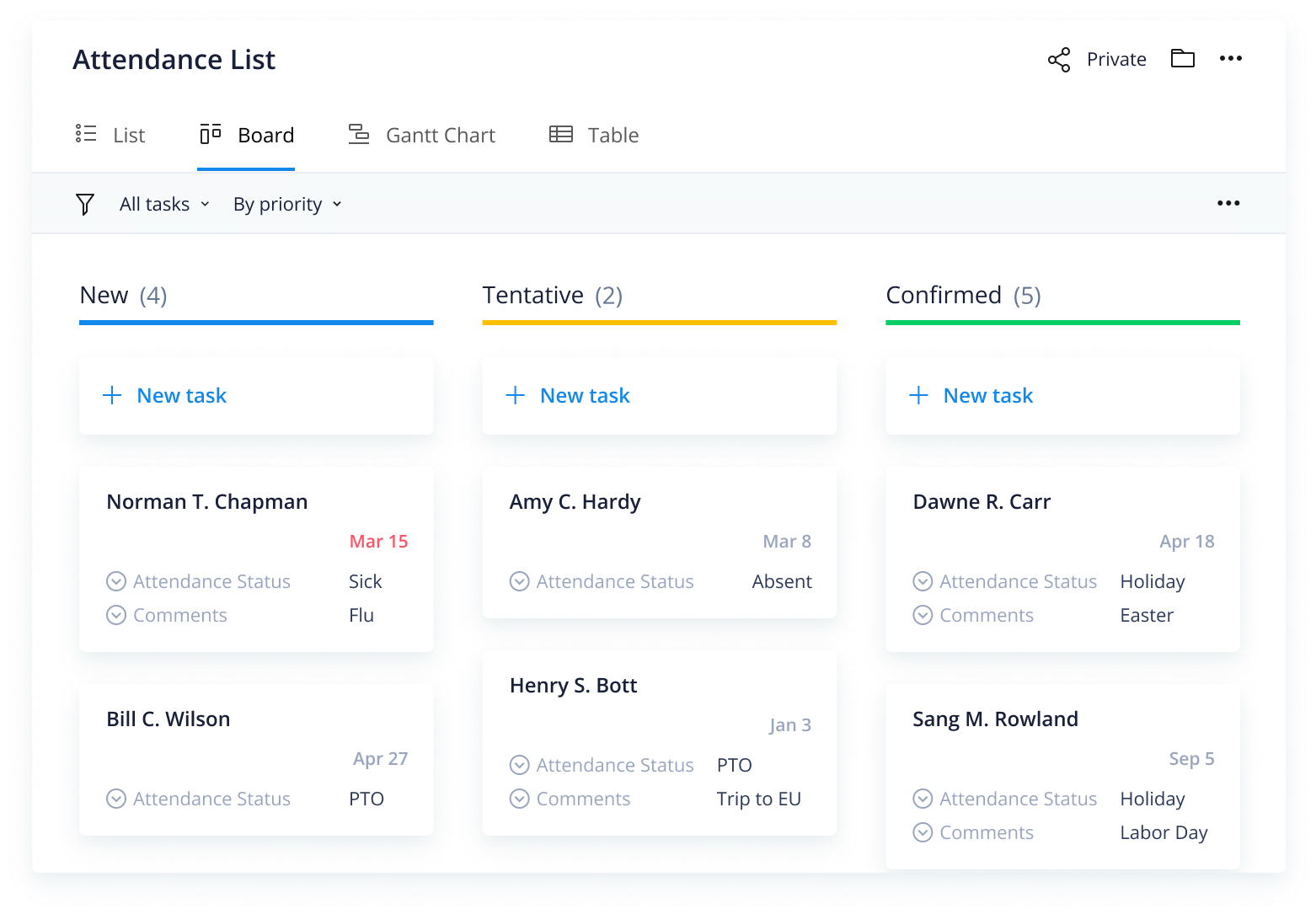
Monitor upcoming and completed absences with dashboards
Whether you’re responsible for two employees or 20, keeping track of unexpected or planned absences can be difficult. Remembering which employee was absent for what reason over the course of a year requires a dependable system.
This attendance tracker template sets up an easy-to-use system for logging, tracking, and monitoring employee absences.
Step 1: Use the request form to submit an absence
Absences can be logged in seconds using the custom request form. Simply input the employee’s name, absence dates, and choose from a drop-down menu of reasons for their absence. Add contextual information in the notes box for future reference.
Step 2: View absences on a team calendar
Absences can be viewed on a team calendar, which is color-coded to reflect each type of absence, including PTO, bereavement, holidays, and unpaid time off. Look back at the previous month to quickly visualize who was absent, when, and why.
Step 3: Plan for future absences
The attendance dashboard summarizes ongoing, upcoming, and completed absences, so you can stay informed of your team’s status and plan tasks according to whomever will be available. You can also get regular updates with the in-built attendance report.
Make Wrike work for you
Interested in how Wrike can help streamline other areas of your work? Wrike’s all-in-one work management software offers a range of powerful tools to help you take projects to the next level. Our customizable features include:
Wrike can be adjusted to suit any project, team, or organization. Personalize your action plans and design your workspace to suit your team’s processes.
Resources for effective employee management
Case study
Discover how Walmart automates processes and gets more done with Wrike
eBook
Learn how to collaborate better and leave email behind with this eBook
eBook
Find 25 simple methods for improving productivity in this free eBook
Monitor workforce attendance with Wrike
FAQ
The attendance tracker template is used to help managers input, track, and monitor employee absences.
The attendance tracker template is designed to help managers create an easy-to-use process to stay on top of employee attendance, eliminating confusion around employee absence.
Wrike’s attendance tracker has a range of features to get you started, including a customizable request form, in-built report, calendar, and dashboard.
How to install this template in your account
You can only access this template when you create a new space. You can access the use case templates gallery through the space creation wizard. When you opt to create a new space, the template gallery opens by default.
Click the “+” button in the upper-right corner of your workspace.
Select “Space.”
On the page that opens, hover over the use case you want and click “Preview.” Look for the “Attendance tracker” template in the list (use the search bar if needed).
Now, you can see more information about the use case. Click “Select” to create a space.
Yes, there are.
To use this template, you need to have at least the Business plan or up. Check our plans here.
You must have the required permission to create a public space in your account.
If the template contains account-level custom fields, custom item types, workflows, request forms, or automation, you must have the permission required to create those items.
This template is only available when the workspace language is set to English.
Check the prerequisites above. If you don’t match one of the prerequisites, talk to your space admin or your account owner. If you match all the prerequisites and you still can’t see the “Attendance tracker“ template, feel free to reach out to the Wrike support team.
Unlock the power of Wrike’s templates
Use our smart search tool to explore versatile templates, designed for easy customization and streamlined project management.
Wrike enhances its website search experience using Google's Vertex AI Search and Conversation generative AI service. Users are cautioned that generative AI might produce inappropriate, inaccurate, offensive, or unintended results, and are advised against submitting explicit, harmful, offensive, or illegal content as search input. Neither Wrike nor Google uses your search inputs to train its machine learning models or for advertising purposes, but search activities may be collected and/or stored via cookies in accordance with our Privacy Policy if you previously registered on our website. These cookies can be deleted through your browser settings. Wrike's search service is not designed to be used in connection with your personal data or any sensitive data of any kind, which users must refrain from inputting.