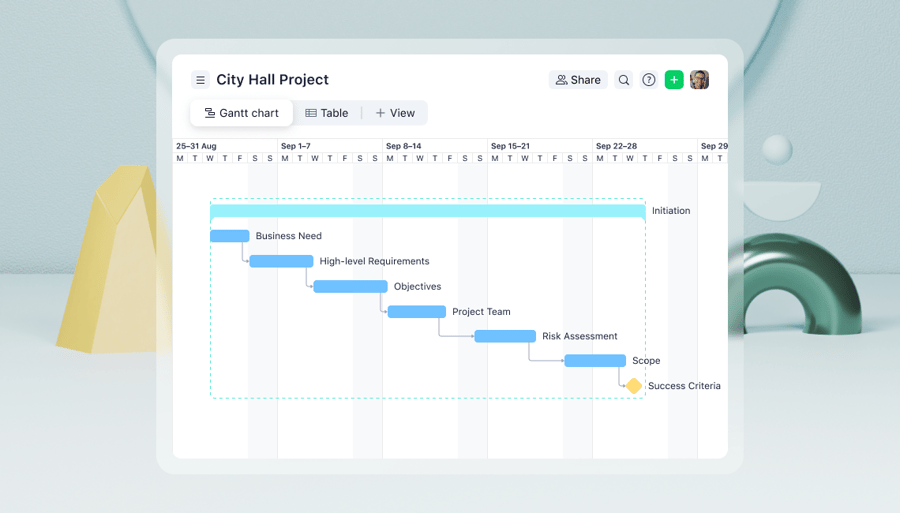
Key takeaways:
- Gantt chart software turns project timelines into interactive, visual roadmaps, helping teams plan, schedule, and track work across multiple projects and stakeholders.
- The best tools go beyond simple timelines with features like milestones, drag-and-drop rescheduling, real-time updates, dependencies, and easy data import from other systems.
- Free online Gantt chart tools can work for individuals or simple projects, but growing teams typically need paid platforms with automation, collaboration, and resource visibility.
- Comparing leading providers means weighing cost, usability, integrations, and depth of project management features — from lightweight Gantt-only tools to full work management platforms.
- Wrike stands out as a top Gantt chart software choice for 2025, combining dynamic Gantt views with powerful workflow automation, collaboration, and reporting in a single, scalable solution.
Top features to look for in Gantt chart software
Whether you choose free Gantt chart software or a paid version, there are a couple of key features you should try to include. For example, you will want to be able to:
- Detailed task and timeline visualization
- Milestones for tracking key project phases
- Drag-and-drop task scheduling
- Real-time schedule updates
- Task dependencies and sequencing
- Data import and integrations
Detailed task and timeline visualization
Gantt charts are renowned for their ability to convert complex situations into easy-to-follow diagrams. However, not all Gantt charts are created equal. You need to be able to visualize each step of the process, not just the start and end date.
Milestones for tracking key project phases
Most project managers seek to break large and unwieldy projects into smaller phases or sprints that are easier to manage. Teams can use Gantt chart software online to visualize each stage or milestone as part of the overall journey to delivery.
Drag-and-drop task scheduling
The ability to drag and drop tasks means that project managers can keep balancing workloads, pushing progression forward, and maintaining momentum. It’s a simple but very important feature you’ll need for effective delivery.
Real-time schedule updates
Things change, priorities shift, and deadlines move. The best Gantt chart software allows you to make updates at any time, anywhere, with the changes appearing instantly. That way, stakeholders can see at a glance the up-to-date status of the project.
Task dependencies and sequencing
Most projects are just a series of actions that combine to an overall result, right? Dependencies can make sure your tasks stay connected, so that one doesn’t happen without the other — keeping your overall project on track.
Data import and integrations
Any Gantt chart software comparison should include a review of its integrations. We’re surrounded by data, but it’s only useful if we can deploy it in our work. Make sure your work management platform allows you to import data easily, quickly, and securely.
A snapshot of 21 leading online Gantt chart makers
|
Platform |
Overview |
Pricing (on an annual basis) |
|
Wrike |
Powerful intelligent workflow management platform with interactive Gantt charts linked to full project management features |
From $10 to $25 per month; bespoke pricing for higher plans |
|
TeamGantt |
Teamwork management software with easy-to-use Gantt charts |
From $49 per month, per manager; bespoke pricing for higher plans |
|
Paymo |
Client-management software with Gantt charts, ideal for small businesses |
From $5.90 to $16.90 per month |
|
GanttPro |
Online paid Gantt-chart software with a short learning curve |
From $8 to $19 per month; bespoke pricing for higher plans |
|
Monday.com |
Robust work management platform featuring built-in Gantt charts and templates |
From $12 to $19 per month; bespoke pricing for higher plans |
|
ProjectManager |
Purpose-built project management software with online Gantt charts included |
From $14 to $26 per month; bespoke pricing for higher plans |
|
Agantty |
Free project management solution with Gantt charts, ideal for non-business users |
From €4.90 per month; bespoke pricing for certain users |
|
Toggl Plan |
Visually engaging project management software with Gantt charts available in paid plans |
From $9 to $18 per month, with custom pricing for its Enterprise plan |
|
Zoho Projects |
Affordably priced project management, with Gantt charts in paid plans |
From $4 to $14 per month |
|
OpenProject |
Open-source project management tool with free Gantt chart software included |
From $7.25 to $19.50 per month; bespoke pricing for higher plans |
|
ClickUp |
Full-service project management platform, including Gantt charts in paid plans |
From $7 to $12 per month; bespoke pricing for higher plans |
|
Smartsheet |
Project management software modeled on spreadsheets; Gantt charts included in paid plans |
From $9 to $19 per month; bespoke pricing for higher plans |
|
Tom’s Planner |
Affordable, simple software focused mainly on Gantt charts |
From $9.95 to $19.95 per month; bespoke pricing for corporate accounts |
|
StudioBinder |
Production management platform centered on the creative industries (including sector-specific Gantt charts) |
Start at $42 per month for individuals and small teams and $229 per month for organizations; additional and bespoke pricing for higher plans |
|
Bitrix24 |
Scalable online work management platform, including Gantt charts on paid plans |
From $49 to $399 per month; bespoke pricing for higher plans |
|
Backlog |
A collaboration, project management, and Gantt chart tool built for software development |
From $30 to $146 per month |
|
InstaGantt for Asana |
Sister product to Asana, focused mainly on providing attractive, detailed Gantt charts |
From $120 to $240 per year, with additional collaborator fees available |
|
ProofHub |
Dynamic collaboration platform including advanced Gantt charts for a flat-rate monthly fee |
From $45 to $89 |
|
Microsoft Planner |
Part of the Microsoft 365 suite, offering robust project management features and tools |
From $10 to $55 per month |
|
Office Timeline |
Another Microsoft product, this is focused entirely on enhancing the visual representation of projects |
Single licenses from $9 to $21 per month (Windows add-in) or $149 per year (browser-based) |
|
Microsoft Excel |
Ubiquitous spreadsheet-based task and project management software, part of the Microsoft family |
From $6 to $22 per month for access to Microsoft 365. Higher paid plans available for enterprise customers. |
Which is the best Gantt chart software in 2026?
Put simply, it’s Wrike. But you don’t have to take our word for it, either: Wrike was selected as among the best Gantt chart software in the industry by expert reviewers at TechRepublic (which named Wrike best for enterprise users), Cloudwards (which highlighted the exceptional range of templates), and TechRadar (which voted Wrike as “Best for collaboration”).
However, there are lots of other, less powerful options on the market too. These range from free Gantt chart software that can meet basic needs all the way to full-service project management software solutions. As well as a handy list of 21 of the best Gantt chart software providers, we’ve also put together the pros, cons, and prices of each.
1. Wrike
Wrike is the most powerful workflow management software available. Its dynamic platform includes the best Gantt chart tools, which are continually top rated by users in every industry. These are packed full of features that integrate seamlessly with other software, allowing you to move cleanly between your favorite work apps.
Wrike Gantt chart software: Key features
Built to offer serious functionality as well as eye-catching design, Wrike provides the best Gantt chart software on the market, including:
- Dynamic timelines
- Intelligent analysis
- Drag-and-drop functionality
- Multiple project management tools
- Easy integration
- Smooth reporting
- Smart dependencies
- Secure storage
Dynamic timelines
A Wrike Gantt chart is much more than just an interactive timeline — it gives you a complete view of your work, including scope, assignees, and dependencies. It’s also fully adjustable, with real-time updates.
Intelligent analysis
Wrike’s online Gantt chart software incorporates intelligent critical path analysis, which makes it easier to spot potential bottlenecks that can cause operational inefficiencies.
Drag-and-drop functionality
One of the most valuable features of a Wrike Gantt chart is the ability to drag and drop tasks and slide dates. This helps to overcome potential bottlenecks fast.
Multiple project management tools
Wrike allows you to control multiple projects from one single platform. Update project timelines with a simple drag-and-drop action and collaborate among teams in real time.
Easy integration
Wrike’s Gantt chart software seamlessly connects with your favorite apps, tools, and platforms like Microsoft. Import key data in seconds.
Smooth reporting
Cut out endless email chains and time-consuming calls by sharing updated Gantt charts across multiple teams or stakeholders with the click of a button in Wrike.
Smart dependencies
Most projects involve a series of tasks that build toward overall completion. Wrike’s Gantt chart software makes this easy to visualize by creating dependencies.
Secure storage
Wrike offers secure, cloud-based storage for all users, ensuring that a team or organization’s Gantt charts are safe, but also easily accessible for future reference.
Key benefits of Wrike’s Gantt chart software
- Wrike customers range from personal accounts all the way to enterprises with thousands of users. Wrike’s pricing is designed to suit all budgets.
- Wrike offers some of the best work management automation on the market, with request forms that can automate entire projects and workflows, not just tasks.
- Users can tag each other into tasks, projects, and spaces, making silos, duplicate requests, and crossed wires a thing of the past.

Other features and considerations when evaluation Gantt chart software
Wrike’s Gantt charts are just one element of powerful project management software that will benefit the entire organization. Wrike offers the best of both worlds, with a fast, simple setup, as well as advanced customization capabilities. A library of ready-built Gantt chart templates and training resources will help first-time users hit the ground running, while enhanced configuration options allow growing users to adapt Gantt chart tools to suit their organization’s processes, language, and way of working.
Pricing plans
Wrike boasts a free plan for individuals and teams seeking intelligent task management. For users who need to create Gantt charts, advanced optionality is available at Team ($10 per month) and Business ($25 per month) levels, and within the bespoke-priced Enterprise and Pinnacle packages.
Customer ratings and reviews
Wrike was top-rated by TrustRadius in 2025, as well as winning awards of 4.4/5 by Capterra, and 4.2/5 by G2.com.
2. TeamGantt
TeamGantt software features
While built around Gantt charts, TeamGantt software includes other great features, such as resource management, drag-and-drop functionality, and time tracking tools.
Key benefits of TeamGantt software
- TeamGantt possesses the ability to create dependencies, subgroups, and nest tasks.
- Users can toggle between different views, including Gantt, calendar, and lists.
- The option of comparing planned and actual timelines is very useful.
Other features and considerations
One of the biggest attractions to TeamGantt is its easy reporting. While the free plan is limited to just one project, with no guests, the paid plans allow sharing without login, which is great for keeping stakeholders up to date without having to create additional users. Time tracking tools are only currently available on the Pro plan.
Pricing plans
TeamGantt offers free Gantt chart software for single users working on one active project. Anyone requiring more than this will need to choose a paid plan (annual prices start at $49) with optional paid add-ons. Two higher-level plans — Unlimited Everything and Construction Edition — are priced on application.3. Paymo
Paymo software features
Designed for small businesses, Paymo offers a Gantt chart tool as well as various features to help manage client work, track time, issue invoices, and monitor financials.
Key benefits of Paymo software
- Paymo is relatively affordable, starting at just $5.90 per month for one user on an annual billing plan.
- It includes dependencies that allow you to connect tasks and manage dates.
- Its drag-and-drop functionality makes its Gantt charts more interactive.
Other features and considerations
Aimed at small businesses, Paymo is ideal for teams that need relatively straightforward project management software at a low price. However, users hoping to use Gantt charts will find themselves looking at prices north of $10 per user per month again.
Pricing plans
Paymo customers have the choice between a basic Free account, a Solo plan ($5.90 per user per month), a Plus plan ($10.90 per user per month), and a Pro offering ($16.90 per user per month). As mentioned, a Gantt chart maker is only available on the Pro plan.
4. GanttPro
GanttPro software features
Designed to visualize project management through Gantt charts, GanttPro features include the ability to prioritize projects, set dependencies, and drag and drop tasks across timelines.
Key benefits of GanttPro software
- The GanttPro interface looks great, with colorful visuals and simple layouts.
- The software provides ready-built (and customizable) Gantt chart templates.
- Users can generate a public URL, so stakeholders can view charts easily.
Other features and considerations
The provision of professionally designed Gantt chart templates is a great bonus. GanttPro has created dozens of templates specifically for industries, including software development, marketing, construction, manufacturing, retail, and event planning. That said, there is no free plan available, and those availing of the 14-day trial should note that unless they upgrade, their work won’t be saved after the two-week period expires.
Pricing plans
GanttPro doesn’t offer free Gantt charts — prices depend on user numbers, but start at $8 per user per month, based on a team size of 1-10 users. This then goes up to $12 for Advanced and $19 for Business. Like most alternatives, it has an Enterprise option too, with bespoke pricing.
5. Monday.com
Monday.com software features
One of the more popular work management platforms, Monday.com includes features such as dependencies, drag-and-drop functionality, multiple assignees, and automated tasks.
Key benefits of Monday.com software
- Monday.com allows for extensive customization and adaptability.
- There are a number of templates available, including Gantt charts.
- Its colorful, vibrant interface is enjoyable to work with.
Other features and considerations
For regular collaborators, Monday.com’s limited cross-functional collaboration and lack of native proofing features could create challenges for certain teams. Like most big work management platforms, there is a learning curve for users, who report that it can take some time to understand Monday.com’s functionality. Although 24/7 customer support is available across all plans, it has no inbound phone line, which can result in a slower path to resolution.
Pricing plans
Monday.com has four pricing options in total, including a Free version. Annual costs for 10 seats starts at $12 per seat/month for Standard, $19 per seat/month for Pro, and Enterprise is custom. Those seeking Gantt charts will have to select the Standard plan or higher.
6. ProjectManager
ProjectManager software features
ProjectManager paid plans offer an online Gantt chart maker that also includes dependencies, delivery deadlines, and drag-and-drop actions.
Key benefits of ProjectManager software
- As a cloud-based provider, ProjectManager allows real-time collaboration.
- Its Gantt charts can be color coded and labeled for easier comprehension.
- It’s possible to import and export a Microsoft Project plan, Excel file, and more.
Other features and considerations
ProjectManager provides features and functionality to help project managers organize, visualize, and deliver their work. It’s not as feature-rich as some all-in-one workflow management platforms like Wrike, so some customers might find they need to invest in additional software.
Pricing plans
ProjectManager’s price plans include a Team option ($14 per user per month), a Business option ($26 per user per month), and an Enterprise solution (with bespoke pricing). Gantt charts are available on all three, but there is no freemium option.
7. Agantty
Agantty software features
The clue is in the name with Agantty, which is a free project management solution featuring dashboards, templates, and — you guessed it — Gantt charts.
Key benefits of Agantty software
- Agantty makes it easy to manage tasks, projects, and users through Gantt chart templates.
- It includes a rights management system offering adjustable permissions.
- Tasks can be exported by PDF, and reminders can be sent by email.
Other features and considerations
Because it provides an easy-to-use free online Gantt chart, Agantty appeals to many non-business users, including creatives, educators, and families. However, teams and users managing multiple projects or groups looking for advanced features like time tracking tools or AI-led automations will require a more robust project management platform.
Pricing plans
Agantty has introduced a Premium model offering unlimited projects, unlimited teams, and unlimited tasks for €4.90 per user per month or €50 per user per year.
8. Toggl Plan
Toggl Plan software features
Visually engaging and simple to use, Toggl Plan’s paid options feature attractive timelines with color coding, built-in filters, and drag-and-drop functionality.
Key benefits of Toggl Plan software
- Toggl Plan’s real-time collaboration means that Gantt charts are updated instantly from anywhere in the world.
- It connects with strong time tracking tools that make resource management easier.
- A visually attractive interface makes the Gantt charts fun to use and share.
Other features and considerations
Toggl Plan’s online Gantt chart software grew from Toggl Track, which was designed to offer time tracking tools. This means that it is particularly strong on the time-related factors within project and work management, although advanced features are only available on paid plans.
While Toggl Plan regularly adds third-party integrations, users should check to see if easy sync with their favorite tool is available before signing up.
Pricing plans
Up to five users can select the Free plan, while larger teams can choose the Starter plan for $9 per user per month or the Premium choice at $18 per user per month. The Enterprise plan has custom pricing.
9. Zoho Projects
Zoho Projects software features
Zoho Projects’ paid plans include Gantt charts with chronological, milestone, and project timeline views to help you better plan, track, and deliver projects.
Key benefits of Zoho Projects software
- Zoho Projects offers three affordable plans, from free to $14 a month.
- It includes dependencies that allow you to connect tasks and manage dates.
- Its drag-and-drop functionality makes its Gantt charts more interactive.
Other features and considerations
Zoho Projects is a great resource for cost-conscious organizations that require Gantt charts. Users seeking extensive project management features such as automations and resource management may find themselves seeking extra software — unlike Wrike, which incorporates everything in one convenient place, with a two-week free trial too.
Pricing plans
Customers who choose Zoho Projects can sign up for a free plan, or access Gantt charts in a premium plan at $4 a month or in an Enterprise plan for $9 a month. For more complex needs, there are two other plans: Ultimate ($14 a month) or ZohoProjects Plus (with custom pricing).
10. OpenProject
OpenProject software features
Offering open-source project management software, OpenProject features a free Gantt chart maker, Kanban boards, and list views, as well as time tracking tools and customizable templates.
Key benefits of OpenProject software
- OpenProject’s Gantt charts include work packages and dependencies.
- The ability to leverage open-source software provides additional capabilities.
- Data security and sovereignty are a high priority, with enhanced safeguards.
Other features and considerations
OpenProject hosts a community of open-source enthusiasts, developers, and businesses who can work together to customize, adapt, and improve work management software. This means that while the interface is highly functional, it is limited to web-based use (a mobile app isn’t currently available).
Pricing plans
OpenProject offers free Gantt chart software online with its Community plan. Alternatively, users can get higher functionality on its paid plans, ranging from Basic ($7.25) to Professional ($13.50), Premium ($19.50), and Corporate (on request). It should be noted that different prices apply for on-premises and cloud-based services, with various subscription period options.
11. ClickUp
ClickUp software features
The Gantt chart software from ClickUp highlights features like the ability to track time, automate workflows, and facilitate any style of project management, including Agile and Waterfall methodologies.
Key benefits of ClickUp software
- ClickUp users can reschedule projects easily with its drag-and-drop interface.
- The Gantt view offers the ability to view multiple projects at once.
- The platform includes integrations with many popular tools like Outlook, Slack, and Google Drive.
Other features and considerations
The ClickUp Free Forever plan doesn’t include Gantt charts, so users needing this functionality will have to choose a paid plan.
Pricing plans
ClickUp’s paid plans range from $7 to $12 per user per month, all the way to a custom Enterprise package.
12. Smartsheet
Smartsheet software features
Many of us have traditionally used sheets in Excel or Google Sheets to manage our schedules and projects. Smartsheet has built on this idea, offering dashboards, templates, and the ability to automate certain functions.
Key benefits of Smartsheet software
- The Smartsheet platform allows customizable, exportable reporting.
- It includes a range of templates that can help teams get started faster.
- Integration with OnePager helps to enhance visualization of Gantt charts.
Other features and considerations
As it’s designed around spreadsheets, Smartsheets will feel particularly comfortable for those familiar with managing their project plans via Excel-type layouts. However, users also find that this spreadsheet layout has the same limitations as traditional spreadsheets, but at an additional cost. Although a free trial is available, there is no permanent free plan available, which might not appeal to small teams or personal users.
Pricing plans
While Smartsheet offers a free trial, users must upgrade to a paid plan after 30 days. These are priced at $9 (Pro) and $19 (Business) per user per month (billed annually) — both provide Gantt charts, so the difference is mainly related to permitted viewers/guests, storage levels, and automation limits. At the Enterprise level, customers can negotiate an agreed price.
13. Tom’s Planner
Tom’s Planner software features
Unlike other providers, Tom’s Planner is dedicated entirely to Gantt charts, offering visualization features like color time blocks, traffic lights, and filters. Users can also drag and drop tasks and create dependencies.
Key benefits of Tom’s Planner software
- Tom’s Planner is very easy to use, with a short learning curve.
- It includes a wide range of ready-to-use templates to get you started.
- Dynamic project overviews help you keep track of progress, your way.
Other features and considerations
Tom’s Planner was designed to strip away some of the complexity of major work management platforms. Its UI is also somewhat basic as a result, with only a select number of integrations with third-party apps. While this makes it simpler to use, it does limit teams or organizations who could benefit from extra tools like time tracking or proofing available in leading work management platforms such as Wrike.
Pricing plans
Tom’s Planner has three pricing plans: Personal (free), Professional ($9.95 per user per month), and Unlimited ($19.95 per user per month), with a discount for corporate accounts. This is all based on annual billing.
14. StudioBinder
StudioBinder software features
Built specifically for the creative industries, StudioBinder is a video, TV, and film production management platform with a Gantt chart maker that features a drag-and-drop interface, custom templates, and the ability to combine files, comments, and tasks within a chart.
Key benefits of StudioBinder software
- StudioBinder has an attractive, engaging user experience that’s easy to navigate.
- It allows users to securely store and access a combination of file types.
- Specially designed Gantt chart templates help users manage production better.
Other features and considerations
StudioBinder does include a free plan, although it’s limited to one project only, without Gantt charts. Users who specialize in producing content will benefit from industry-specific features like call sheets, script breakdowns, and shooting schedules, but they may be too niche (and somewhat expensive) for those outside of the entertainment or production sectors.
Pricing plans
StudioBinder offers specific plans for small teams, including Free ($0), Starter ($42/month), Indie ($85/month), and Professional ($127/month). Larger organizations can choose from Free, Agency ($229/month), Studio ($340/month), or Enterprise (custom). These are all based on annual billing.
15. Bitrix24
Bitrix24 software features
Bitrix24 is an online work management platform that includes Gantt chart software with four dependency types, as well as resource management and planning and workflow automation tools for better team collaboration.
Key benefits of Bitrix24 software
- Bitrix24 is a multifaceted tool, offering additional business management benefits.
- Its free plan includes unlimited users and 5GB of storage.
- Collaboration is enhanced by features that mimic social media interactions.
Other features and considerations
Bitrix24 is often mentioned as a good option for organizations or companies that are seeking to scale. This is because it offers a number of business management tools, all packaged in a single online platform that integrates well with other software providers. That very complexity can make the learning curve a little steep.
Pricing plans
While its free plan is stronger than many other competitor options, fans of Gantt charts will need to stump up for a paid plan. These include Basic, at $49 organization/month, Standard, at $99 org/month, Professional, at $199 org/month, and Enterprise at $399 org/month. While this is all based on annual billing, it might make it a little on the more expensive side for small teams that need a limited set of features.
16. Backlog
Backlog software features
Originally created with software development in mind, Backlog is a project management and collaboration tool that offers Gantt charts. Features include the ability to drag and drop, adjust tasks in bulk, and assign role-based controls.
Key benefits of Backlog software
- The Backlog platform features a simple, clutter-free user interface.
- Gantt charts are customizable in terms of colors and dependencies.
- Additional guest roles are available for stakeholder review.
Other features and considerations
Backlog is part of a suite of other Nulab-operated applications and tools dedicated to managing work, communications, and system security. This means there are added benefits to explore for growing teams, although third-party integrations are limited. Also, Gantt charts are only available on the higher paid plans.
Pricing plans
While it doesn’t include a free online Gantt chart, Backlog’s $0 plan does work for up to 10 users, so it’s beneficial for teams to try. Paid plans range from $30 per month (30 users) to $146 (unlimited users). Users seeking Gantt charts specifically will need to look at the Standard plan ($84 per month) and above. This pricing is based on annual billing.
17. InstaGantt for Asana
InstaGantt for Asana software features
InstaGantt for Asana’s Gantt chart software plugin features help users visually plan project plans and schedule tasks by creating start dates, progress percentages, connected tasks, and dependencies.
Key benefits of InstaGantt for Asana software
- InstaGantt is backed by Asana, so it syncs seamlessly with this platform.
- The interface is attractive, with simple export and reporting features.
- Users can drag and drop tasks and create dependencies, assignees, and comments easily.
Other features and considerations
InstaGantt is specifically designed as a Gantt chart software online provider. Users who want to access a wider range of business supports such as resource management, time tracking tools, and proofing functionality will need to sign up for a broader work management platform.
Pricing plans
Asana paid plan subscribers can access InstaGantt for free, but for independent users, paid plans are available (prices based on annual billing): the Individual plan is $120 a year, while the Team plan is $240 a year (with $80 per additional collaborator once they go above the 3 included). There is also a seven-day trial period for customers who want to sample its capabilities first.
18. ProofHub
ProofHub software features
ProofHub’s Gantt chart software provides features including task dependencies, milestones, progress tracking, drag-and-drop functionality, and the ability to export or print Gantt charts.
Key benefits of ProofHub software
- ProofHub users can highlight a critical path on Gantt charts to view key milestones.
- A chat feature offers opportunities for fast and easy collaboration.
- The ability to email in tasks rather than logging on directly is handy.
Other features and considerations
While it sounds like it’s focused on proofing only, ProofHub is in fact a full-service collaboration software platform. That means it includes a range of additional features, such as collaboration, time tracking, and document storage tools. However, its entry-level pricing might be high for individual users or small teams, and users seeking advanced customization capabilities may not find all they need.
Pricing plans
ProofHub’s pricing is a little different to other competitors, as it charges a flat-rate fee of either $45 per month (40 projects) or $89 per month (unlimited projects). This means that there isn’t a pay-per-seat charge, but the downside is that the flat rate might be relatively high for smaller teams. These prices are based on annual billing.
19. Microsoft Planner
Microsoft Planner software features
As the name indicates, Microsoft Planner is the technology behemoth’s project management platform. Users regularly cite Gantt charts as a big plus for the platform, with features such as milestones, critical paths, and customizable views.
Key benefits of Microsoft Planner software
- Microsoft Planner is easily accessible to those trained as project managers.
- It integrates easily with other MS products like Teams and Outlook.
- The built-in Gantt chart generator is intuitive.
Other features and considerations
Microsoft Planner is part of the Microsoft 365 family and connects seamlessly to familiar apps and platforms like Microsoft Office. However, it doesn’t come free with a 365 subscription and has to be purchased or added separately. Microsoft Planner also doesn’t currently include the type of advanced cross-functional collaboration available in platforms such as Wrike without upgrading to one of the advanced Premium plans.
Pricing plans
Customers can choose Planner Plan 1 ($10/user/month) to get started, but may need Project Plan 3 ($30/user/month) or Plan 5 ($55/user/month) for more work management capabilities. These prices are based on annual billing.
20. Office Timeline
Office Timeline software features
For many people, Gantt charts are a key part of presentations — to colleagues, stakeholders, or clients. Office Timeline works well to this effect, helping to create visually rich Gantt charts with roadmaps, swimlanes, and templates that work seamlessly with PowerPoint presentations.
Key benefits of Office Timeline software
- The Office Timeline Gantt chart software includes 24 specially designed templates.
- Its Wizard function helps to guide new users with easy-to-follow instructions.
- It’s easy to import data from multiple sources for inclusion in your Gantt chart.
Other features and considerations
Another branch of Microsoft’s tree of work management software, Office Timeline was built primarily to help enrich diagrams, schedules, and timelines for presentations. While it works well alongside project management software, it doesn’t include any advanced tools like time tracking or resource allocation. As an add-on tool, it could be seen as expensive for small teams or individual users.
Pricing plans
Purchasers of Office Timeline have to choose either a PowerPoint/Windows-based add-in ($9, $17, or $21 per user per month), or a browser-based online tool ($149 for a one-year license). These prices are based on one license, billed annually.
21. Microsoft Excel
Microsoft Excel software features
Part of the ubiquitous Office suite for many years now, Microsoft Excel doesn’t offer Gantt chart software per se. However, some people still use the platform to convert data into simple Gantt charts, with the ability to view projects by phases, progress, tasks, due dates, and assignees.
Key benefits of Microsoft Excel software
- Microsoft Excel will feel familiar and relatively easy for existing Excel users.
- There are many free online Gantt chart templates available for Excel.
- It’s compatible with many other file formats, allowing simpler export.
Other features and considerations
While using Microsoft Excel for Gantt charts can seem like an easy choice initially, any attempt to scale in terms of complexity will run into challenges, or the need for sister software like Microsoft Planner. Real-time collaboration is also limited, particularly if users are operating different versions. For overall project or work management, a full-service platform might be a better option.
Pricing plans
Excel is part of Microsoft 365 (formerly Office 365), which has packages ranging from $6 to $22 per user, per month (based on annual billing). There are other options for enterprise-sized organizations, with Teams or without Teams.
How to choose the best Gantt chart software for your business
With so many software options available, it can be tricky to decide what’s the best Gantt chart software for you or your team. Hopefully, the above list of this year’s most popular choices will help to guide you during your research. For an extra helping hand, we’ve outlined three additional steps to make the decision process a little easier.
- Look internally first
- Compare like for like
- Take a free trial
1. Look internally first
Start by reviewing your own needs and constraints:
- Do you need a simple visual timeline or advanced features, such as drag-and-drop scheduling and task dependencies?
- Will you manage projects on your own or do you need to collaborate with a team?
- Are you looking for a free Gantt chart tool, or do you have the budget for a paid solution?
Answering these questions will help narrow your options and focus your search.
2. Compare like-for-like
When evaluating Gantt chart software, compare similar tools side by side, bearing the below in mind:
- Free Gantt chart software typically offers fewer features than paid options.
- Single-purpose Gantt chart tools usually cost less than full work management platforms.
- Ensure the tools you’re comparing include similar functionality, integrations, and collaboration features.
This approach makes it easier to understand true value and avoid misleading comparisons.
3. Take a free trial
A free trial lets you test Gantt chart software before committing. You can:
- Explore core features like dynamic Gantt charts, task dependencies, and real-time updates.
- Test collaboration tools, views, and integrations in real workflows.
- Evaluate ease of use and fit for your team.
Wrike offers a full two-week free trial, giving you time to explore everything from Gantt charts and Kanban boards to real-time collaboration and AI-driven automation.
How to get started with Wrike’s Gantt chart software
As the world’s most powerful work management platform, Wrike offers the best Gantt chart software available.
A Wrike Gantt chart can help you visualize your project timeline, reschedule tasks (if necessary), and keep an eye on milestones. You can even go a step further and use dependencies to arrange tasks in sequence.
If you’re ready to move beyond basic timelines and manage projects with greater visibility and control, Wrike’s Gantt chart software brings everything together in one powerful platform.
Gantt chart software FAQs
What is Gantt chart software?
Gantt chart software helps teams plan, schedule, and track work visually by displaying tasks and timelines on a timeline. It automates updates, manages dependencies, highlights milestones, and gives teams a centralized view of progress so they can coordinate work, identify risks, and adjust plans in real time.
What should I look for in Gantt chart software?
When choosing Gantt chart software, look for more than a static timeline. At a minimum, you want the ability to visualize every step of the project, set milestones, drag and drop tasks, create dependencies, and update schedules in real time as work changes.
Strong options also make it easy to import data from other tools, support collaboration with comments and file sharing, and connect your Gantt charts to other work views like calendars, boards, and reports.
A platform like Wrike brings all of this together in one place so your Gantt charts are fully integrated with day-to-day workflow management.
Is free online Gantt chart software worthwhile?
Free online Gantt chart software can be worthwhile for individuals or small teams with simple scheduling needs. It provides basic visualization and task planning without cost.
However, free tools often lack advanced features such as automated dependency updates, real-time collaboration, resource management, and integrations with other project management tools, which larger teams and complex projects typically require.
Which is the best Gantt chart software in 2025?
The best Gantt chart software in 2025 depends on your needs, but for teams that want powerful timelines tightly connected to broader work management, Wrike is a leading choice. It combines dynamic Gantt charts with real-time updates, drag-and-drop scheduling, intelligent dependencies, resource visibility, and deep integrations, so you can plan, execute, and report on complex projects without juggling separate tools.
How does Gantt chart software improve team collaboration?
Gantt chart software enhances collaboration by centralizing project timelines and task information, allowing team members to view updates in real time, leave comments, share links, and receive notifications when changes occur.
This reduces confusion, improves transparency, and keeps everyone aligned without relying on manual updates or siloed spreadsheets.