Use Wrike’s robust RACI chart template to identify everyone’s roles and responsibilities within a project. With streamlined communication, you can ensure every team member gets involved with tasks relevant to them.
Which of the following scenarios relate to your team’s work?
Projects don’t meet their original goals
You struggle to deliver projects within budget
Completing work on time remains a pain point
Address these issues with Wrike’s RACI matrix template.
Create dashboards that provide more project visibility from start to finish
View report summaries that detail each task and their respective status
Expedite approvals with built-in automation
Why you need this RACI template
Balance team workloads
See how work is distributed across teams to ensure an even workload. With Wrike’s RACI template, you can make adjustments with a few simple clicks.
Communicate with clarity
Wrike’s responsibility matrix template enables you to make clear tasks and objectives at the beginning of a project, creating total transparency.
Streamline each task
With full visibility from the start, Wrike’s RACI matrix template allows for streamlined projects and cohesion between individuals and teams.
Industry leaders agree that project governance is the number one critical success factor for projects, programs, and portfolios. Without an established template that allows the codification of resource roles and responsibilities, your team may fail to meet project goals, deliver on time, and stay within budget.
Take advantage of our RACI chart template’s robust features.
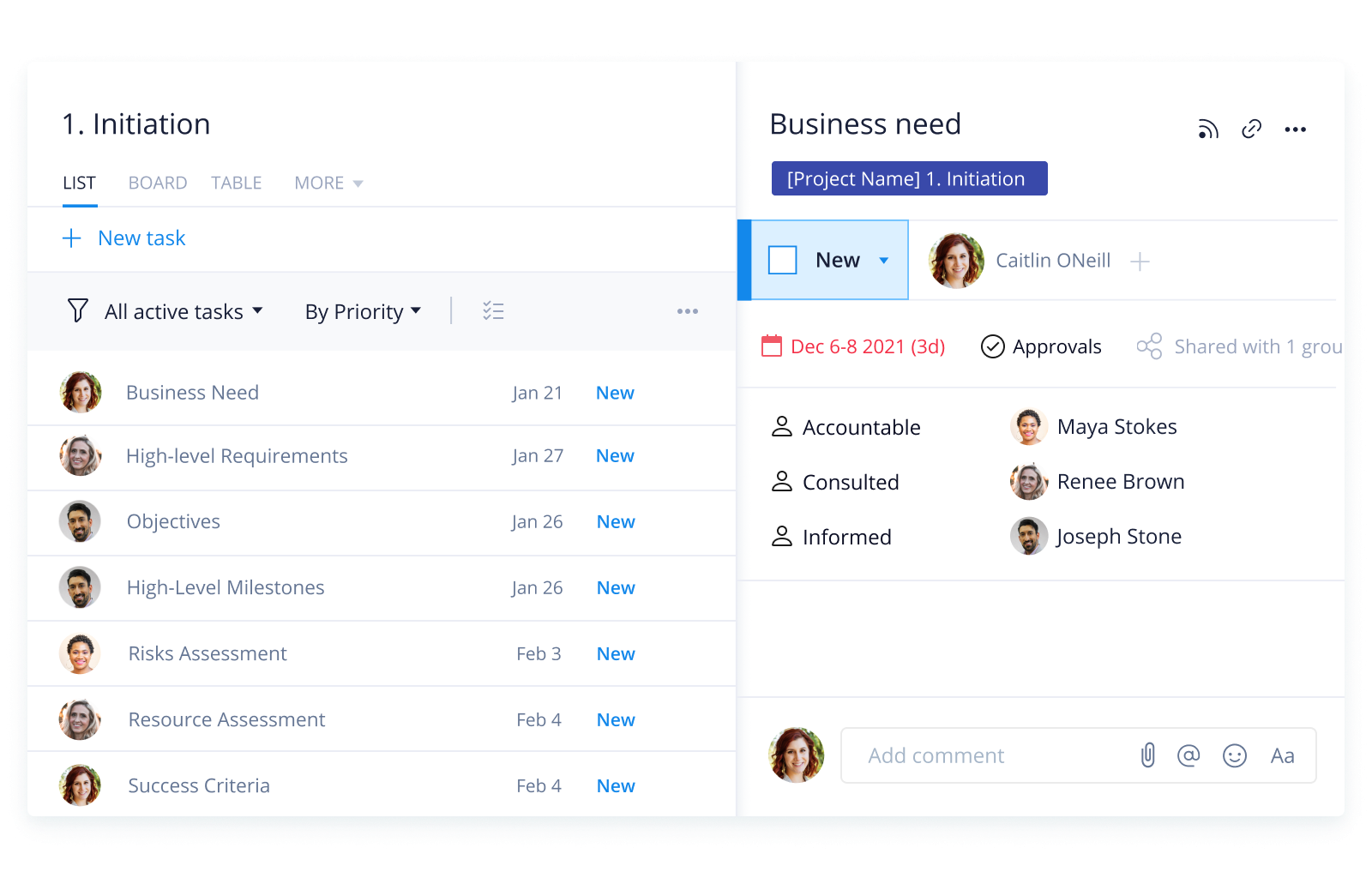
To navigate and use Wrike’s RACI matrix template, follow the steps below.
Step 1:
Within the RACI space you will see the project, which includes pre-labeled folders (aka project phases) to help you organize and clarify the upcoming work. There are five phases: Initiation, Planning, Development, Testing, and Launch. Within these folders are tasks to get your team started faster.
Step 2:
Next, the Responsible role is covered with the person assigned to the task, and three custom fields (Accountable, Consulted, and Informed) help identify the current stage of each task, based on the respective user.
Step 3:
Multiple dashboard views (Project Manager and Team Member) provide a high-level overview of each user’s tasks. Each widget in the dashboards is configured so that it’s filtered by the current user.
Step 4:
The RACI report pulls in all the tasks that are within the project RACI along with any custom fields so that all stakeholders can see performance results in real time.
Make Wrike work for you
Wrike is the most robust and intuitive collaborative work management platform for client-side PMOs and internal IT teams. Our industry-leading features include:
The RACI model template is built for any type of project or program. It helps to identify project team member roles and responsibilities while expediting the communication between all teams to improve project outcomes.
Using the template, teams can establish a more balanced workload with an increased understanding of work expectations.
The template is free and users with access include those on Wrike Business, Wrike Enterprise, and Wrike Pinnacle.
How to install this template in your account
You can only access this template when you create a new space. You can access the use case templates gallery through the space creation wizard. When you opt to create a new space, the template gallery opens by default.
Click the “+” button in the upper-right corner of your workspace.
Select “Space.”
On the page that opens, hover over the use case you want and click “Preview.” Look for the “RACI” template in the list (use the search bar if needed).
Now, you can see more information about the use case. Click “Select” to create a space.
Yes, there are.
To use this template, you need to have at least the Business plan or up. Check our plans here.
You must have the required permission to create a public space in your account.
If the template contains account-level custom fields, custom item types, workflows, request forms, or automation, you must have the permission required to create those items.
This template is only available when the workspace language is set to English.
Check the prerequisites above. If you don’t match one of the prerequisites, talk to your space admin or your account owner. If you match all the prerequisites and you still can’t see the “RACI“ template, feel free to reach out to the Wrike support team.
Unlock the power of Wrike’s templates
Use our smart search tool to explore versatile templates, designed for easy customization and streamlined project management.
Wrike enhances its website search experience using Google's Vertex AI Search and Conversation generative AI service. Users are cautioned that generative AI might produce inappropriate, inaccurate, offensive, or unintended results, and are advised against submitting explicit, harmful, offensive, or illegal content as search input. Neither Wrike nor Google uses your search inputs to train its machine learning models or for advertising purposes, but search activities may be collected and/or stored via cookies in accordance with our Privacy Policy if you previously registered on our website. These cookies can be deleted through your browser settings. Wrike's search service is not designed to be used in connection with your personal data or any sensitive data of any kind, which users must refrain from inputting.