

Picture a B2B SaaS company preparing a product launch campaign:
- The brief lives in Notion.
- Ad tasks are tracked in Asana or Trello.
- Creative files sit in Google Drive or Dropbox.
- Feedback arrives through a handful of Slack threads, while legal keeps notes on the sign-offs in a spreadsheet.
As launch week approaches, no one is sure which asset is final, which feedback has been addressed, or where there’s still an outstanding approval in the pipeline. Even if the campaign is technically on track, it takes a dozen separate check-ins to confirm it.
This article covers the solution to this problem: centralized campaign management tools. We’ll look at:
- What campaign management tools are
- The features worth prioritizing when you’re looking for new software
- The 8 best campaign management tools and platforms (and how to choose the right one)
- How marketing teams and agencies use these tools to manage a campaign from intake through post-launch reporting.
What are campaign management tools?
Campaign management tools are software platforms designed to run marketing campaigns from one place. They can be separated into two broad categories — ones that fully organize campaign work by combining briefs, tasks, timelines, approvals, and reporting (like Wrike) and ones that launch campaigns into the world (like Mailchimp or Hootsuite).
Regardless of the type, without the connection provided by a campaign management tool, teams often face delayed campaign launches, inconsistent messaging, and avoidable reworks.
Campaign management tools like Wrike act as a central source of truth for a campaign, keeping every task, file, and approval tied to the same record instead of scattered across separate apps. The benefits show up in a few concrete ways:
- Creative files stay attached to the specific tasks they belong to, so there’s no need to hunt through a shared drive for the version under discussion or development.
- Feedback stays next to the specific asset or task it’s about, instead of sitting in a separate email or chat thread.
- Reporting pulls from real-time, granular data on the tasks being tracked, showing what’s done, delayed, or blocked while the campaign is still running, not just a summary pulled together after the fact.
We’ll get into how Wrike and other campaign management tools compare later in this guide. First, it helps to look at where these pieces appear throughout a full campaign, from initial planning through the post-launch report.
Campaign management lifecycle stages
Every campaign moves through five stages of campaign management, from initial planning to the post-launch report, and each one calls for something slightly different from the tools a team relies on.
Planning and strategy
Every campaign starts with planning and strategy, where teams set goals, define the target audiences, choose channels, assign KPIs, and build timelines. These decisions shape everything that follows, from the assets built to how they measure success.
The best campaign management tools support this stage by tracking and displaying goals, audience definition, channel choices, and KPIs together, with a project timeline everyone on the team can see.
While you can use spreadsheets for this, software with flexible views and Gantt charts (such as the one below by Wrike) makes planning much more intuitive and visually appealing.

Creation and content
Once the plan is set, teams move into content planning and creation. Briefs get distributed to designers, writers, and any outside contributors, and work begins on the new assets. This stage produces most of a campaign’s files, and it’s where version control and communication problems tend to start.
Campaign management tools should support this stage by:
- Distributing the brief directly to the people doing the work.
- Organizing files by the task, person, and asset they belong to.
- Tracking versions automatically so the current file is always obvious, instead of buried under a pile of copies named “final,” “final v2,” and “final final.”
Execution
Execution is where the campaign is built out and cooperated day by day.
Tasks are assigned to specific owners, dependencies are mapped so nobody starts work that depends on something unfinished, and a launch checklist means every channel, from email to paid ads to social, is accounted for before go-live. Stakeholders across marketing, design, product, and legal all need visibility into this stage at once.
Campaign management tools should support execution by:
- Making task ownership and deadlines clear.
- Flagging task dependencies before they cause a delay.
- Giving every stakeholder a shared view of what’s ready, what’s blocked, and what’s still in progress without requiring a status meeting.
Wrike’s task management can tailor every part of this process to the unique workflows of marketing and creative teams running campaigns.
Monitoring and optimization
Once a campaign is live, the work shifts to monitoring and optimization. Teams track progress against the plan, watch for blockers, and review performance signals early enough to adjust.
Campaign management tools should support this stage with real-time marketing dashboards that show status across every workstream at once.

Tools with reliable and flexible dashboards surface blockers and delays before they become a bigger problem. Teams that see this data as it changes can shift budget, creative, or messaging mid-campaign instead of waiting for a post-mortem.
Analysis and post-campaign
After launch, the campaign moves into analysis and post-campaign work. The team documents their results, builds performance reports, and captures the lessons learned while the details are still fresh.
Campaign management tools should support this stage by keeping performance data connected to the tasks and assets that generated it, so reporting doesn’t require teams to reconstruct the campaign from memory. Many teams also use this stage to update their campaign templates, so they have a stronger starting point the next time a request comes in.
Together, these five stages make up the full campaign lifecycle. In the next section of this post, we’ll walk through how you can use campaign management tools to put these essential stages into practice, step by step, from initial brief to final report.
How to manage campaigns with campaign management tools
Turning strategy into organized campaign execution comes down to a consistent set of steps, and a campaign management tool should support each one:
- Centralize the campaign brief: Start by putting the brief with goal setting, audience breakdown, and target channels somewhere the whole team can access, instead of a document that gets emailed around. If the brief lives in your campaign management tool from day one, it can act as a single reference point.
- Assign ownership: Next, break the brief down into tasks and assign each one to a specific person with a deadline. This means responsibility for every deliverable is clear from day one, and nobody has to guess who’s handling, for example, a landing page or the ad copy.
- Connect files to tasks: When you’re ready to start producing new assets, attach creative files directly to the task they belong to, so anyone who opens that task sees the current version immediately. This moves the team away from a separate shared drive, where files get duplicated and renamed with every new round of edits.
- Collect feedback in context: Let stakeholders leave comments directly on the asset or task they’re reacting to, rather than in Slack threads or email chains. This keeps every round of feedback attached to the file it applies to. Nothing gets lost when a thread moves on, and you have a record of when and how any changes were actioned.
- Manage approvals workflows: Route each file through a defined approval stage, with sign-off tracked for every stakeholder who needs to weigh in, from brand to legal to leadership. This makes it clear at a glance whether an asset is cleared or still waiting, and helps your team chase approvals where necessary.
- Track launch readiness: As the launch date approaches, build a checklist that confirms every channel, from email to paid ads to the landing page, is ready before the campaign goes live. This step catches small gaps, like unresolved dependencies, before they delay the launch.
- Monitor progress: Once the campaign is live, use progress-tracking dashboards to see what’s on schedule, what’s delayed, and where blockers are showing up across every workstream. Seeing this in real time lets your team adjust before a small issue becomes a bigger one.
- Document results: Record performance data, learnings, and any process changes alongside the tasks that produced them, so the next campaign starts with solid evidence of what worked and what didn’t. Over time, this builds a record that makes each new campaign easier to plan.
Once these steps are in place, the next question is which software features make them possible in the first place.
Campaign management tool features to look for
The campaign management features that matter most to your team will depend on where your current process tends to break down. Before comparing specific tools, it helps to know which capabilities solve real problems rather than just sound impressive in a demo.
In our experience, the most important tools for marketing teams are:
- Campaign intake forms: These forms collect complete campaign requests upfront, giving you all the crucial details on campaign goals, audience, and deadlines while reducing the chance of having to rework the campaign later.
- Task management: Task and workflow management tools let you assign owners, deadlines, and priorities across every workstream, from creative to legal, keeping even complex, multi-department campaigns moving without constant check-ins.
- File management: This keeps creative assets linked to the campaign tasks they belong to, rather than stored separately on a shared drive, so teams never work from outdated files.
- Feedback tools: These collect comments and discussion beside the relevant asset or task, rather than in a separate email or chat thread, so feedback is less likely to get missed or misapplied.
- Approval workflows: Approval workflow software routes assets through a defined sign-off process instead of relying on informal approvals, giving you both an overview of your approval pipeline and a paper trail.
- Dashboards: These show campaign status, blockers, and pending reviews in a single view, allowing a manager to catch problems early in the campaign lifecycle.
- Templates: These standardize repeatable campaign processes, such as launch checklists or intake forms, so a team doesn’t have to rebuild the same structure for every new campaign.
- Reporting: Reporting connects campaign execution to performance review, tying tasks and files to the results they produced and making the lessons easy to grasp.
- Integrations: These reduce tool switching across marketing platforms by automatically pulling data or triggering actions between systems. In practice, fewer manual handoffs mean fewer chances for something to fall through the cracks.
With these features in mind, it’s easier to see which tools cover the most ground and which are built for one piece of the puzzle.
Best campaign management tools to consider
Not every team needs the same things from their campaign management software. Some run social campaigns across channels, some need tighter CRM and lead data integration, and some are focused on testing messaging before it goes out widely.
The tools below cover different strengths across planning, files, tasks, feedback, approvals, visibility, and reporting, so you can match the tool to the gaps in your current workflow.
We evaluated each tool on how well it natively supports campaign management, considering features for task management, file handling, feedback collection, approval workflows, and reporting, without requiring a stack of third-party integrations to cover the basics.
Here’s how they compare at a glance, followed by a closer look at each one.
|
Tool |
Best for |
Why it works |
Limitations |
|
Wrike |
Marketing teams and agencies coordinating multi-channel campaigns across several stakeholders |
Connects campaign folders, tasks, files, proofing, approvals, and custom dashboards in one workspace |
Some automation and reporting features sit behind higher-tier plans; not built for executing campaigns on specific channels (e.g., email or social) |
|
Hootsuite |
Teams running always-on social campaigns across multiple channels and accounts |
Unified scheduling, publishing, analytics, and listening across 20+ networks, with approval workflows |
Scoped to social; doesn’t cover email, landing pages, or cross-functional task management |
|
Mailchimp |
Small to mid-sized businesses running email-led campaigns without a design or dev team |
Drag-and-drop email/SMS builders, automation flows, segmentation, and built-in reporting |
No task management, file organization, or approval workflows; mostly beginner-focused with limited capabilities |
|
ActiveCampaign |
Teams that want campaign automation and sales pipeline connected in one system |
Multi-step automation across email, SMS, and WhatsApp, plus a built-in CRM |
Very limited task management and file organization; no workflow approvals outside of Enterprise plan |
|
HubSpot |
Teams that want campaign performance tied directly to lead and pipeline data |
Shared campaign planning space, lead scoring, and multi-touch attribution reporting |
Focused on execution and automation, not internal workflow governance |
|
Sprout Social |
Marketing and social teams, including agencies, that need structured approval on social content |
Shared content calendar and scheduling, with a built-in approval workflow, including an external approval option |
Limited to social campaigns; doesn’t cover email, landing pages, or broader campaign tasks |
|
Klaviyo |
B2C and ecommerce teams running personalized campaigns across messaging channels |
Unified customer profiles power segmentation across email, SMS, WhatsApp, and more |
No task, file, or approval features, since it’s focused on campaign messaging and customer data organization |
|
Optimizely |
Teams that want to test campaign messaging, offers, or creative before scaling |
Structured experiments validate what performs best before committing budget |
Heavily dependent on developers for setting up the platform; steep learning curve |
1. Wrike: Full campaign lifecycle management in one workspace
Best for marketing teams and agencies coordinating multi-channel campaigns across several stakeholders.
Why Wrike works for campaign management
Marketing teams that use Wrike can set up campaign folders to keep briefs, tasks, and files together in one place, and built-in proofing and approval workflows, including a direct integration with Adobe Creative Cloud, to move everything from campaign strategy documents to creative assets through review without a separate tool for feedback.
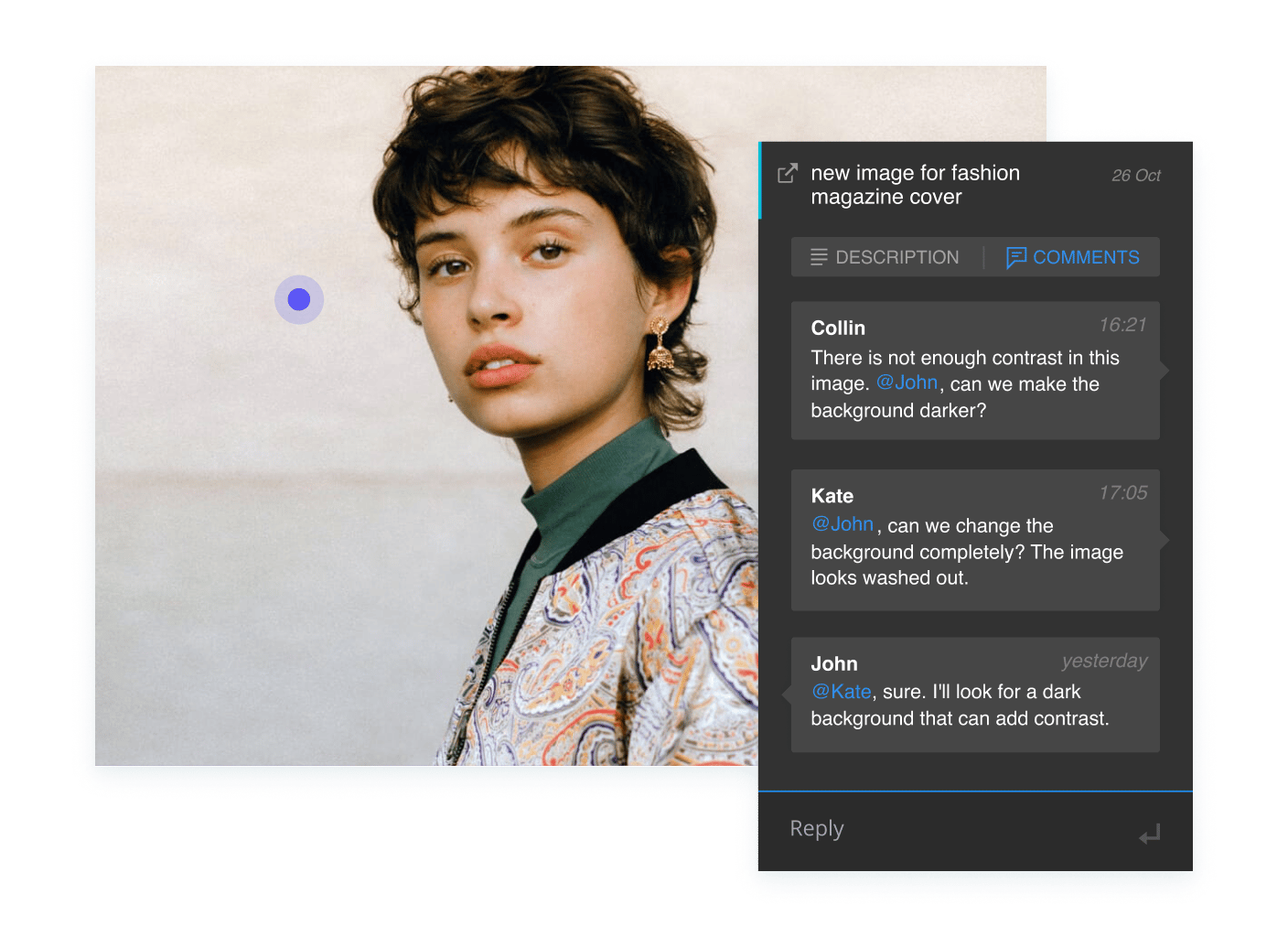
Dynamic request forms with custom fields auto-generate tasks from intake, turning a new campaign request into an assigned task without manual setup. Reporting dashboards show you the results as the campaign runs, and templates for campaign management, social planning, and marketing operations give teams a starting point rather than a blank page.

Limitations
Wrike is built for organizing campaigns and ensuring everyone is on the same page, not for executing channel-specific campaigns. Some of its automation and reporting features are also limited to higher-tier plans.
Who should choose Wrike?
Teams running multiple concurrent campaigns with several departments involved, like creative, brand, and legal, who need one system spanning the full lifecycle instead of several point tools stitched together.
2. Hootsuite: Social media scheduling and publishing at scale
Best for teams running always-on social campaigns across multiple channels and accounts.
Why Hootsuite works for campaign management
Hootsuite includes unified dashboards and schedules, and the tool publishes content across multiple networks, so a campaign’s social rollout can be planned and queued well ahead of launch instead of channel by channel manually. Built-in analytics and social listening, across more than 30 social networks and 300 review sites, track how a campaign is performing and what’s being said about it beyond the brand’s own posts.
Approval workflows also let a reviewer sign off on content before it goes live, keeping a campaign consistent across multiple contributors.
Limitations
Hootsuite is built specifically for social and doesn’t extend to non-social campaign work, such as landing pages, email, or cross-functional task management. Campaigns spanning channels beyond social will need a separate tool for the rest.
Who should choose Hootsuite?
Social media and marketing teams whose campaign work centers on managing and scaling a high volume of social content.
3. Mailchimp: Email marketing and SMS campaigns for small teams
Best for small to mid-sized businesses running email-led campaigns without a dedicated design or dev team.
Why Mailchimp works for campaign management
Mailchimp includes drag-and-drop email and SMS builders and prebuilt templates, and lets a team launch a campaign without needing a designer or developer. Automation flows, like welcome series and win-back campaigns, keep campaigns running after setup, and behavioral segmentation and send-time optimization help target who receives a campaign and when.
In terms of reporting, this platform also includes features to track performance, so a team can see how a campaign did without a separate analytics tool.
Limitations
Mailchimp is mostly a beginner-oriented tool, which makes it simple but limited compared to more robust options like Klaviyo or Omnisend. It also doesn’t offer task management, file organization, or approval workflows.
Who should choose Mailchimp?
Freelancers and small teams whose campaign work is primarily transactional email and SMS, with lighter cross-functional coordination needs.
4. ActiveCampaign: Marketing automation software with a built-in CRM
Best for teams that want their campaign automation and sales pipeline connected in one system.
Why ActiveCampaign works for campaign management
With ActiveCampaign, automation builds and runs multi-step campaigns across email, WhatsApp, and SMS marketing, so a single campaign can trigger a sequence of messages based on how a contact responds. The built-in CRM keeps campaign activity tied to contact and pipeline data, so marketing and sales share the same customer record.
This tool also includes built-in AI features to speed up campaign creation from a brief, cutting the time between an idea and a live campaign.
Limitations
Like Mailchimp, ActiveCampaign is built for running campaigns, not for coordinating the creative and review work behind them.
Who should choose ActiveCampaign?
Teams that want marketing automation and CRM combined, especially where sales follow-up is a key part of the campaign.
5. HubSpot: Campaign execution tied to CRM and lead management data
Best for teams that want campaign performance tied directly to lead and pipeline data.
Why HubSpot works for campaign management
HubSpot Marketing Studio gives teams a shared space to plan and execute campaigns, and lead scoring and segmentation route the right leads to sales as campaigns generate them. Multi-touch attribution reporting shows which campaign activity drove revenue, not just clicks or opens.
For teams with a large database of customers and leads, a two-way Salesforce sync keeps lead data aligned, so campaign results and pipeline data stay connected without manual exports.
Limitations
HubSpot is focused on execution and automation rather than internal workflow governance. Teams may prefer to integrate HubSpot with another project management platform to handle jobs like task assignment, file organization, and approval routing.
Who should choose HubSpot?
Marketing teams already running on HubSpot’s CRM, or that want campaign reporting tied closely to lead generation and revenue attribution.
6. Sprout Social: Social publishing with structured approval workflows
Best for marketing and social teams, including agencies, that need structured approval on social content before it goes out.
Why Sprout Social works for campaign management
Sprout Social includes shared content calendar views and scheduling tools to plan posts across networks and a built-in Message Approval Workflow with an external approval option for stakeholders without platform access, which routes content through review before it publishes. That external option helps agencies, since a client can approve a post without logging in.
Social listening, available as an add-on, will also track how a campaign is landing beyond the brand’s own posts.
Limitations
Like Hootsuite, Sprout Social is scoped to social, so it doesn’t manage the non-social pieces of a campaign, such as email, landing pages, or broader cross-functional tasks.
Who should choose Sprout Social?
Teams whose campaigns run heavily through social and need built-in approval steps, including agencies managing sign-off across external clients.
7. Klaviyo: Personalized email and SMS marketing based on unified customer data
Best for B2C and ecommerce teams running personalized campaigns across multiple messaging channels.
Why Klaviyo works for campaign management
Klaviyo includes unified customer profiles to power audience segmentation, so that a single campaign can be personalized and sent consistently across email, SMS, WhatsApp, and other channels from one data source.
What’s more, automated flows and an AI marketing agent set up recurring campaigns quickly, cutting manual setup time for repeat sends. That single data source keeps segmentation accurate as customer behavior changes, without manual re-syncing across tools.
Limitations
Klaviyo is primarily built to handle the campaign send and the data behind it, rather than the internal coordination of getting a campaign built and approved.
Who should choose Klaviyo?
E-commerce and B2C brands that want campaign personalization driven by a single customer data platform across several messaging channels.
8. Optimizely: A/B testing to validate campaigns before scaling
Best for teams that want to test campaign messaging, offers, or creative before fully rolling it out.
Why Optimizely works for campaign management
With Optimizely, running structured experiments on live traffic lets a team validate which version of a campaign, landing page, or offer performs better before committing budget, instead of guessing which creative direction to scale. It’s positioned within the broader Optimizely One platform, which aims to reduce handoffs between planning and execution.
Limitations
Optimizely is a heavy, enterprise-grade platform that requires a significant investment to set up events, variables, server-side feature flags, and more. It also has a very steep learning curve.
Who should choose Optimizely?
Teams with enough traffic to run meaningful tests, who want to validate a campaign’s messaging or creative before scaling spend behind it.
How to choose the right campaign management tool
With eight strong options above, the final decision usually comes down to which parts of the campaign lifecycle your team needs one tool to cover.
A small team running mostly social content would do well with Hootsuite, which is built around post scheduling, while an agency managing external client approvals would benefit from Sprout Social’s additional approval workflow, which lets a client sign off without a login.
Before picking a tool, it helps to walk through what matters most for your team. To do this, we recommend evaluating each tool based on the specific features it offers for each stage of running a campaign:
- Campaign intake and briefing: How does the tool handle request intake and scoping? Getting this right means a campaign starts with a clear brief rather than assumptions that surface as rework later.
- Task ownership and dependencies: How clearly does the tool assign work and its order? Without tools to visualize and monitor the links between tasks, bottlenecks can form, and deadlines can slip.
- File and asset management: Does the tool keep creative files connected to the tasks they belong to? Loose files scattered across drives are one of the most common causes of confusion within campaign teams, especially as you scale up.
- Feedback and proofing: Where do comments live relative to the asset they’re about? Feedback disconnected from the work is more likely to be missed or applied to the wrong version.
- Approval workflows: How does the tool track sign-off across stakeholders? Without a visible trail, campaigns can launch with a sign-off still missing.
- Dashboards and campaign visibility: Can status be seen at a glance, or will you need to ask around? That visibility lets a manager catch a delay before it becomes a launch-day problem.
- Reporting and optimization: Is performance data available while the campaign is still running? Real-time reporting enables mid-campaign adjustments, and that flexibility can make all the difference in your campaign results.
- Templates and repeatable workflows: How much setup does a new campaign require? Campaign management templates cut the time between deciding to run a campaign and having it underway.
- Integrations with marketing tools: How well does the tool connect to the rest of the marketing stack? Without a strong set of integrations, a team often wastes time moving data and files manually between their systems.
- Ease of use for internal and external stakeholders: How approachable is the tool for people who aren’t in it daily, like legal, leadership, or clients? A tool that’s easy for the core team but confusing for occasional users can create its own problems further down the line.
The right choice comes down to matching the tool to where your team’s process breaks down most, whether that’s scattered files, missing approvals, disconnected reporting, or a channel-specific gap like testing or social scheduling.
Campaign management tools vs. project management tools
Campaign management tools and project management software overlap, but they’re built for different scopes. Campaign management tools are designed specifically for the marketing campaign lifecycle, from brief to launch to reporting, while project management tools are broader, tracking any kind of work across a company, not just marketing campaigns.
|
Feature / Need |
Campaign management tools |
Project management tools |
|
Primary scope |
Built specifically around marketing campaigns, from intake to post-launch reporting |
Built for any kind of project, across any department, not campaign-specific |
|
Campaign/request intake |
Intake forms scoped to campaign briefs (goals, audience, channels) |
General task or project request intake, without campaign-specific fields |
|
Feedback and proofing |
Comments and proofing tied directly to creative assets |
Comments tied to tasks, usually without dedicated creative proofing tools |
|
Approval workflows |
Approval routing built around creative sign-off (brand, legal, leadership) |
Approval features vary by tool, typically for a generic task or milestone approval |
|
Reporting |
Campaign performance reporting (engagement, channel results, ROI) |
Project status reporting (timelines, resource allocation, budget) |
|
Templates |
Campaign-specific templates, like launch checklists and social calendars |
General project templates, like sprints and roadmaps |
|
Best fit |
Marketing teams and agencies running campaigns |
Cross-functional teams managing any kind of project |
How Wrike automates your campaign management successfully
Most of the campaign and project management software we’ve covered so far handles one piece of a campaign well, whether that’s social scheduling, email sends, or creative testing.
Wrike’s advantage is that it automates the connections between those pieces: a request becomes a task, a task carries its files and deadline, and a comment or approval updates the record the whole team is looking at, without anyone passing information along by hand.

Wrike includes creative workflow automation tools for:
- Campaign intake: Dynamic request forms adjust based on submitted answers, then automatically generate and assign the resulting tasks. This turns a request into an assigned, deadlined task without manual setup.
- Dashboards: Kanban boards, grid views, and Gantt charts update automatically as tasks move, and campaign-level overviews roll all of that into a single view of where every active campaign stands, without anyone having to compile a status report manually. At the Texas Rangers, Manager of Marketing and Advertising Claire Girman said, dashboards “eliminated a lot of the stress and time spent trying to pull summaries of what everyone was working on.”
- Task assignment: Task cards carry a clear owner, deadline, and attached files by default, and automated notifications alert the right person when a task is assigned, updated, or overdue.
- Asset organization: Creative files live in campaign folders and are cross-tagged across teams, so a designer, copywriter, and approver automatically see the latest version, rather than separate copies.
- Feedback collection: Comments land directly on the asset or task they’re about, and Wrike’s AI can summarize a long feedback thread into the specific changes needed, saving the time spent re-reading a comment chain.
- Proofing and approvals: With our workflow automation features, assets route seamlessly through a defined approval stage, with sign-off tracked and the next reviewer notified as soon as the previous one clears it.
- Status tracking: Automated, color-coded status flags surface what’s on track, delayed, or blocked as it happens, instead of someone compiling it into a report later.
- Templates: Blueprint templates auto-generate the full task structure for a new campaign the moment a request comes in, so a standard campaign type never starts from a blank workspace. At Lead Express, a client request now duplicates a blueprint that includes all the tasks and requirements for a standard campaign, according to Head of Digital Emily Trussler.
- Client and stakeholder collaboration: Wrike gives external parties access to review or approve specific work without a login to the full workspace.
- Reporting: Performance-tracking data pulls automatically from the same tasks and files used to run the campaign, connecting results to execution without a separate reporting step.
Campaign management in practice: A real-world example
With all those features in mind, here’s what a truly centralized campaign management tool can look like in practice for a B2B SaaS marketing team. Imagine a team launching a new product tier, with a tool like Wrike connecting every stage from intake to reporting.
|
Campaign stage |
Example tasks |
How a campaign management tool helps |
|
Intake |
The product team submits a launch request with goals, audience, channels, and deadline |
The request auto-generates a task with those details attached, so nothing has to be re-entered or clarified later |
|
Briefing |
Marketing defines messaging, KPIs, offer, target audience, and campaign channels |
The brief lives in the same system the campaign will be built from, so every task pulls from the same source |
|
Planning |
The campaign manager assigns landing page, email, ads, social, and sales enablement tasks |
Tasks have owners, deadlines, priorities, and dependencies, so no parallel work gets missed |
|
Asset creation |
Designers create ad creatives, banners, landing page visuals, and social assets |
Files attach directly to the right tasks, so there’s no hunting across Google Drive |
|
Feedback |
Stakeholders comment on copy, design, CTA, and legal wording |
Feedback stays connected to the exact asset or task, so nothing gets lost in a Slack thread |
|
Approval |
Brand, legal, product, and leadership approve final assets |
Approval status is visible before launch, so no asset goes live without sign-off |
|
Launch |
Email, paid ads, landing page, and social posts go live |
A launch checklist confirms every channel is ready and all dependencies are resolved |
|
Monitoring |
Team tracks blockers, deadlines, status, and early performance signals |
Dashboards show real-time progress and surface delays before they become problems |
|
Reporting |
Campaign manager reviews leads, conversions, engagement, and lessons learned |
Results and learnings are documented in the same workspace used for execution |
For the product marketing team, this means a single confirmed status at launch week, with everything filed and approved instead of chased down at the last minute. It’s the same kind of shift Jellyfish saw after moving off scattered emails and spreadsheets, cutting the time they spent on client call summaries by 95%.
Every stage of a campaign works better when it’s connected end-to-end, from the first brief to the final report. That’s what a tool like Wrike is built for: keeping campaign requests, tasks, files, feedback, and results together from start to finish.
If that sounds like what your team needs, you can start a free trial or book a demo to see how Wrike handles a campaign like yours.
Frequently asked questions (FAQs) about campaign management
What is campaign management?
Campaign management is the process of planning, executing, and tracking a marketing campaign from initial brief through post-launch reporting. It covers coordinating tasks, creative assets, feedback, and approvals across everyone involved, then measuring how the campaign performed once it’s live.
How do campaign management tools help marketing teams?
Campaign management tools help marketing teams by keeping a campaign’s brief, tasks, files, feedback, and approvals connected in one system rather than scattered across email, chat, and shared drives. That connection reduces missed feedback, delayed approvals, and time spent tracking down the right file.
When should a team use campaign management software?
A team should use campaign management software once campaigns involve more than one or two people, span multiple channels, or require sign-off from stakeholders like legal or leadership. Below that threshold, a simpler tool or shared document can usually still work.
What are the key metrics to track in campaign management?
The key metrics to track in campaign management include task completion and deadline adherence during execution, as well as engagement, conversions, and ROI once the campaign is live. Together, these operational and performance metrics show whether the campaign ran smoothly and delivered results.
Is Wrike a campaign management tool?
Yes, Wrike is a campaign management tool. It connects campaign planning, tasks, files, feedback, approvals, and reporting in one workspace, covering the full lifecycle of a campaign from intake through post-launch results.