Enterprise software, especially for work planning and management, is only useful when everyone keeps information up to date. That’s why low employee adoption can be a massive problem. Employees tend to avoid these tools, omit the data their teammates need, and use them only when someone’s watching.
Most organizations use classic tactics to boost enterprise software adoption — role-specific training, internal champions, pilot teams, leadership support, and so on. These steps may help, but even after a successful rollout, people struggle to use the platform consistently when:
- They have to update a spreadsheet or send a status email after entering their work in the platform.
- Requests arrive via email or chat without the necessary details to get started.
- No one has defined what information each handoff requires.
- The platform’s main benefit goes to management reporting, with little payoff in their own work.
Lasting adoption depends on how easy the platform is to use and how well it supports people’s daily work.
When it falls short, the platform gives an incomplete picture of progress, work stalls while people track down missing details, and admins end up catching missed steps and reminding employees to update their tasks.
The good news is that these problems usually come from how work is set up rather than from the people doing it. For example, Wrike customer Jellyfish improved adoption and process adherence by pairing a phased rollout with workflows that make the agreed-upon process the easiest one to follow.
In this guide, we’ll discuss:
- Why employees aren’t using your software consistently
- How Jellyfish got teams to adopt Wrike with a phased rollout
- How to build your process in Wrike using request forms, blueprints, required fields, and automation
- How to check whether adoption is reducing admin work
Why employees aren’t using enterprise software consistently
Access to a platform and a walkthrough of its features don’t necessarily make it part of employees’ daily work. If the software adds steps without making their responsibilities easier, they have little reason to move away from familiar tools.
Before asking people to use any platform or adhere to a process consistently, look at what happens when they try.
- They’re doing the same work twice: When employees update a task in the platform but still have to maintain a spreadsheet or email their manager a status report, using the software becomes an additional reporting obligation.
- They don’t know what’s expected: Asking employees to “keep the system updated” leaves room for interpretation. One person might change a status as soon as they finish a draft, while another waits until it has been reviewed.
- The process is harder to follow than it needs to be: A request form that asks irrelevant questions or a task with several overlapping statuses can make a straightforward job confusing. Employees may turn to a quick message because it feels easier than figuring out which option to select.
- The benefit is clearer to management than to employees: Better reporting gives leaders a reason to want the platform used, but employees also need to see how it helps them. Receiving a complete brief or finding feedback in one place gives them a practical reason to make the software part of their routine.
It also helps to distinguish adoption from process adherence. An employee may use the platform every day while still leaving out details needed for a handoff, so more activity won’t necessarily improve process compliance.
When this happens, the admin ends up tracking down missing information and reminding people what to do next. Improving adoption and adherence to the process starts with understanding why the follow-up is necessary and making it easier for employees to complete it themselves.
How Jellyfish got teams to adopt Wrike with a phased rollout
Jellyfish, a UK-based digital marketing agency that works on large global branding projects, ran into a problem many enterprise teams will recognize. Before Wrike, the company relied on a mix of task trackers, spreadsheets, and email chains, which created inefficiencies and made it hard to see where work stood.
Sarah Wagner, Customer Success Director of Creative and Experience at Jellyfish, led the move to Wrike through a phased rollout designed to reduce resistance and give teams time to adjust.
In Wrike’s account of the rollout, she describes how the company supported that transition:
- Identify essential workflows and involve team leads early: Jellyfish confirmed that Wrike could support its processes and worked with team leads to align on the platform’s benefits and goals.
- Start with pilot teams: The company incorporated feedback and refined its approach before expanding usage across the organization.
- Tailor training to employees’ responsibilities: Onboarding focused on specific roles and use cases, with support channels, Wrike Champions, and quick reference guides available afterward.
- Share results that demonstrate the benefit: Jellyfish highlighted reduced turnaround times and improved collaboration to encourage broader adoption.
Jellyfish now runs campaign planning, task assignments, and approvals in Wrike, and it has integrated Wrike with its Salesforce/FinancialForce (now Certinia) instance to keep data aligned between the two platforms.
It automates task assignments and reminders, and real-time dashboards show progress and resource allocation. As a result, employees spend significantly less time on manual follow-ups, frequent status meetings, and lengthy approvals.
For teams facing similar adoption and process adherence problems, start with one workflow that regularly needs an admin’s intervention. Work with employees to improve it, test changes with a small group, and configure Wrike around the agreed process so routine handoffs require less follow-up.
How to build your process in Wrike for maximum adherence
Jellyfish’s rollout shows how to help employees adopt a new platform, but consistent day-to-day use also depends on how that platform is configured. Admins often step in when requests arrive incomplete, recurring projects are missing tasks, or handoffs need clarification.
Wrike can build requirements and routine reminders into the workflow, reducing the need for someone to coordinate each step.
The sections below follow an illustrative campaign in which a regional marketing manager requests a landing page and promotional email. The creative team produces the assets, a reviewer approves them, and marketing operations launches the campaign.
This is our own example rather than a documented customer setup. Your configuration should reflect the process agreed with the team, including where flexibility is needed, so workflow adherence feels practical rather than imposed.
Collect complete requests with request forms
In many organizations, a campaign request starts as an email like, “We need a landing page for the spring promotion.” It leaves out the audience, the launch date, and the brand assets, so the creative team spends time going back and forth with the requester before work can begin.
Wrike request forms collect those details when someone submits a request, then use the answers to populate a task or project and assign it to the designated team members. Dynamic forms can show follow-up questions based on earlier answers, so someone requesting a landing page can provide the relevant specifications without answering questions meant for other asset types.
For the campaign example, the form might ask for:
- The campaign name and goal, so the team understands what success looks like
- The target audience, which shapes both the copy and the design
- The desired launch date, which helps the team plan production and review
- The deliverables needed, with follow-up questions for each asset type
- Brand assets and reference files, so designers don’t have to hunt for them
- The approver, so the review step is clear from the start
Keep the form focused on what the receiving team needs to begin, since unnecessary questions make submission harder and can push requesters back to email.
Lutheran Hour Ministries uses this approach for internal data requests. Staff who need a Salesforce report answer questions about its parameters in a Wrike form, and submitting it creates a task for the data team. As the organization’s Manager of Project Management explained, “All that can happen without me ever finding out.”
Launch recurring projects from blueprints
When every campaign gets built from scratch, steps like legal review or QA testing are easy to forget, and projects can end up following different structures. The person setting up the project has to remember every task and dependency, leaving employees to ask the admin what comes next when instructions are missing.
Wrike blueprints store the core tasks and structure of a repeatable project, so each campaign starts with the work already outlined. A request form can launch a project from a blueprint, so someone doesn’t have to assemble it manually after submission. Define those steps with the people doing the work before building the blueprint.
For our campaign example, the blueprint could include tasks for drafting the email, designing and building the landing page, reviewing both assets, and preparing for launch. Where responsibilities stay the same across campaigns, predefined assignees can help establish ownership from the start.
BlackLine uses this setup for recurring campaigns and webinars. Its custom request forms initiate projects from blueprints that include core tasks, and answers to specific questions can add subprocesses or task sets as needed. This gives each project a consistent structure while accommodating differences between requests.
Review the blueprint whenever the process changes so employees don’t follow outdated instructions or ask an admin to correct the same tasks in every new project.
Require key details before work changes status
A task marked “In review” isn’t always ready for the next person. If the designer changes the landing page task to “In review” without adding the asset link or review deadline, the reviewer has to chase those details before getting started.
Required fields in Wrike let admins make specific standard or custom fields mandatory when someone selects a status. If the information is missing or doesn’t meet the configured criteria, Wrike blocks the change and prompts the employee to complete it. Employees see what’s missing at the point of handoff, reducing the need for someone else to catch the omission.
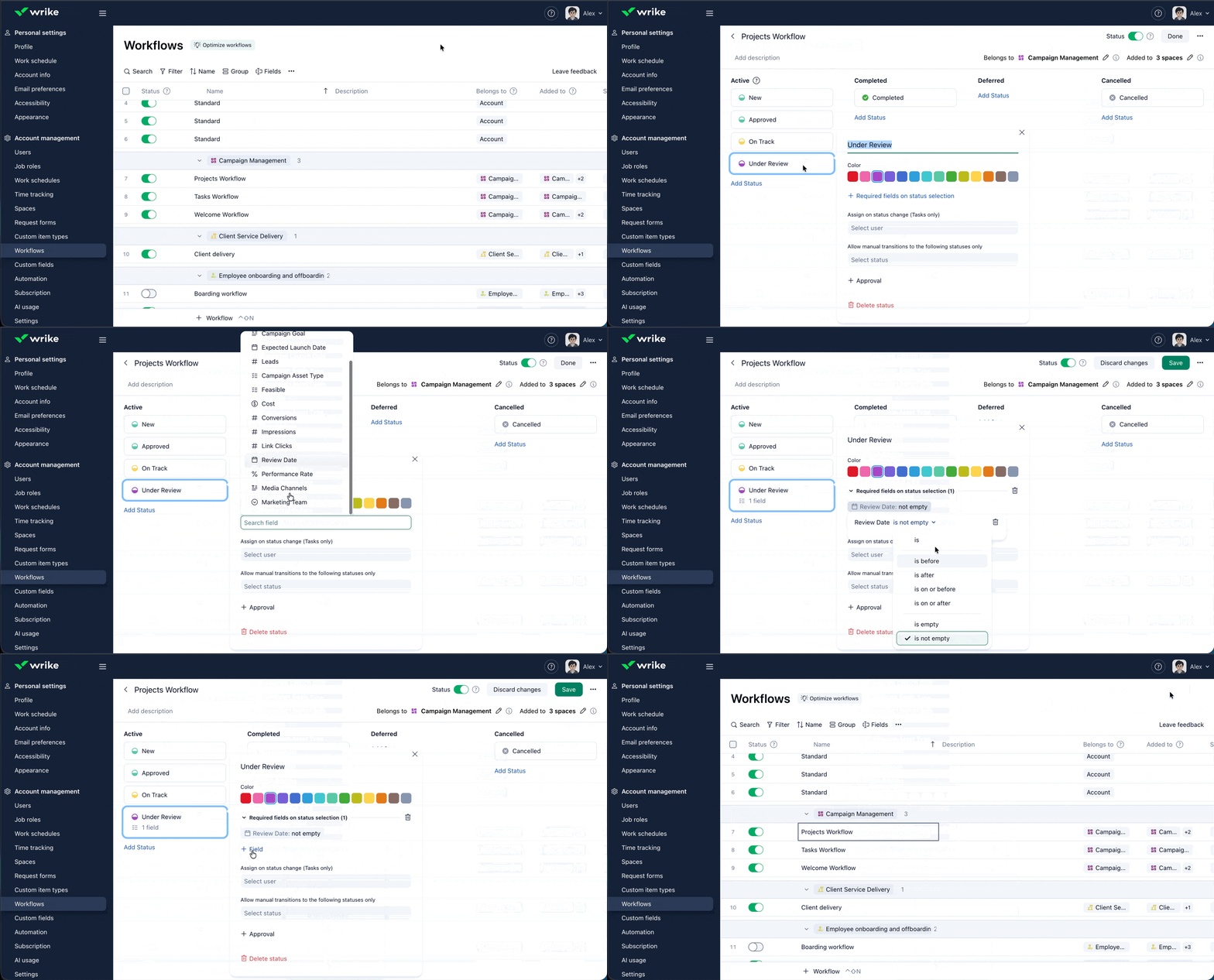
In our campaign workflow, entering “In review” may require a populated text field with the asset link and a date field for the review deadline. The reviewer would then have those details available when picking up the task, although the fields alone don’t verify that the link works or the asset is ready.
Request forms collect the information needed to start a project, while status-based requirements help enforce the agreed process as work progresses. When each detail is required at the right stage, employees can provide useful information without asking them for answers they don’t yet have.
Automate task assignments and reminders for stalled work
Even with complete requests and clear handoff rules, someone still has to tell the next person their part is ready and notice when a task has been sitting too long. In many teams, the admin takes on that responsibility, checking progress and sending reminders alongside their other work.
Wrike automation rules can handle these routine follow-ups by pairing a trigger, such as a status change, with an action, such as assigning a task. In our campaign example, rules could:
- Assign the landing page task to the designated reviewer when its status changes to “In review.”
- Add a comment mentioning the reviewer when the task stays in “In review” for three days, asking them to review the asset or flag what’s holding it up.
The status-inactivity trigger fires once after the configured interval has elapsed. Set that interval around the team’s agreed turnaround time so the reminder arrives when follow-up is useful.
Jellyfish automated task assignments and reminders as part of its Wrike implementation, reporting less time spent on manual follow-ups, status meetings, and lengthy approvals. Configuring these routine prompts can reduce the number of reminders admins send themselves, allowing them to address blockers that require a conversation or a decision.
Check whether adoption is reducing admin work
Employees may use the platform more often while admins still spend hours chasing updates. To see whether your changes help, measure how much intervention the workflow requires and whether employees are following standard processes without someone filling in the gaps.
Before changing the setup, establish a baseline for the workflow you’re improving. In our campaign example, that could mean spending a few weeks recording how requests arrive and how often the admin contacts someone for missing information or a progress update.
After the team has settled into the new setup, track these measures against your baseline:
|
Measure |
What to track |
What it helps you understand |
|
Form usage |
Requests submitted through the form as a share of all campaign requests, including those received by email or chat |
Whether employees are following the agreed intake process |
|
Overdue handoffs |
Review tasks that pass their agreed deadline without completion |
Where work still needs intervention |
|
Incomplete handoffs |
Work returned because the required information is missing |
Whether the handoff requirements give people what they need |
|
Manual follow-ups |
Admin follow-ups per request, alongside time spent on them |
Whether the workflow is reducing coordination work |
Compare similar types of work and account for request volume. Fewer reminders during a quiet week won’t necessarily mean adoption has improved.
Use Wrike dashboards to review relevant tasks and deadlines, along with a simple tally of manual follow-ups. If you track returns for missing information through a dedicated status or field, agree on when employees should use it so records stay consistent.
When a specific measure shows little improvement, ask the people involved what’s happening before changing the configuration. Employees may struggle to find the request form, while an overdue review may reflect limited capacity rather than a missed notification.
Adjust the step causing repeated intervention, then check whether follow-up decreases without adding unnecessary work for employees. Share those results with the team before expanding the approach to another workflow.
Help your teams work more independently with Wrike
Improving enterprise software adoption and process adherence means helping employees follow a shared process from the initial request through review and completion. Wrike supports that process across departments, with features you can configure to reduce missing information and keep routine handoffs moving:
- Request forms: Collect required details at intake, then automatically create the work and route it to the designated team.
- Blueprints: Start recurring projects with predefined tasks and assignees, reducing setup work and forgotten steps.
- Required fields and approvals: Require key information before status changes and give reviewers a clear place to record sign-off.
- Automation rules: Assign work as its status changes and prompt the responsible person when a task stalls.
- Dashboards: Give workflow owners a shared view of progress and overdue work so they can focus on follow-up where it’s needed.
With these features configured around your team’s process, employees can complete routine work with less admin help, while workflow owners can focus on exceptions that need their attention.
Book a demo or try Wrike for free to see how your team could manage its next project with fewer manual follow-ups.
Frequently asked questions (FAQs) about enterprise software adoption
What is enterprise software adoption?
Enterprise software adoption is how fully employees use a company-wide platform in their daily work. Adoption happens when employees consistently use the software for its intended purpose, such as submitting requests or managing projects. When adoption is low, information becomes outdated as work continues through email and spreadsheets.
What’s the difference between software adoption and process adherence?
Software adoption measures whether employees use the platform. Process adherence measures whether they follow the agreed-upon steps, such as completing required fields, submitting the correct request form, or obtaining approval before work proceeds. A team can log in every day and still skip steps, so admins need to track both.
Why do employees resist using new software?
Resistance usually comes from extra work and unclear value. Employees push back when they have to enter the same information in multiple places, aren’t sure which steps are required, or feel the platform exists primarily for management reporting. Familiarity with older tools also plays a role, especially when the new system adds steps without removing any.
How do you get employees to use new software without forcing them?
The best way to get employees to use new software is to make it the easiest way to get work done. Employees adopt a tool faster when it removes tasks they already dislike, such as chasing missing details, rebuilding recurring projects, or sending status updates by hand. Involve team leads early, pilot the change with one team, and share early wins so others can see the benefit.
How do you measure software adoption?
Measure software adoption by tracking how consistently employees complete work in the platform, including the share of requests submitted through the agreed form and how often handoffs need clarification. Track these measures alongside manual follow-ups over time. Together, they show whether the software helps work move forward more clearly than login frequency alone.