Key takeaways:
- What is a retrospective? A retrospective is an Agile practice for evaluating a team’s progress and efficiency at the end of each sprint, focusing on what worked and what didn’t.
- What is the purpose of visual retrospectives? Visual collaboration increases engagement and information retention, benefiting the majority of visual learners for more effective discussions.
- How can Wrike Whiteboard enhance retrospectives? Wrike Whiteboard offers templates and AI tools for creating engaging retrospectives that streamline collaboration and improve productivity.
- What are the steps to create a retrospective? Set up your whiteboard, select a template or use the AI assistant, and customize it to your team’s needs for an effective session.
- How can you transition from retrospectives to action plans? After conducting a retrospective, easily convert ideas discussed on the board into actionable Wrike tasks to kick off your new year with a plan.
In just a few weeks, 2025 will be over! It’s time for us to now enter wrap-up mode. This includes not only end-of-year gifts and personal achievements, but also your projects, events, and collaboration initiatives at work.
Regardless of the topic, conducting an effective retrospective of the past year is the best way to identify and build on key takeaways, all while maintaining team momentum for future steps.
And guess what? We have the perfect tool to help you build an engaging and visual retrospective, harnessing the power of our new feature: Wrike Whiteboard!
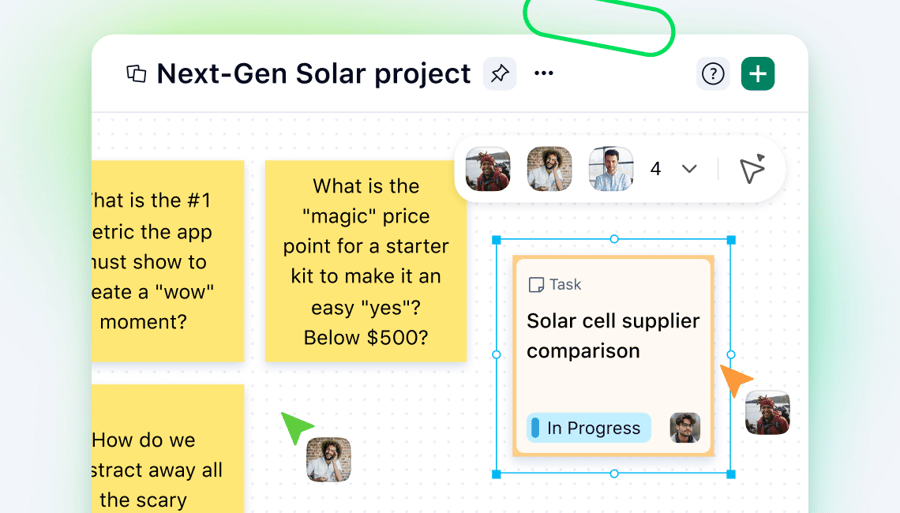
Revealed at Collaborate 2025, the Wrike Whiteboard add-on is an interactive canvas that rounds out the Wrike tool suite. Bringing in a touch of visual collaboration, it’s designed to revolutionize the way teams think, brainstorm, and work together.
So, why should you consider retrospectives your winning ticket for upcoming projects? How can you make them a no-brainer with Wrike Whiteboard?
Let’s take a deep dive into our complete method to find out!
What is a (sprint) retrospective?
A retrospective is a key feature in Agile working methods. The goal of Agile is to maximize a team’s efficiency and flexibility at each step of a project by dividing it into time-bound iterations, or sprints. The retrospective takes place at the end of each sprint, bringing everyone together to identify:
- What worked well during the sprint, and should be reinforced in the future
- What hasn’t worked so well, and needs to be reduced or stopped in the next sprint

A retrospective meeting template, designed for project management and team collaboration
Basically, the use of Agile retrospectives can be extended to any type of project involving several teams or functions. They are useful tools for continuous improvement and team alignment for the next steps or future initiatives.
What makes visual retrospectives so effective?
Imagine you’re on a Zoom call. If someone is reeling off facts and figures without any visual aid, that info will likely evaporate right after the meeting (unless you’re a very diligent note-taker). However, if your colleague shares their screen and shows you a beautiful pie chart with clear data represented by bright colors, that image has a far better chance of sticking in your brain.
This is the power of visual collaboration.
Research suggests that 65% of the population are “visual learners,” meaning they need to see information represented in order to absorb it properly. That’s likely why, according to a Forrester study, 82% of organizations believe that investing in a collaboration tool would help them stay competitive and even become an industry leader.
Retrospectives are no exception. The more visual they are, the more likely they are to engage stakeholders and facilitate information retention. This is why using visual collaboration features, like Wrike Whiteboard, to create retrospectives is even more powerful!
How to set up an effective retrospective with Wrike Whiteboard
Powered by Klaxoon, Wrike Whiteboard leverages years of expertise in visual collaboration to elevate your team retrospectives within your Wrike workspace.
All you need to do is:
- Select the Tools tab in the left sidebar.
- Click on the “+” symbol on the left sidebar.
- Select Whiteboard.
- Enter the board name, then select Create and attach.
- Your new whiteboard will now appear in your Tools sidebar.
Note: You must be a Wrike space admin to create a whiteboard from the Tools section.

Wrike Whiteboard AI retrospective
Now that your whiteboard has been created, let’s add a ready-to-use retrospective framework to it. There are three ways to proceed:
1. Import a whiteboard template
- In the toolbar at the bottom, click the three-dot button labeled Insert content.
- Select Templates.
- Use the search bar in the template library to find available retrospective templates, and select your preferred one.
- Click Use template when the preview appears.
- Click Insert into my board.
The retrospective template is now pasted into your whiteboard! Take a look at the instructions before asking your team to complete the board, either in real time or asynchronously.
2. Use the AI setup assistant
The positive impact of AI (artificial intelligence) on productivity is now well established. One of the most valuable applications of AI is using it to save time on workshop preparation, since it reduces manual action and frees up more time for your team to focus on high-value thinking and contributions.
This is why you can now use our AI setup assistant on Wrike Whiteboard to help you quickly generate a framework for your retrospective with just a simple prompt. Here’s how:
- Click on the Board setup assistant icon in the bottom-left corner of your whiteboard.
- In the list of available options, select Retrospective to generate a default prompt for this workshop.
- Add any specifications if needed (number of attendees, roles and teams, project to assess, etc.) to complete the prompt, then hit Send.
- Review the whiteboard framework suggested by the assistant. If it fits your needs, click Keep. If not, click Discard, and enter a different prompt.

Wrike Whiteboard AI setup assistant interface
3. Create your retrospective from scratch
Teams that are familiar with visual collaboration and the retrospective format may want to create their own canvas to address specific needs or requirements. Wrike Whiteboard offers a variety of features to help you do so, starting with a blank board:
- Digital sticky notes, also called ideas
- Visual connectors to link one idea to another
- Shapes and drawing tools
- File import
- Table creation
- Zones to easily navigate between the different parts of your retrospective

Whiteboard features including collaboration tools and functionalities
New year, new you
Now that your sprint retrospective is complete, you can effectively report on a successful 2025! But it doesn’t stop there.
With Wrike Whiteboard, you have all the necessary tools to create a roadmap for the upcoming year. What happens after you share your ideas on the canvas? Convert them directly into Wrike tasks and create a ready-to-launch action plan in just a few clicks!
Feel free to browse the resources below to deepen your understanding of Wrike Whiteboard and, by extension, the Klaxoon platform.
Happy planning!
More resources to get started
- Wrike Discover course: Are you curious about what goes on behind the scenes at Wrike Whiteboard? This crash course will introduce you to the Klaxoon platform and the Board tool that powers Wrike Whiteboard.
- Klaxoon Board quick-start guide: Discover how Klaxoon can add a splash of color to your workspace, with tips and best practices that can be applied in Wrike Whiteboard.
- Wrike-Klaxoon Community forum: Use it to read up on the latest product updates, and feel free to share your feedback or initial experiences with Wrike Whiteboard or Klaxoon!