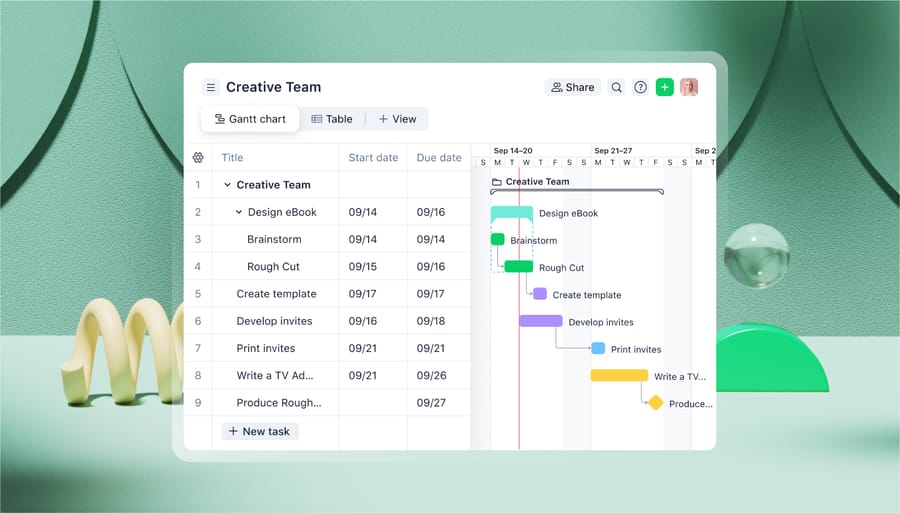
If you have ever dealt with project management software, you know Gantt charts can be helpful. But most likely you are stuck with your e-mail to manage your projects and you want to build charts based on the tasks that your e-mails contain without much hassle. We’ve got something for you. Use a timeline option in Wrike project management solution.
You work with your sales leads, customer service requests or Web site development tasks. Wrike helps you keep track of them. At any time you can switch to the Timeline view and get excellent support for your time management. A timeline visualizes a project schedule perfectly. It helps you quickly understand how your projects are going and what requires your particular attention. You can easily build plans and keep track of progress.
You can update your plans in accordance with your business goals and time frames. Devote time to prepare a presentation and simultaneously quote potential customers who send you RFPs. Then schedule participation in an exhibition and follow-up with the received leads. Sign contracts and take a long breath on vacation finally. If you update shared plans, change dates or delegate tasks, everyone on the team is informed about it on the same basis as when they work with the Task List view.
So add the due date [in square brackets] into the subject of your e-mails and [email protected] into the CC field and Wrike will build a Gantt chart for you: